I have secondary FOG server. I imported images from the main server and while I also copied all the images from the main, or tried to, not all of them made it over, the secondary server has much less drive capacity. So now I have a bunch of invalid and dup entries on the secondary FOG web ui image list. Is there a way to delete all of the images from the list and make the server rescan /images to repopulate that List all Images list?
D
Posts
-
How to rescan /images/ to repopulate FOG Web UI>List all Images pageposted in General
-
RE: Password protect initial ipxe menuposted in General
Wait nevermind I figured it out. I enabled the “Hide Menu” option under Fog Configuration>iPXE General Configuration>Menu Hide/No Menu settings. Pressing ESC after entering the FOG tftp server IP shows the login menu. Perfect!
-
Password protect initial ipxe menuposted in General
I have been experimenting with booting the FOG ipxe menu via USB drive with great success. During the ipxe boot process it asks for the fog server IP. Is there way to password protect the next step after this? I want to secure the initial fog menu that has options like Deploy Image, Register, etc. The reason for this is that I added Hirens WinPE as an option. My concern is that Hirens has a utility to reset the admin password for Windows on the local hard drive. So if someone knows the FOG server IP, they can just build their own FOG USB drive and get into Hirens to reset the password or gain unauthorized access to user files.
-
RE: Imaging from large drive to small driveposted in FOG Problems
@sebastian-roth Nor did I assume it would be!

I haven’t tried any of this yet, but I am assuming that this would have to be done for each image. -
RE: Imaging from large drive to small driveposted in FOG Problems
@sebastian-roth
cat /images/DOHWIC_7450AIO/d1.minimum.partitionslabel: gpt label-id: 665ED030-2751-4506-B81A-D098A006B220 device: /dev/sda unit: sectors first-lba: 34 last-lba: 976773134 sector-size: 512 /dev/sda1 : start= 2048, size= 1024000, type=C12A7328-F81F-11D2-BA4B-00A0C93EC93B, uuid=93F996F2-F2D7-4086-87CD-765BF2355148, name="EFI system partition", attrs="GUID:63" /dev/sda2 : start= 1026048, size= 262144, type=E3C9E316-0B5C-4DB8-817D-F92DF00215AE, uuid=7A4B87F6-F8A8-4A6B-A90E-3445738EC128, name="Microsoft reserved partition", attrs="GUID:63" /dev/sda3 : start= 1288192, size= 45294648, type=EBD0A0A2-B9E5-4433-87C0-68B6B72699C7, uuid=30391013-A07B-4662-8088-8082ABF79A72, name="Basic data partition" /dev/sda4 : start= 967014400, size= 96256, type=DE94BBA4-06D1-4D40-A16A-BFD50179D6AC, uuid=9F46892D-941F-430E-BA27-F56630C6B02F, name="Basic data partition", attrs="RequiredPartition GUID:63" -
RE: Imaging from large drive to small driveposted in FOG Problems
Well capturing may be an issue since we don’t really have “golden hdd’s” with master images. We’d have to recreate the images from scratch OR find same size HDD’s as the image to deploy then recapture. We’d have to do it to 20+ images which time consuming.
You said the issue was fixed in the dev-branch, and that we’d have to recapture every image for the fix to be useful. Correct? I just want to make sure I understand what to do and how to move forward.
-
RE: Imaging from large drive to small driveposted in FOG Problems
@sebastian-roth Oh I have to recapture the image? I thought the dev-branch version of FOG would take care of the resizing?
-
RE: Imaging from large drive to small driveposted in FOG Problems
@george1421 So I updated to the latest dev branch on my secondary FOG server using these instructions https://github.com/FOGProject/fogproject/tree/dev-branch and got the same error:
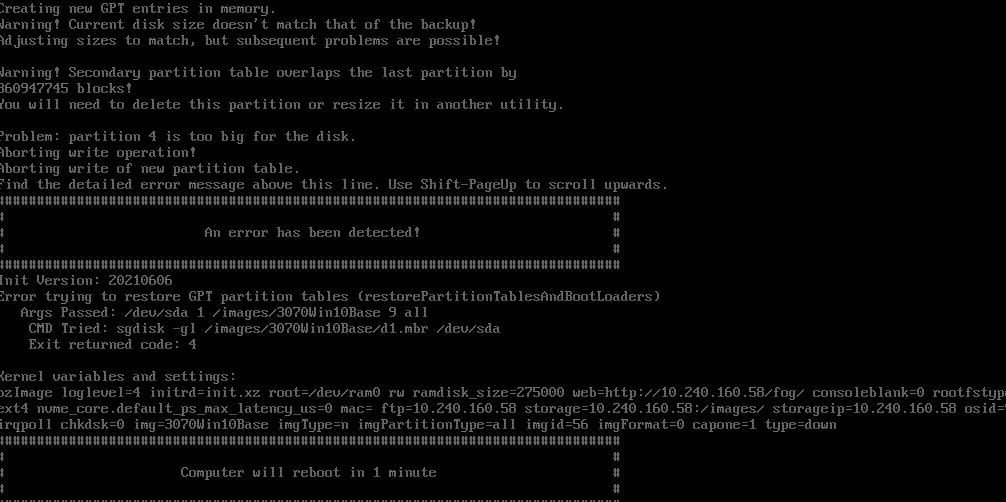
Guess it wasn’t fixed.
-
RE: Imaging from large drive to small driveposted in FOG Problems
@george1421 Ah okay makes sense. I have a secondary FOG server to test the 1.5.9 dev branch. In the meantime I will my staff know about this. Thanks!
-
Imaging from large drive to small driveposted in FOG Problems
I think this has been talked about before but I am trying to understand something. This is how I have my image set up on FOG:
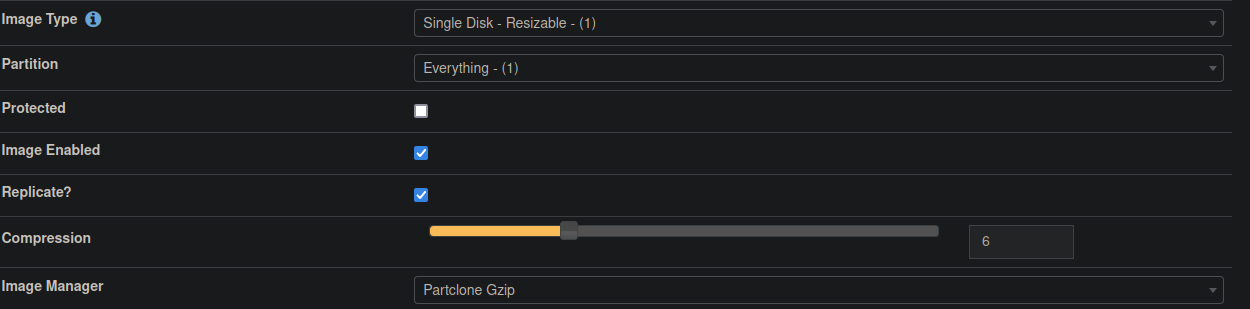
This image was created from a 500GB drive and we are trying to deploy it to a 256GB drive. The error message that pops up says that partition 4 is too large, and the actual file size for that partition is 140KB. Now when I use Acronis for example, I have been imaging smaller drives using images that were created from larger drives. Why can’t FOG do the same? -
RE: Reconfiguring an exisiting FOG Server to not have PXE enabledposted in General
@george1421 I thought I did but I was wrong. I started reading these instructions down at the bottom under “Older Instructions” https://wiki.fogproject.org/wiki/index.php?title=USB_Bootable_Media#USB_Boot_UEFI_client_into_FOG_menu_.28harder_way.29
But the files and folders don’t match up with what I got. Do I still need to copy the contents of /tftpboot/ to the root of the USB? Where do I start?
-
Reconfiguring an exisiting FOG Server to not have PXE enabledposted in General
I have a second FOG server that used to be our main but we got a new server that is our current FOG server. I want to reconfigure the old server so that we can remotely image over the network and boot using USB. If I run the foginstaller script will I be able to change the FOG server IP and disable pxe/dhcp on it? Or do I have to wipe the server completely and install from scratch?
-
RE: Setup Fog to use NAS to store imagesposted in FOG Problems
you could set up fog as normal then mount your NAS share to /images afterwards.
-
RE: USB Boot and point to custom FOG server IPposted in General
@sebastian-roth
I figured such. The usb method on my offline imaging switch is redundant since pxe works fine on that. Just would have been nice to be able to image remotely booting via USB, kind of like Acronis+mapping to an SMB share that stores the images. If only my network team would enable tftp/pxe on their dhcp servers. We have it only on our hq subnet but it is being used by SCCM, and SCCM takes a very, very long time to image a PC. We only use it to get a base Windows 10 image and work on it from there, then capture/upload our custom dept images to the FOG server. -
RE: USB Boot and point to custom FOG server IPposted in General
@Sebastian-Roth
Single cast is the goal when imaging PCs remotely. This is really for times when we have to reimage a few or a single PC and we need to bring it back to hq to image. I could put fog servers at each site loaded with dept specific images. Do the web files reference 10.0.0.10 or does something else do that? Because I could make two fog sources under /var/www and have each dedicated to the interfaces. -
RE: USB Boot and point to custom FOG server IPposted in General
@Sebastian-Roth
I read through this tutorial and others https://www.slashroot.in/how-to-configure-split-horizon-dns-in-bind
Seems like it isn’t practical since it handles requests coming from specific subnets, which we have a very large number of. I’d have to put each known subnet into the bind config. I want requests coming from the interfaces to be handled the way you described above. -
RE: USB Boot and point to custom FOG server IPposted in General
@george1421
A split horizon DNS config huh? I will investigate this. Thanks! -
RE: USB Boot and point to custom FOG server IPposted in General
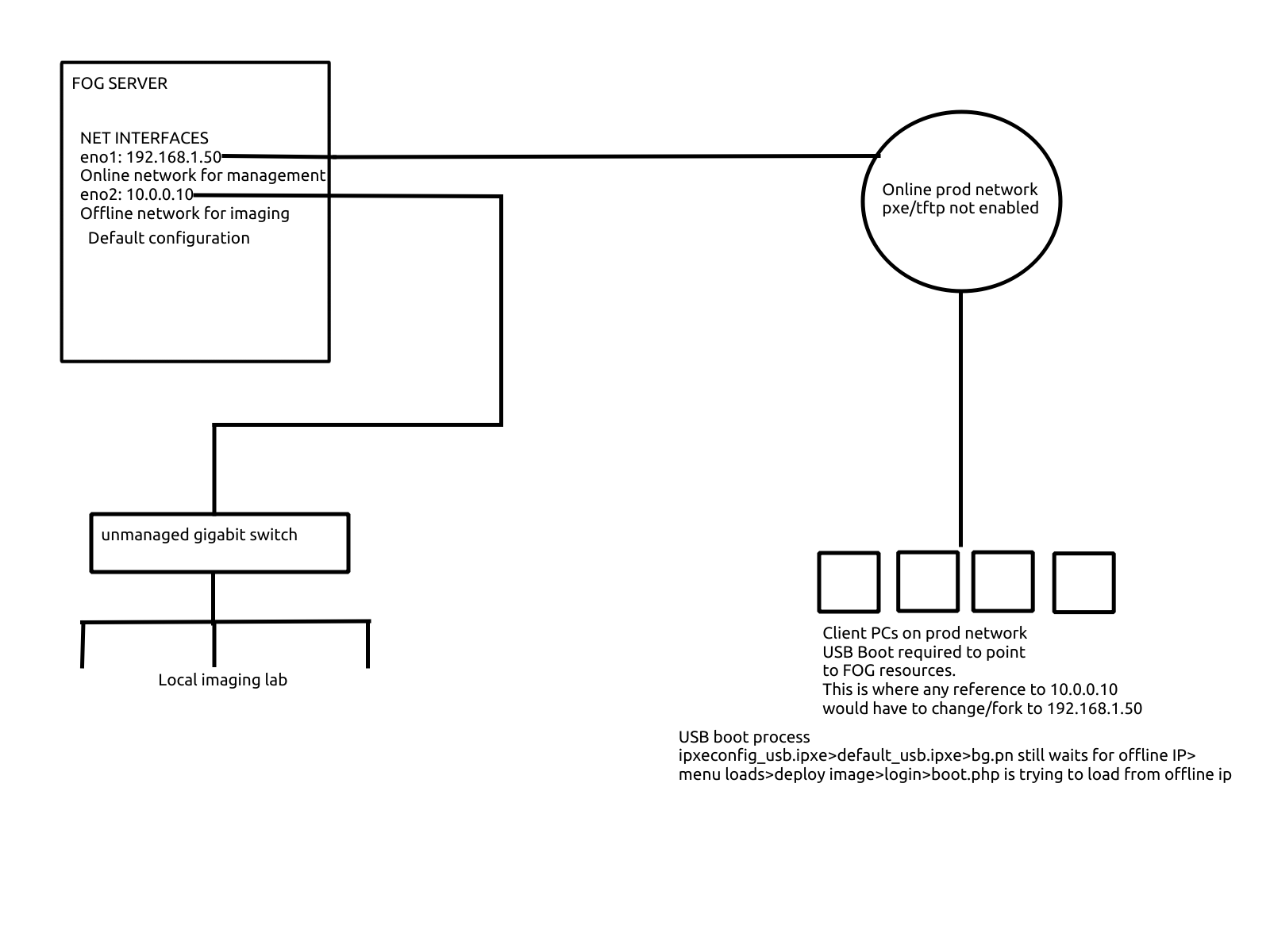
My guess is that somewhere along the chain, a reference to ${fog-ip} is made that breaks the chain. So I would have to find a spot to fork the process by setting a new ${fog-ip}, duplicating files naming them “whatever_usb” like I’ve been doing so far with success. Does that make sense? I think the fork would have to be at the boot.php part. Since default.ipxe points to the boot.php, I’d have to make a custom boot.php file that points the process to the online interface. I’m looking at boot.php now but don’t see any IP addresses or files being referenced. I also don’t know much about php.
-
RE: USB Boot and point to custom FOG server IPposted in General
@george1421 It is a full FOG server.
So far I changed the ip address in ipxeconfig.ipxe (embedded into the ipxe.efi image) and default.ipxe to point to the online IP 192.168.1.50. I renamed default.ipxe to default_usb.ipxe and referenced that filename in ipxeconfig.ipxe before I compiled the image.