Is it possible to clone an image from a recent Win10 workstation to a virtual machine on ProxMox?
I have tried but when I start up, I get a black screen and my Win10 doesn’t boot…
Do you have any feedback? Thanks for your help!

Is it possible to clone an image from a recent Win10 workstation to a virtual machine on ProxMox?
I have tried but when I start up, I get a black screen and my Win10 doesn’t boot…
Do you have any feedback? Thanks for your help!
Thank you for your reply @sebastian-roth
So I forked the project and started the translation, there is a lot of work!
Is there an end date for this translation to arrive in the next version of FOG?
Ok, i found message.po on GitHub : https://raw.githubusercontent.com/FOGProject/fogproject/dev-branch/packages/web/management/languages/fr_FR.UTF-8/LC_MESSAGES/messages.po
Perhaps the wiki page mentioned above should be modified…
If I modify the message.po file for the French language, how do I submit it for the future version?
Hi !
I would like to improve the French translation of FOG. So, I followed this tutorial (https://wiki.fogproject.org/wiki/index.php?title=How_to_translate_FOG) but it starts badly because the message.pot file (http://freeghost.svn.sourceforge.net/viewvc/freeghost/trunk/packages/web/management/languages/messages.pot) is not available.
How should I proceed, is there a new translation solution?
Thanks a lot !
Hello,
I use FOG version 1.5.9 and the last client on win10 computers that I try to join to an NT domain (Samba and not AD).
My clients can’t join the domain, it stays in workgroup but they are well renamed.
Here is what I fill in AD :
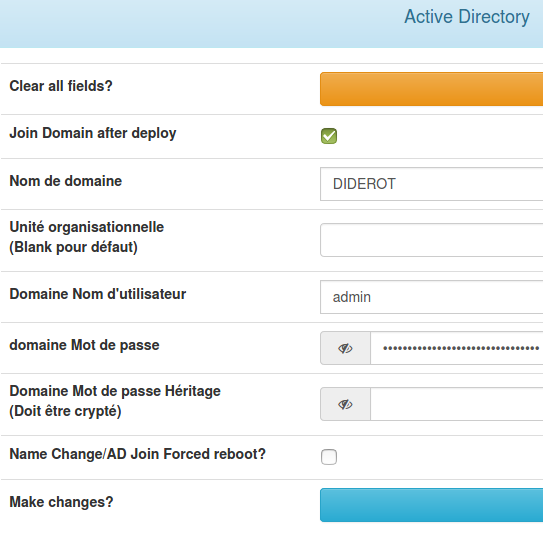
Am I wrong somewhere? Thanks for your fabulous project !
Thanks @tom-elliott . So, if I understand correctly, I only use the first one and it must not be encrypted, am I right?
Hello !
I’m going to have some Win 10 jobs to integrate into my domain for the first time. It’s not an AD but an NT Domain, on an Ubuntu server.
I don’t understand the difference between these 2 passwords (sorry, it’s a mix between French and English) :
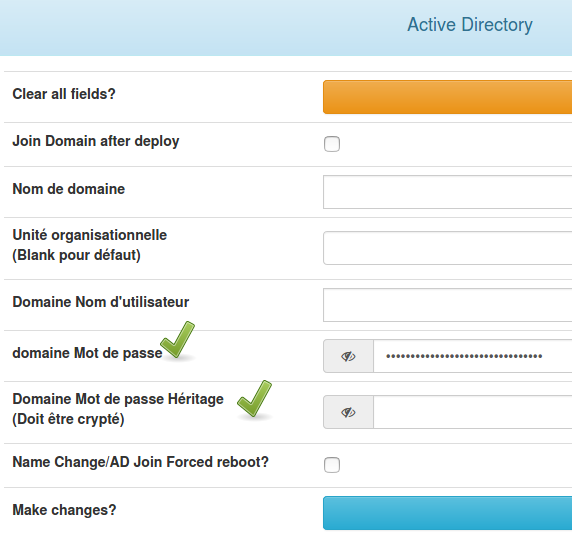
On my domain, I only have a login/password and a domain name…
Thanks
I have just migrated a Fog from one server to another and I noticed 2 small problems on this page: https://wiki.fogproject.org/wiki/index.php?title=Migrate_FOG#Arranging_Images
The following command generates 2 messages :
root@fogserver:~# mv /images/dev/* /images
mv: Cannot move '/images/dev/dev' to '/images/dev': The folder is not empty.
mv: Cannot move '/images/dev/postdownloadscripts' to '/images/postdownloadscripts': The folder is not empty.
I don’t think it’s serious, is it?
But this one is more annoying:
root@fogserver:~# chown -R fog:root /images
chown: incorrect user: " fog:root ".
The fog user does not exist, it is fogproject. So I replaced by this command:
chown -R fogproject:root /images
Thanks for this amazing project !
Finally, I dropped LXC in Proxmox 6 and used a KVM-based VM to virtualize my Fog server.
It works perfectly as it is.
No problem regarding my disappointment. I am especially sorry that I didn’t succeed like a great one 
I know many open source projects and I contribute to some of them: PeerTube, OpenStreetMap. I’m very happy to have discovered Fog and to have been able to quickly clone posts and 1 classe. I work in a French school with limited IT resources.
So, to answer your question, I followed a tutorial from the forum.
I started to disable apparmor on my container with :
 Edit the container configuration file and add the line lxc.aa_profile: unconfined.
 On Proxmox the configuration file is located at /etc/pve/lxc/CTID.conf, where CTID is the ID number of the container.
and I restarted container and the script but not better.
Then I did step 2 of this page: https://wiki.fogproject.org/wiki/index.php?title=Installation#LXC but no better.
I also tried to enable NFS in the options. Anyway, I think I did everything but I wonder if I did some things wrong.
So, what do you advise me for FOG on Proxmox 6.3-2? Maybe I’ll have to start from scratch… and focus on one action, but which one? and how do you know if the NFS server is running without having to restart the script?
Thanks for your help!
Hello @smoblikat
I couldn’t get FOG to work in an LXC container, I’m still coming across a server NFS problem.
Here is the error in the FOG install logs:
 * Setting up and starting NFS Server..........................Failed!

!!!!!!!!!!!!!!!!!!!!!!!!!!!!!!!!!!!!!!!!!!!!!!!!!!!!!!!!!!!!!!!!!!!
!! The installer was not able to run all the way to the end as   !!
!! something has caused it to fail. The following few lines are  !!
!! from the error log file which might help us figure out what's !!
!! wrong. Please add this information when reporting an error.   !!
!! As well you might want to take a look at the full error log   !!
!! in /root/fogproject-1.5.9/bin/error_logs/fog_error_1.5.9.log !!
!!!!!!!!!!!!!!!!!!!!!!!!!!!!!!!!!!!!!!!!!!!!!!!!!!!!!!!!!!!!!!!!!!!

Dec 18 15:35:31 fogserver systemd[1]: nfs-server.service: Job nfs-server.service/start failed with result 'dependency'.
Failed to enable unit: Unit file nfs.service does not exist.
Failed to stop nfs.service: Unit nfs.service not loaded.
Failed to start nfs.service: Unit nfs.service not found.
Unit nfs.service could not be found.
I found a few tips on the forums but none of them worked. I’m trying to install FOG 1.5.9 on Proxmox 6.3-2 and Debian 10.
What do you recommend? I’m a bit disappointed 
Thanks for your answers and happy holidays.
@george1421 Fine, thanks for your quick response !
FOG is a fabulous project 
Hi !
I did not find a recent answer to my question.
It’s quite simple, I wanted to know if Fog was fully compatible with the Proxmox 6.3 virtualization solution?
It would make maintenance easier for me.
Thank you for your answers.