Services failing to start
-
Hi,
I have 3 services failing to start and spamming my syslog with the following:
Started FOGAgentReleaseSync.service - FOGAgentReleaseSync.
Could not open input file: /opt/fog/service/FOGAgentReleaseSync/FOGAgentReleaseSync
FOGAgentReleaseSync.service: Main process exited, code=exited, status=1/FAILUREStarted FOGPluginRunner.service - FOGPluginRunner.
Could not open input file: /opt/fog/service/FOGPluginRunner/FOGPluginRunner
FOGRetentionRunner.service: Main process exited, code=exited, status=1/FAILUREStarted FOGRetentionRunner.service - FOGRetentionRunner.
Could not open input file: /opt/fog/service/FOGRetentionRunner/FOGRetentionRunner
FOGPluginRunner.service: Main process exited, code=exited, status=1/FAILURECan you tell me what those services are missing and how to fix it?
Thank you,
Adam
-
@AdamC Those three services are new in FOG 1.6. Your server has their systemd units, but not the scripts they start. Which FOG version is installed now? Did you upgrade from 1.5, or return to 1.5 after you tried 1.6? Please post the output of
ls /opt/fog/service. If you are on 1.6, run the installer again. That copies the missing scripts. If you are on 1.5, runsystemctl disable --now FOGAgentReleaseSync FOGPluginRunner FOGRetentionRunnerto stop them. -
@Tom-Elliott I recently did a fresh master node install and migrated my old data into it, due to a major OS upgrade.
So the initial install was 1.6.0.14, which I upgraded to 1.6.0.158
The thing is each of the folders in question does have a script in it by the correct name. I’ve compared permissions with the other service folders and scripts, they appear the same.
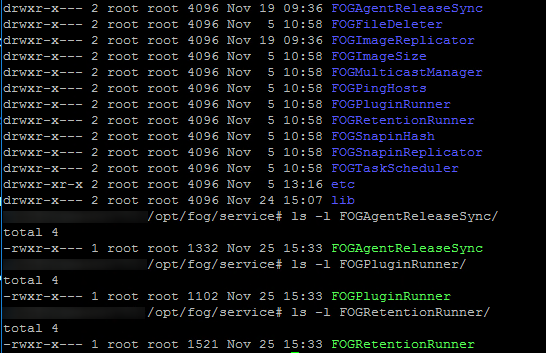
I ran a reinstall, no change.
Thanks,
Adam
-
@AdamC Thanks, the screenshot shows the cause. Those three services run as the web server user, not as root. Your service folders and scripts are root-only (
drwxr-x---and-rwxr-x---), so that user cannot open them. The other services run as root, so they start. The installer copies the modes your FOG checkout has. A system with a restrictive umask (027) makes the checkout root-only, and a reinstall copies the same modes again.The installer fix is https://github.com/FOGProject/fogproject/pull/2166. It reaches stable with the next 1.6 release. Until then, run this as root:
chmod a+x /opt/fog /opt/fog/log /opt/fog/service/etc
chmod a+rx /opt/fog/service
cd /opt/fog/service && for d in FOG* lib; do chmod -R a+rx "$d"; done
chmod 644 /opt/fog/service/etc/config.php
systemctl restart FOGAgentReleaseSync FOGPluginRunner FOGRetentionRunner
This does not touch anything else in
/opt/fog/service/etc.