• Recent
    • Unsolved
    • Tags
    • Popular
    • Users
    • Groups
    • Search
    • Register
    • Login

    Services failing to start

    Scheduled Pinned Locked Moved Unsolved FOG Problems
    3 Posts 2 Posters 11 Views
    Loading More Posts
    • Oldest to Newest
    • Newest to Oldest
    • Most Votes
    Reply
    • Reply as topic
    Log in to reply
    This topic has been deleted. Only users with topic management privileges can see it.
    • A
      AdamC
      last edited by

      Hi,

      I have 3 services failing to start and spamming my syslog with the following:

      Started FOGAgentReleaseSync.service - FOGAgentReleaseSync.
      Could not open input file: /opt/fog/service/FOGAgentReleaseSync/FOGAgentReleaseSync
      FOGAgentReleaseSync.service: Main process exited, code=exited, status=1/FAILURE

      Started FOGPluginRunner.service - FOGPluginRunner.
      Could not open input file: /opt/fog/service/FOGPluginRunner/FOGPluginRunner
      FOGRetentionRunner.service: Main process exited, code=exited, status=1/FAILURE

      Started FOGRetentionRunner.service - FOGRetentionRunner.
      Could not open input file: /opt/fog/service/FOGRetentionRunner/FOGRetentionRunner
      FOGPluginRunner.service: Main process exited, code=exited, status=1/FAILURE

      Can you tell me what those services are missing and how to fix it?

      Thank you,

      Adam

      Tom ElliottT 1 Reply Last reply Reply Quote 0
      • Tom ElliottT
        Tom Elliott @AdamC
        last edited by

        @AdamC Those three services are new in FOG 1.6. Your server has their systemd units, but not the scripts they start. Which FOG version is installed now? Did you upgrade from 1.5, or return to 1.5 after you tried 1.6? Please post the output of ls /opt/fog/service. If you are on 1.6, run the installer again. That copies the missing scripts. If you are on 1.5, run systemctl disable --now FOGAgentReleaseSync FOGPluginRunner FOGRetentionRunner to stop them.

        Please help us build the FOG community with everyone involved. It's not just about coding - way more we need people to test things, update documentation and most importantly work on uniting the community of people enjoying and working on FOG! Get in contact with me (chat bubble in the top right corner) if you want to join in.

        Web GUI issue? Please check apache error (debian/ubuntu: /var/log/apache2/error.log, centos/fedora/rhel: /var/log/httpd/error_log) and php-fpm log (/var/log/php*-fpm.log)

        Please support FOG if you like it: https://wiki.fogproject.org/wiki/index.php/Support_FOG

        A 1 Reply Last reply Reply Quote 0
        • A
          AdamC @Tom Elliott
          last edited by

          @Tom-Elliott I recently did a fresh master node install and migrated my old data into it, due to a major OS upgrade.

          So the initial install was 1.6.0.14, which I upgraded to 1.6.0.158

          The thing is each of the folders in question does have a script in it by the correct name. I’ve compared permissions with the other service folders and scripts, they appear the same.
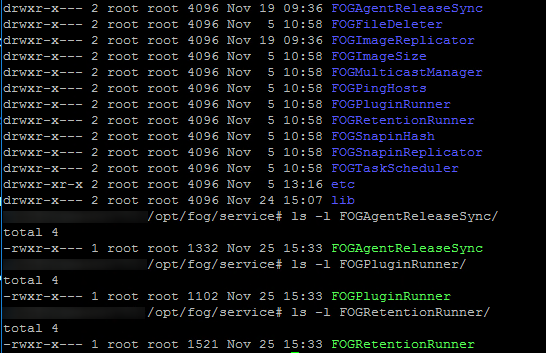
          FogServices2.png

          I ran a reinstall, no change.

          Thanks,

          Adam

          1 Reply Last reply Reply Quote 0
          • 1 / 1
          • First post
            Last post

          30

          Online

          12.8k

          Users

          17.7k

          Topics

          157.5k

          Posts
          Copyright © 2012-2026 FOG Project