Fog 1.6.14 Driver Replication Issue
-
@Tom-Elliott The issue is still happening. I have attached the replication log.
fogreplicator.log -
@Tom-Elliott I could be wrong but after stopping the Replication service on the Main and Master Slave. There was still a copy going on from the Slave node to the Master slave until I stopped the server on the slave node. backwords replication?
-
@FlareImp Thanks, that copy in the other direction is a good clue. The log shows two separate problems.
-
A file name with a space is never seen on the storage node. For example, “7450 AIO-WIN11-A10-YHP57.CAB” shows a size of 0 on the node every cycle, so the replicator deletes it and copies it again. This is a bug in how FOG reads the node’s FTP listing, and a fix is on the way. Until then, renaming those files without spaces stops the loop for them.
-
Files without a space, such as win11/3500-win11-A00-YH77C.CAB, show the same smaller size on both nodes every hour. A copy from the other node back toward your main server would explain that. Each storage group’s master sends an image to the other groups only when its own group is that image’s primary group. If another group’s master also sends the image, the two copies overwrite each other.
Can you check these for one affected image, such as Drivers_Latitude3500:
- Image Management > Drivers_Latitude3500 > Storage Groups tab: which group is marked primary?
- Storage Management: for each storage group, which node is the master? Is the node you saw copying marked as a master?
ls -l /images/Drivers/Latitude3500/win11/on the main server and on that node.
-
-
- I removed the spaces in the names of the driver files.
- The Image Primary Storage Group are set to “A(Default) - (1)”
Master Slave Node
administrator@tvne-fog:~$ ls -l /images/Drivers/Latitude3500/win11/
total 1522432
-rwxr-xr-x 1 fogproject fogproject 1558966032 Nov 13 14:20 3500-win11-A00-YH77C.CAB
Main
administrator@tv-fog-main:~$ ls -l /images/Drivers/Latitude3500/win11/ total 1652688 -rwxrwxrwx 1 fogproject administrator 1692345974 Dec 13 2023 3500-win11-A00-YH77C.CAB``` -
@FlareImp Thanks. The main server has the full file (1692345974 bytes). The node tvne-fog has a short copy (1558966032 bytes), and the log shows that same short size every hour. A copy that is still running would show a different size each time. So something writes the same short file to the node again and again.
The copy you saw from the other node is the likely source. Only a node marked as master runs replication. A master sends to every other enabled node in its own storage group, even to another master. If that node is also marked master and has a short copy of the file, it overwrites the copy on tvne-fog each cycle.
Can you check these:
- Storage Management: list each storage node, its storage group, and whether “Is Master Node” is checked.
- On the node you saw copying:
ls -l /images/Drivers/Latitude3500/win11/ - On the same node: the top of
/opt/fog/log/fogreplicator.logfor one cycle. It shows which nodes that node sends to.
If that node is a master in the same group as tvne-fog, uncheck “Is Master Node” on it. A storage group must have only one master.
-
@Tom-Elliott
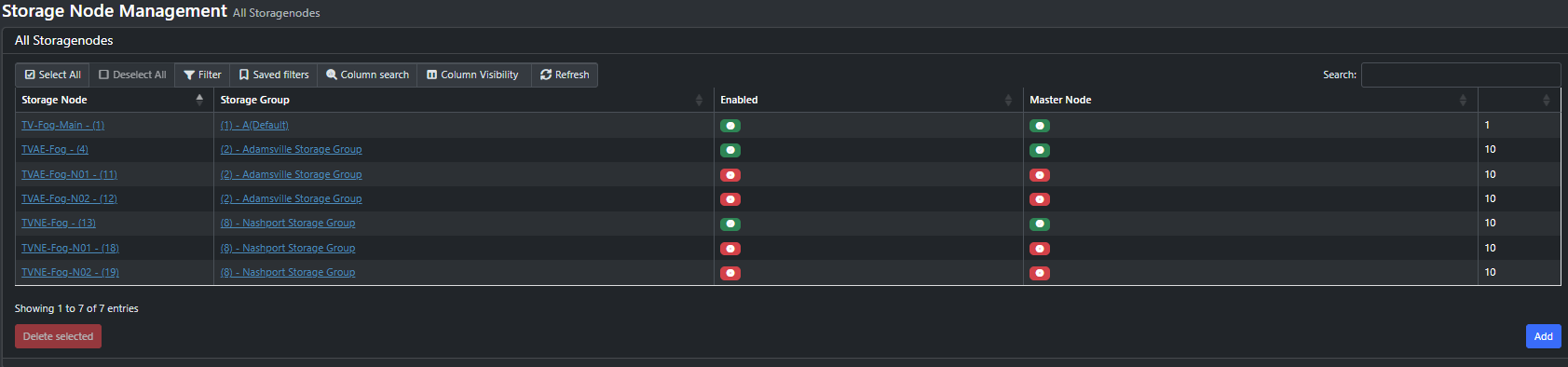
There is only one master in each storage group. I have N01 and N02 disabled for right now until I can get replication from Main to tvne-fog working. -
This is the replication log from TVNE-Fog-N01 that is not a master node in the group.
fogreplicator.log -
@Tom-Elliott Was in the process of doing an rsync from TVNE-Fog to TVNE-Fog-N01 and I got this
Win11_25H2_FabLab/d1.shrunken.partitions
            849 100%    1.46kB/s    0:00:00 (xfr#63, to-chk=21/141)
Win11_25H2_FabLab/d1p1.img
              0   0%    0.00kB/s    0:00:00  file has vanished: "/images/Win11_25H2_Smart26/d1.fixed_size_partitions"
file has vanished: "/images/Win11_25H2_Smart26/d1.mbr"
file has vanished: "/images/Win11_25H2_Smart26/d1.minimum.partitions"
file has vanished: "/images/Win11_25H2_Smart26/d1.original.fstypes"
file has vanished: "/images/Win11_25H2_Smart26/d1.original.swapuuids"
file has vanished: "/images/Win11_25H2_Smart26/d1.partitions"
file has vanished: "/images/Win11_25H2_Smart26/d1.shrunken.partitions"
file has vanished: "/images/Win11_25H2_Smart26/d1p1.img"
file has vanished: "/images/Win11_25H2_Smart26/d1p2.img"
file has vanished: "/images/Win11_25H2_Smart26/d1p3.img"
file has vanished: "/images/Win11_25H2_Smart26/d1p4.img"
     12,705,589 100%   17.54MB/s    0:00:00 (xfr#64, to-chk=20/141)
I had just finished copying the files from TV-Fog-Main to TVNE-Fog and I checked them and everything was there and matched up. I am unsure what just deleted the files.
-
@FlareImp Thanks, that log shows the cause. Every cycle on TVNE-Fog-N01 starts with:
We are node ID: 1. We are node name: TV-Fog-MainSo N01 runs replication as if it were your main server. N01 has short copies of the large files, and every hour it pushes them to TVAE-Fog and TVNE-Fog. For example, it sends d1p3.img at 1323409736 bytes over the full 22556692664 byte file. That is the copy you saw, and that is why both nodes show the same short sizes. Your main server then deletes the short file and starts again, and the cycle repeats.
This is a bug in 1.6. Each FOG server adds the FOG_WEB_HOST address (your main server) to the list of its own addresses. So every storage node matches the main server’s storage node entry and acts as the main server. 1.5 does not do this, which is why 1.5 replicated correctly. The fix is done and will be in the next release.
The same bug explains the files that vanished during your rsync. A server that acts as the main server deletes each file on the other nodes that it does not have itself. While the rsync ran, N01 did not yet have the Win11_25H2_Smart26 files. So N01’s replicator deleted them on TVNE-Fog. To confirm, look in /opt/fog/log/fogreplicator.log on N01 for “File does not exist on master node, deleting” lines that name TVNE-Fog.
Until the fix is released, stop the replicators on every storage node, but not on the main server:
sudo systemctl stop FOGImageReplicator FOGSnapinReplicator
sudo systemctl disable FOGImageReplicator FOGSnapinReplicator
Run that on TVAE-Fog, TVNE-Fog and all four N01/N02 nodes before you copy anything else. Then start the replicator on the main server. It replaces the short and missing files on TVAE-Fog and TVNE-Fog, Win11_25H2_Smart26 included, on its next cycles. Leave N01 and N02 disabled in Storage Management until the fix is out, because their copies are short too.
-
@FlareImp A correction to my last post: the fix is already in dev-branch. You do not need to wait for the next release. To use it now, update the main server and every storage node from dev-branch:
cd /path/to/your/fogproject/checkout
git fetch
git checkout dev-branch
git pull
cd bin
sudo ./installfog.sh -y
Update every server, because the bug is on each node. After all of them run the new version, you can enable the replicators on the storage nodes again.
-
@Tom-Elliott When updating the nodes to the dev-branch I got this message.
* Requesting a web certificate from the master................ * The master declined to issue a web certificate: the issued certificate does not verify against /etc/fog/pki/web/ca/.trustAnchor.pem -- a requested name is probably outside the CA's name constraints```