PXE boot failing on Wyse 5060
-
FOG version 1.6.0-beta.5136, https enabled
PXE works great with Wyse 5070 thin clients and Dell Optiplex 3000 thin clients.Tried my first 5060 today.
Wyse 5060, BIOS 1.0J (2018-11-06), UEFI boot, Secure Boot disabled. PXE acquires DHCP, downloads EFI binary and autoexec.ipxe. Even an autoexec.ipxe containing only:
#!ipxe
echo HELLO
sleep 30causes an immediate reboot. No requests for default.ipxe, boot.php, bzImage, or init.xz ever reach the FOG server. Same FOG server works perfectly with Wyse 5070 and Dell OptiPlex systems.
I’ve tried handing out all the different *.efi devices in my /tftpboot dir, all do the same thing. I know this is a really old system, it’s just weird that it’s just rebooting so early in the ipxe process.
Has anyone seen this before? THanks
-
@ahaeder I’m still fighting this 5060 but I’ve made progress. When the bios is in Legacy mode (not UEFI) I got it to boot undionly.kkpxe and get to the fog pxe menu. I was even able to deploy an image to it successfully. The problem now is that although the pxe boot menu shows up, it can’t transition from there to booting off the hard drive. The default SANBOOT hangs at:
Booting from SAN device 0x00
Boot from SAN device 0x00 failed: Input/output error (https://ipxe.org/1d852039)
Booting from SAN device 0x80The other options I have in the fog server for this system under Host BIOS exit type are:
SANBOOT
GRUB
GRUB_FIRST_HDD
GRUB_FIRST_CDROM
GRUB_FIRST_FOUND_WINDOWS
REFIND_EFI
EXITNone of them work. They either immediately reboot, hang or just leave me at a grub prompt.
I can boot directly off the newly imaged hard drive, but I can’t transition from pxe boot menu -> hard drive boot.
-
Thanks for the detailed writeup — there are two separate things going on here, and one of them is our bug.
The
Booting from SAN device 0x00 ... Input/output errorline is on us.sanboot --drive 0means “the first disk carrying\EFI\Boot\bootx64.efi” under UEFI, but under BIOS iPXE hands that number straight to int13, where0x00is the first floppy and hard disks start at0x80. We’ve been emitting the same exit string for both platforms since July 2024, so every legacy client opens its exit by trying to boot a floppy that isn’t there. Fixed in https://github.com/FOGProject/fogproject/pull/1741 — BIOS clients will go straight to0x80again.To be clear though, that isn’t what’s stopping you: your log shows it does fall through to
0x80, so your failure is after that point. The fix just removes a misleading error that sends people hunting a disk fault that doesn’t exist.Two things would help me nail down what’s left:
1. For the legacy-mode “won’t boot to disk” part — what was the image captured from? If the source machine was UEFI/GPT, the disk you deployed has an ESP and no MBR boot code, so BIOS
sanboot --drive 0x80has nothing to jump to even though the firmware’s own boot menu may still find and boot it via its UEFI path. That would explain “direct hard drive boot works, PXE-to-hard-drive doesn’t” exactly.2. For the UEFI immediate-reboot — a script containing only
echoandsleeprebooting means iPXE itself is dying before anything we generate matters. Nothing FOG produces is in that path yet. Can you grab a stockipxe.efifrom https://boot.ipxe.org/ipxe.efi, drop it in/tftpboot, point DHCP at it and boot the 5060 with the same minimalautoexec.ipxe?- Stock also reboots → it’s the 5060’s firmware, and legacy mode is the answer for that box.
- Stock survives and ours doesn’t → it’s our iPXE build config, and I want an issue open on it. We pin our own iPXE fork and overlay three config headers, and we’ve already had one console regression out of that recently, so it’s a real possibility.
That one test tells us which side of the line this is on.
-
@Tom-Elliott Thank you so much for the reply. The image I’m trying to boot was created on a UEFI system, so of course it’s failing, why did I not think of that. I’m going to do a fresh install under legacy mode on this 5090 (I’m using Windows 10 IoT) and create a new golden image, rather than pushing a 5070 image and updating the drivers. I’ll report back. Thanks again
-
Stock ipxe.efi from boot.ipxe.org did the same thing. I’m going to chalk this up to bad firmware on the 5060 and just use legacy mode. Thanks for the feedback.
-
I want to close the loop on this in case other folks run into this. Although the Wyse 5060 thin client supports UEFI mode, it looks like it’s buggy enough that none of the pxe files included with Fog will boot it. Legacy mode works however, so that’s what I’m going with. I actually did a test on each file in /tftpboot and here are the results:
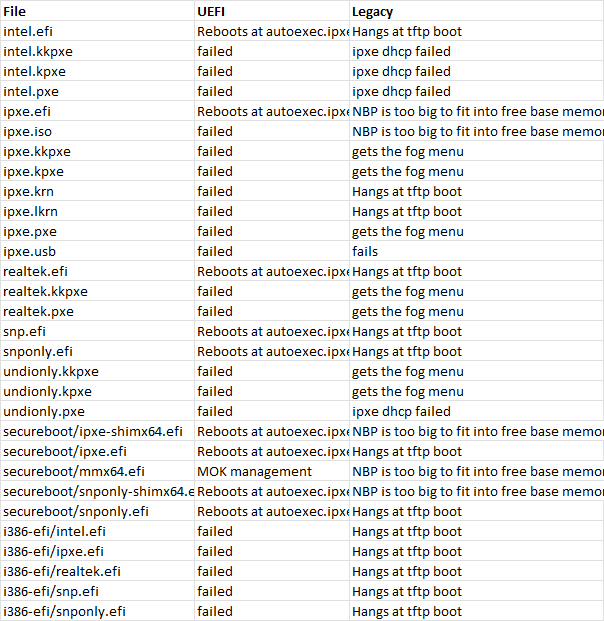
So I’m going with undionly.kpxe.
The other issue I’ve had is that once I did a Win 10 IoT install on a legacy-booted 5060, the fog capture process would fail, saying I needed to run fixparts. In the ‘capture - debug’ shell, the fixparts command wasn’t available, and I ended up accidentally nuking my Win10 boot partition. Oh well.
I’m retrying this again. I have a flash drive that’s MBR (not GPT) formatted with the Win10 IOT installer. I made sure the 5060 is in legacy mode, and when I started the install I hit Shift-F10 to drop to a cmd prompt and used these commands to ensure there were no linger gpt partitions on this disk:
diskpart
list disk
select disk 0
clean
convert mbr
exitand I went ahead with the install. When windows updates finish, I’m going to attempt to capture the image and see if it works.
-
@ahaeder This did work, by the way, so I have a successful way to use FOG to image and deploy Wyse 5060 thin clients. They need to be in Legacy mode in the bios, boot to undionly.kpxe, the Win10 image you install has to be on a flash drive formatted with an MBR (not GPT partition), and you need to make sure there are no GPT partitions on the hard drive before you install Windows. Then everything works.
-
@ahaeder A final setting - you have to set Bios exit type = GRUB (not the default SANBOOT) or the boot hangs at ‘Booting from SAN device’.
