@Tom-Elliott I wondered if that was the case, thank you.
A
Latest posts made by ahaeder
-
RE: "Bad response" sending a restart taskposted in FOG Problems
-
"Bad response" sending a restart taskposted in FOG Problems
Running FOG Version 1.6.0-beta.5136 on Ubuntu 26.04.1 with php8.5-fpm and apach2.4.66-2.
Just recently I started having this issue with a few of my Windows 10 IoT clients: when I try to send a restart task, I get the popup in the upper right, and it’s a green background indicating success, but the message on the green is “Bad Response” and then “Power action sent to 1 host(s)”. The host never reboots on its own.
I’ve had this happen with 3 different systems today. I did the ‘Reset Encryption Data’ and that didn’t help. I know the fog client is communicating because I can send snapins all day long, just the restart command that’s not working.
Thanks in advance!
-
RE: PXE boot failing on Wyse 5060posted in General Problems
@ahaeder A final setting - you have to set Bios exit type = GRUB (not the default SANBOOT) or the boot hangs at ‘Booting from SAN device’.
-
RE: PXE boot failing on Wyse 5060posted in General Problems
@ahaeder This did work, by the way, so I have a successful way to use FOG to image and deploy Wyse 5060 thin clients. They need to be in Legacy mode in the bios, boot to undionly.kpxe, the Win10 image you install has to be on a flash drive formatted with an MBR (not GPT partition), and you need to make sure there are no GPT partitions on the hard drive before you install Windows. Then everything works.
-
RE: PXE boot failing on Wyse 5060posted in General Problems
I want to close the loop on this in case other folks run into this. Although the Wyse 5060 thin client supports UEFI mode, it looks like it’s buggy enough that none of the pxe files included with Fog will boot it. Legacy mode works however, so that’s what I’m going with. I actually did a test on each file in /tftpboot and here are the results:
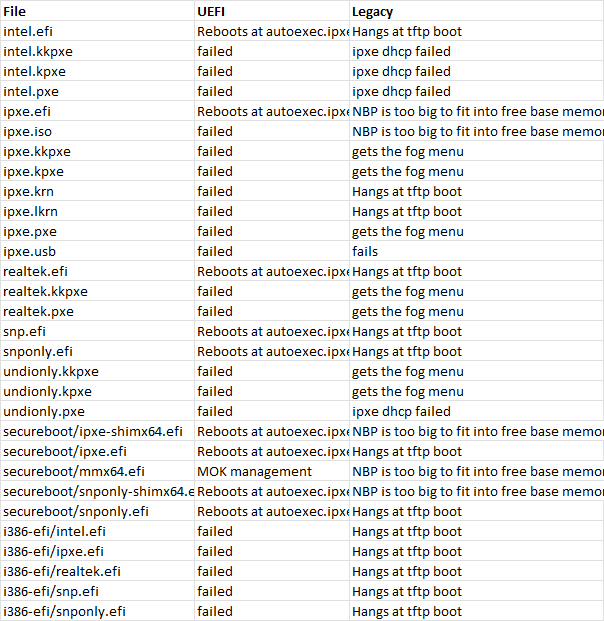
So I’m going with undionly.kpxe.
The other issue I’ve had is that once I did a Win 10 IoT install on a legacy-booted 5060, the fog capture process would fail, saying I needed to run fixparts. In the ‘capture - debug’ shell, the fixparts command wasn’t available, and I ended up accidentally nuking my Win10 boot partition. Oh well.
I’m retrying this again. I have a flash drive that’s MBR (not GPT) formatted with the Win10 IOT installer. I made sure the 5060 is in legacy mode, and when I started the install I hit Shift-F10 to drop to a cmd prompt and used these commands to ensure there were no linger gpt partitions on this disk:
diskpart
list disk
select disk 0
clean
convert mbr
exitand I went ahead with the install. When windows updates finish, I’m going to attempt to capture the image and see if it works.
-
RE: Secureboot preventing booting into windows after imagingposted in Windows Problems
For anyone else struggling with this, I finally figured it out. FYI this is not a fog issue, it’s a Windows secureboot UEFI issue.
Once I image a machine, I need to make sure secure boot is disabled, boot windows, and run these commands from an elevated command prompt:
mountvol s: /s
del s:*.* /f /s /q
bcdboot %systemroot% /s S:That will rebuild the EFI partition files.
I did this, rebooted to the bios, re-enabled secureboot, and Windows successfully booted. Hooray.
My only issue now is that I can’t do unattended reimaging with secureboot enabled. If I push my golden image back to this system with secureboot enabled, Windows will fail to boot again until I make it rebuild the EFI partition files. What’s so weird to me is that I don’t have this problem on Wyse 5070 thin clients - I can leave secureboot enabled all day, reimage a system, and Windows boots just fine. But these Dell Optiplex 3000s sure don’t like it.
-
RE: PXE boot failing on Wyse 5060posted in General Problems
Stock ipxe.efi from boot.ipxe.org did the same thing. I’m going to chalk this up to bad firmware on the 5060 and just use legacy mode. Thanks for the feedback.
-
Secureboot preventing booting into windows after imagingposted in Windows Problems
FOGProject version 1.6.0-beta.5136 running on Ubuntu 26.04.1 LTS and php 8.5.4.
I am working with Dell Optiplex 3000 thin clients. I have successfully done the following with secureboot disabled (UEFI enabled):
- Manually created a golden image of Windows 10 IoT, ran sysprep
- Booted to FOG PXE and done a complete inventory
- Captured the hard drive image to my fog server
- Deployed the image to a different Optiplex 3000
- Successfully booted that 2nd system. Even joined my windows domain, after changing the hostname
Where I run into problems is with secureboot. I successfully followed the instructions to get MOK.der accepted by the clients (did it manually from the pxe boot menu), so now I can enabled secureboot in the bios and the fog menu options work (inventory, debug, deploy image). However, when I attempt to boot the imaged WIndows 10 IoT after secureboot is enabled, I get an error.
If I let the system boot normally from pxe, I get the fog menu, which select ‘boot from hard drive’ after 3 seconds. It tries to SAN boot the partitions on the drive, and each one says “Verification failed: Security Policy Violation”. If I attempt to boot directly to the hard drive, the Dell bios immediately goes into testing mode because it can’t find a partition it can boot from.
I know this is 100% a secureboot problem because as soon as I disable secureboot in the bios Windows boots up and everything is happy.
On the original Optiplex that I created the golden image on (I installed Win10 IoT from a usb flash drive) I am able to perform the entire install while secureboot is enabled. So I know that secureboot can work with Windows on these thin clients.But for some reason I can’t get it to work after fog deploys a good image to one.
What am I not understanding about the secureboot process? I even went into the bios, select ‘custom keys’ and reset all the keys to the defaults. I also tried running “bcdboot C:\Windows /s S: /f UEFI” post-image deploy, with secureboot disabled, trying to get windows to recreate the uefi partition. Turned secureboot back on, still didn’t work.
I’m running out of things to troubleshoot here, and I’m hoping some folks with more experience in secureboot have some ideas for me. Thank you!
-
RE: PXE boot failing on Wyse 5060posted in General Problems
@Tom-Elliott Thank you so much for the reply. The image I’m trying to boot was created on a UEFI system, so of course it’s failing, why did I not think of that. I’m going to do a fresh install under legacy mode on this 5090 (I’m using Windows 10 IoT) and create a new golden image, rather than pushing a 5070 image and updating the drivers. I’ll report back. Thanks again
-
RE: PXE boot failing on Wyse 5060posted in General Problems
@ahaeder I’m still fighting this 5060 but I’ve made progress. When the bios is in Legacy mode (not UEFI) I got it to boot undionly.kkpxe and get to the fog pxe menu. I was even able to deploy an image to it successfully. The problem now is that although the pxe boot menu shows up, it can’t transition from there to booting off the hard drive. The default SANBOOT hangs at:
Booting from SAN device 0x00
Boot from SAN device 0x00 failed: Input/output error (https://ipxe.org/1d852039)
Booting from SAN device 0x80The other options I have in the fog server for this system under Host BIOS exit type are:
SANBOOT
GRUB
GRUB_FIRST_HDD
GRUB_FIRST_CDROM
GRUB_FIRST_FOUND_WINDOWS
REFIND_EFI
EXITNone of them work. They either immediately reboot, hang or just leave me at a grub prompt.
I can boot directly off the newly imaged hard drive, but I can’t transition from pxe boot menu -> hard drive boot.