FOG Project Image Capture on Raspberry Pi 4 (ARM64) via U-Boot
-
@Jeremy Sorry about the VM. Take the snapshot, and also export the host and image from the web UI (Hosts → Export Host, Images → Export Image), so the next rebuild is an import rather than a retype.
Your screenshot is actually the best news so far, and it answers your “fine-tune” question with “there is nothing to type”:
U-Boot’s DHCP works now.
DHCP client bound to address 192.168.203.77 (1 ms)— twice, once insidebootflow scanand once by hand. Whatever was blocking it on the old setup is gone. (TheC0A8CB4D.img“File not found” right after is harmless: with no bootfile from DHCP, U-Boot guesses a name from its IP and fails to fetch it.setenv autoload nosilences it, but you can’t save that without a card, and it costs nothing.)bootflow scanis already doing the FOG boot path for you. Look at the top of your screen: after DHCP it asked the TFTP server forpxelinux.cfg/default-arm-bcm283x, thendefault-arm, thendefault(and, above what’s visible,01-88-a2-9e-53-34-c0first). That ispxe get— U-Boot runs it by itself as part of standard boot, nobootcmd, no environment, noboot.scr. Every one came back “File not found” because FOG only writes the01-<mac>file while that host has a task queued, and nothing was queued. So the whole automation is: queue the task in the web UI, power the Pi on, done. No typing.Drop
boot.screntirely.Wrong image format for "source" commandis because yourboot.scris plain text;sourceonly runsmkimage-wrapped scripts. You don’t need to fix that, you need to stop using it — thepxepath replaces it.So, on the rebuilt server, please confirm two things and then do one test:
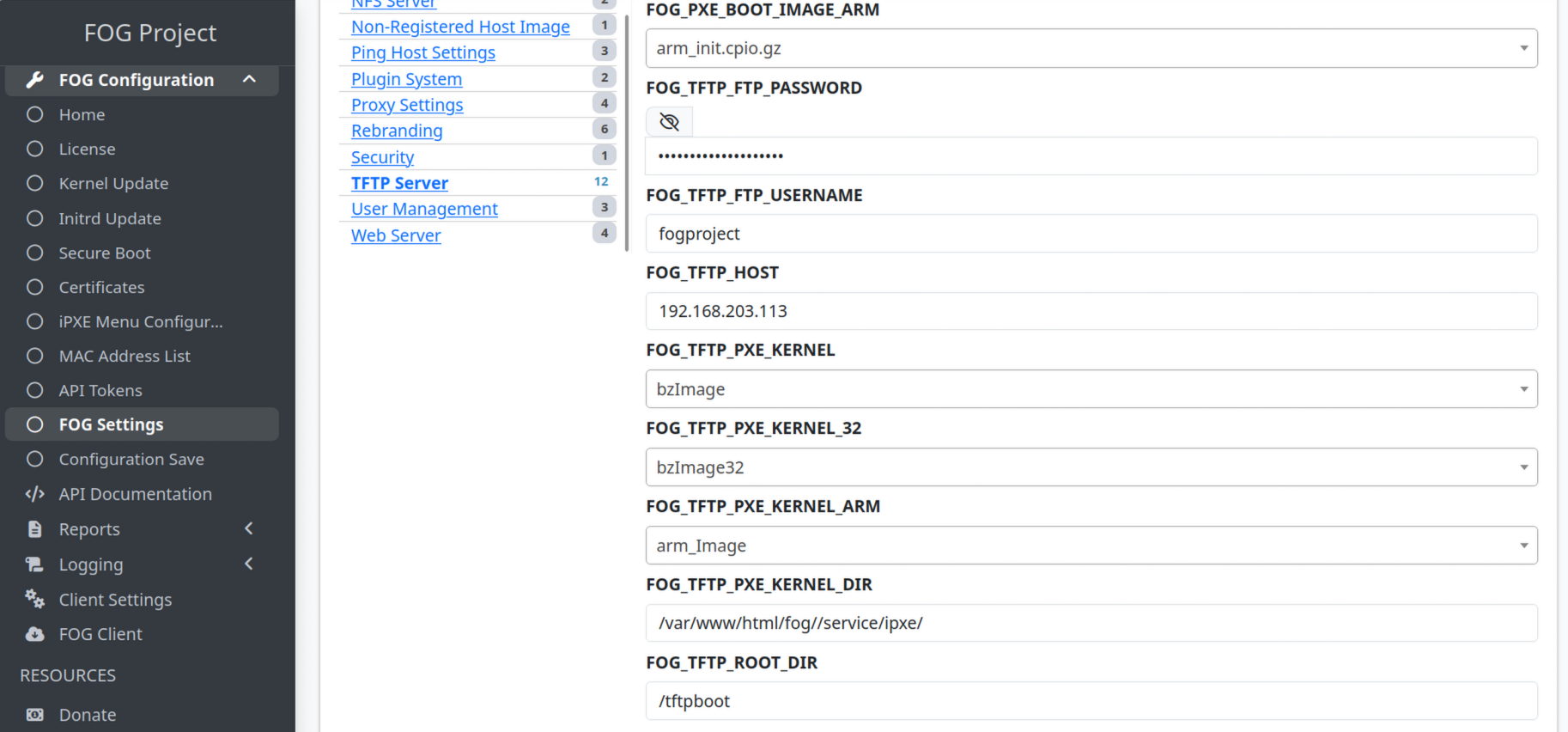
- FOG Settings → TFTP Server has a
FOG_TFTP_ROOT_DIRentry reading/tftpboot. If it doesn’t, the install is older than the fix; run the updater on the beta channel. - Queue a Deploy task for
Raspberry-test, then on the servercat /tftpboot/pxelinux.cfg/01-88-a2-9e-53-34-c0— it should start# Generated by FOG Projectand containkernel arm_Image— andls -l /tftpboot/arm_Image /tftpboot/arm_init.cpio.gz. Paste both here. - Then just power-cycle the Pi and let
bootflow scanrun. It should now find the01-file, pullarm_Image, and boot into FOS.
On “can’t get an IP via DHCP” during deployment: I need to know which DHCP. U-Boot’s is fine per your screenshot. If you mean FOS itself (after the kernel boots, the FOG banner,
Attempting to check innever coming), that’s a different network stack — tell me which kernel booted (FOG’sarm_Imagevia the01-file, orkernel8.imgfrom your old script) and paste the lines aroundudhcpc/eth0. Text rather than a photo if at all possible; a serial adapter on the Pi’s UART pins makes that easy and is worth the few euros for a 200-unit project. - FOG Settings → TFTP Server has a
-
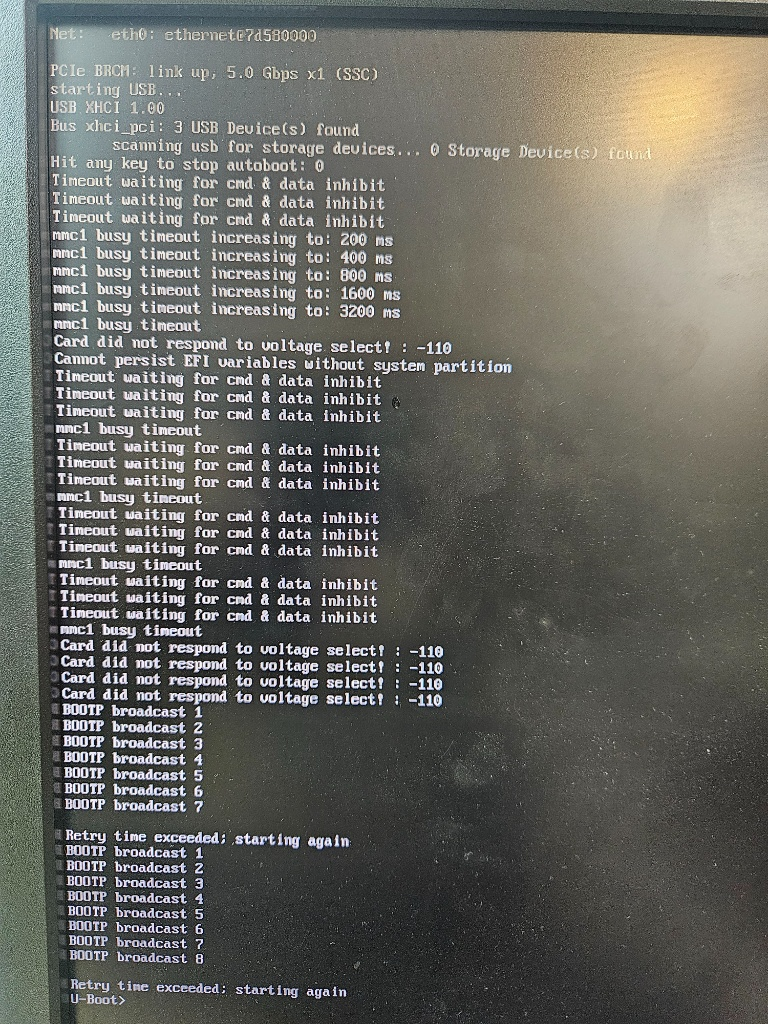
I created a new snapshot to avoid losing data again and having to start everything from scratch; right now, I’m stuck on this page on the Raspberry Pi.
-
@Jeremy That screen is the STP pattern, and I’m now fairly confident that’s your DHCP problem. Look at the timing:
bootflow scanstarts DHCP the instant the link comes up, retries for two cycles (about 20 seconds total), then gives up. Yesterday’s “1 ms” success was typed at the prompt after the board had been sitting there a while. A switch port running classic spanning tree drops everything for roughly 30 seconds after link-up. First 20 seconds: nothing gets through; a minute later: instant lease. That matches every screenshot you’ve posted.U-Boot can’t be made to wait longer without a saved environment, and without an SD card you can’t save one. So this is fixed on the switch, not on the Pi: ask whoever runs it to enable PortFast (Cisco) / edge port (most others) on the ports the Pis plug into, or move to RSTP. That is a normal setting for any PXE client, not a Pi special case. If you want proof before asking, plug the Pi into a dumb unmanaged switch for one boot; if
bootflow scangets a lease first time, you have your answer.Two more things from that screen:
0 Storage Device(s) found. Last time it found 1 (the USB SSD). If the SSD isn’t attached, there’s nothing to deploy to, so make sure it’s plugged in and powered for the deploy test.- I still need the three things from my last post, and I can’t go further without them: whether
FOG_TFTP_ROOT_DIRexists in FOG Settings → TFTP Server; the contents of/tftpboot/pxelinux.cfg/01-88-a2-9e-53-34-c0after you queue a Deploy task; andls -l /tftpboot/arm_Image /tftpboot/arm_init.cpio.gz. Those tell me whether the FOG side is doing its job on your rebuilt server. Everything else in this thread is now on the network side.
-
Regarding OPNsense, there isn’t anyone on the infrastructure team available to look into it right now; I can probably check on that Monday morning.
To be transparent with you, I’ve been retraining for a new career since February 2026 and only just obtained my IT diploma in July. What helps is that I’m persistent with projects and usually manage to get the job done. I’ll get back to you once I have the information regarding OPNsense.

-
@Jeremy If you can put a dumb switch between the Pi and the cable you currently connect into:
Connect the cable you normally plugin to the Pi into the 5 port switch then your pi to that switch and this should test the connectivity STP problem I believe is occurring.
-
Hi, I’m using a Proxmox bridged network interface, I can’t connect anywhere else because otherwise it wouldn’t be the same network, so we’re trying to find a solution on our end.
-
Hi, The blockage isn’t caused by a forgotten debug command, since that isn’t present in the deployment test; we have a managed switch right before the Raspberry Pi connection—that might be the issue. I’m discussing it with my colleagues at work to see how we can handle it.
-
This post is deleted! -
This post is deleted! -
OPNsense:
Option 66: I correctly entered the FOG server’s IP address.
Option 67: I entered the filename ipxe.efi.
Do I always need to keep ipxe.efi in OPNsense?
-
@Jeremy
Option 66 -> The FOG server or your TFTP Server.
Option 67 -> The Filename ALL machines should use for booting automatically.I don’t think this matters in respect to the Raspberry Pi’s though.
-
Okay, thanks for the reply.
The OPNsense box does assign an IP address to the Raspberry Pi at startup—and it is always the same one, even though it is set to DHCP—but during the U-Boot boot process, it fails to find an IP address.
-
My Raspeberry is :
RaspberryPI 4 2GB Model B
The settings might vary depending on the model?
-
@Jeremy That’s a useful data point, and it says the same thing as before, more firmly: OPNsense hands the Pi’s firmware a lease every time (same address, so you have a static mapping, good), and the only DHCP client that fails is U-Boot’s, which runs seconds after U-Boot resets the network port. The DHCP server is fine. The reservation is fine. What differs is when the request happens relative to the port coming up, and that’s the managed switch your colleagues are now looking at. Nothing in OPNsense will change this.
You can test the whole FOG deploy today, without waiting for anyone. I asked for this last time and haven’t seen the result yet, so once more, because it matters: power the Pi on, let it fail and land at the
U-Boot>prompt, wait until it has been powered for a full minute, then typeboot. By then the switch port is forwarding, DHCP will bind at once, and standard boot will find your01-file and pullarm_Image. Whatever appears afterStarting kernel ...is the next thing I need to see. This is the same sequence that will run automatically once the switch is fixed; you’re only giving it the head start by hand.Option 67: the Pi doesn’t use it. The Pi’s bootloader finds the TFTP server from option 66 / next-server and fetches its files by fixed names, and U-Boot’s
pxecode only looks at the filename to work out a directory to prefix ontopxelinux.cfg/…— a bareipxe.efihas no directory, so it prefixes nothing, which is what you want. Two cautions: don’t ever put a path with a folder in there (boot/ipxe.efiwould make the Pi look forboot/pxelinux.cfg/01-…), andipxe.efias the single filename for all machines is wrong for your x86 fleet — BIOS machines needundionly.kpxe, UEFI onesipxe.efi, and OPNsense has the per-architecture fields for exactly that. That’s a separate topic; it won’t affect the Pi either way.One more thing so you don’t chase it: the advice above about
mode=debug, running FOS onkernel8.img, VLANs and firewall rules between subnets was written against your old hand-typed setup and doesn’t apply any more. You’re on FOG’s ownarm_Imagevia FOG’s own file now, on one subnet, and the FOG side is already proven on your server. It’s the switch port, then whatever the kernel says after it boots.
