FOG Project Image Capture on Raspberry Pi 4 (ARM64) via U-Boot
-
Regarding OPNsense, there isn’t anyone on the infrastructure team available to look into it right now; I can probably check on that Monday morning.
To be transparent with you, I’ve been retraining for a new career since February 2026 and only just obtained my IT diploma in July. What helps is that I’m persistent with projects and usually manage to get the job done. I’ll get back to you once I have the information regarding OPNsense.

-
@Jeremy If you can put a dumb switch between the Pi and the cable you currently connect into:
Connect the cable you normally plugin to the Pi into the 5 port switch then your pi to that switch and this should test the connectivity STP problem I believe is occurring.
-
Hi, I’m using a Proxmox bridged network interface, I can’t connect anywhere else because otherwise it wouldn’t be the same network, so we’re trying to find a solution on our end.
-
Hi, The blockage isn’t caused by a forgotten debug command, since that isn’t present in the deployment test; we have a managed switch right before the Raspberry Pi connection—that might be the issue. I’m discussing it with my colleagues at work to see how we can handle it.
-
This post is deleted! -
This post is deleted! -
OPNsense:
Option 66: I correctly entered the FOG server’s IP address.
Option 67: I entered the filename ipxe.efi.
Do I always need to keep ipxe.efi in OPNsense?
-
@Jeremy
Option 66 -> The FOG server or your TFTP Server.
Option 67 -> The Filename ALL machines should use for booting automatically.I don’t think this matters in respect to the Raspberry Pi’s though.
-
Okay, thanks for the reply.
The OPNsense box does assign an IP address to the Raspberry Pi at startup—and it is always the same one, even though it is set to DHCP—but during the U-Boot boot process, it fails to find an IP address.
-
My Raspeberry is :
RaspberryPI 4 2GB Model B
The settings might vary depending on the model?
-
@Jeremy That’s a useful data point, and it says the same thing as before, more firmly: OPNsense hands the Pi’s firmware a lease every time (same address, so you have a static mapping, good), and the only DHCP client that fails is U-Boot’s, which runs seconds after U-Boot resets the network port. The DHCP server is fine. The reservation is fine. What differs is when the request happens relative to the port coming up, and that’s the managed switch your colleagues are now looking at. Nothing in OPNsense will change this.
You can test the whole FOG deploy today, without waiting for anyone. I asked for this last time and haven’t seen the result yet, so once more, because it matters: power the Pi on, let it fail and land at the
U-Boot>prompt, wait until it has been powered for a full minute, then typeboot. By then the switch port is forwarding, DHCP will bind at once, and standard boot will find your01-file and pullarm_Image. Whatever appears afterStarting kernel ...is the next thing I need to see. This is the same sequence that will run automatically once the switch is fixed; you’re only giving it the head start by hand.Option 67: the Pi doesn’t use it. The Pi’s bootloader finds the TFTP server from option 66 / next-server and fetches its files by fixed names, and U-Boot’s
pxecode only looks at the filename to work out a directory to prefix ontopxelinux.cfg/…— a bareipxe.efihas no directory, so it prefixes nothing, which is what you want. Two cautions: don’t ever put a path with a folder in there (boot/ipxe.efiwould make the Pi look forboot/pxelinux.cfg/01-…), andipxe.efias the single filename for all machines is wrong for your x86 fleet — BIOS machines needundionly.kpxe, UEFI onesipxe.efi, and OPNsense has the per-architecture fields for exactly that. That’s a separate topic; it won’t affect the Pi either way.One more thing so you don’t chase it: the advice above about
mode=debug, running FOS onkernel8.img, VLANs and firewall rules between subnets was written against your old hand-typed setup and doesn’t apply any more. You’re on FOG’s ownarm_Imagevia FOG’s own file now, on one subnet, and the FOG side is already proven on your server. It’s the switch port, then whatever the kernel says after it boots. -
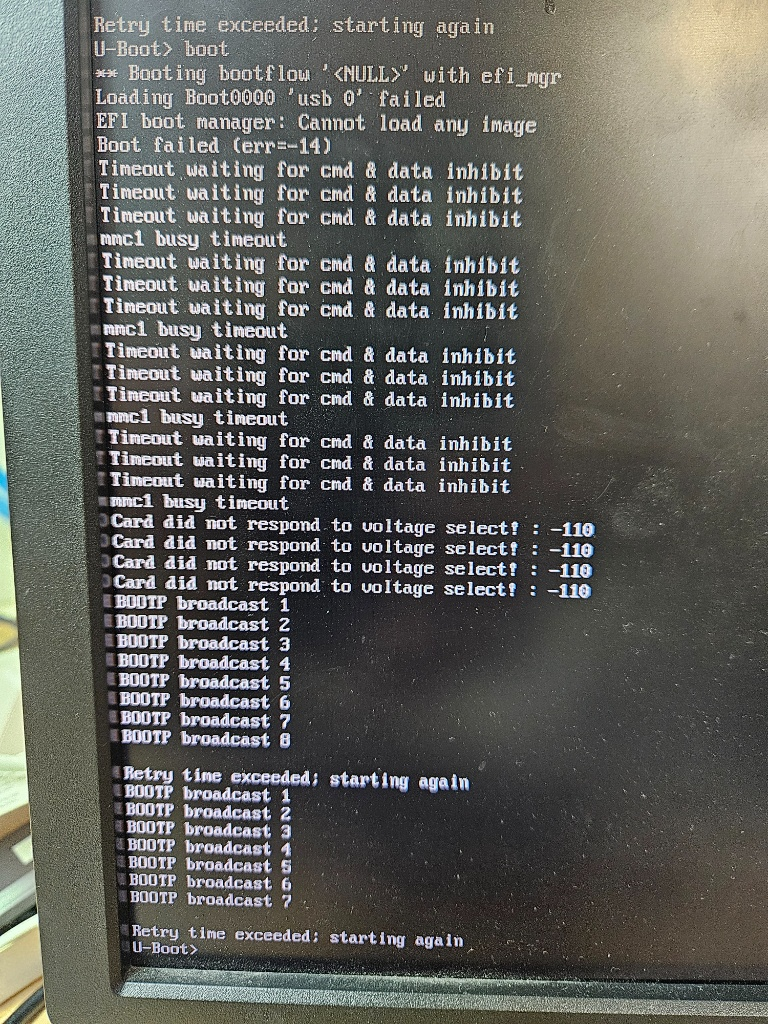
I tried your test and am sending you a screenshot; I’ll keep testing on my end, and if I have any good news, I’ll let you know.
-
@Jeremy Thanks for running it. The model doesn’t change anything: a Pi 4 Model B is what all of this was written for, and 2 GB is plenty.
From the screenshot I can’t tell whether the minute had passed before you typed
boot(it looks like it went straight after the first failure). But rather than argue about seconds, let’s get the one measurement that settles this, and it needs nothing from the infrastructure team: watch the DHCP traffic from the FOG server, which sits on the same network and sees every broadcast.On the FOG server, as root, start this and leave it running:
tcpdump -ni any -e port 67 or port 68Then power-cycle the Pi and let U-Boot do its
BOOTP broadcastloop. You’ll see one of three things:- Nothing at all from
88:a2:9e:53:34:c0while U-Boot is broadcasting → the frames never leave the Pi’s switch port. That’s the switch (STP or port security), full stop. Hand that to your colleagues with the capture. - Requests arrive but no reply comes back (lines from the Pi’s MAC, none from OPNsense’s) → OPNsense is receiving and ignoring them. Then it’s a DHCP-server question, and the OPNsense DHCP log for that MAC at the same moment will say why.
- Request and reply both appear, but U-Boot still says “Retry time exceeded” → the reply is being dropped on the way back or U-Boot isn’t accepting it. Rare, but it points at the switch again, or at the MAC below.
Copy the tcpdump lines here as text (that’s a terminal, so no photo needed).
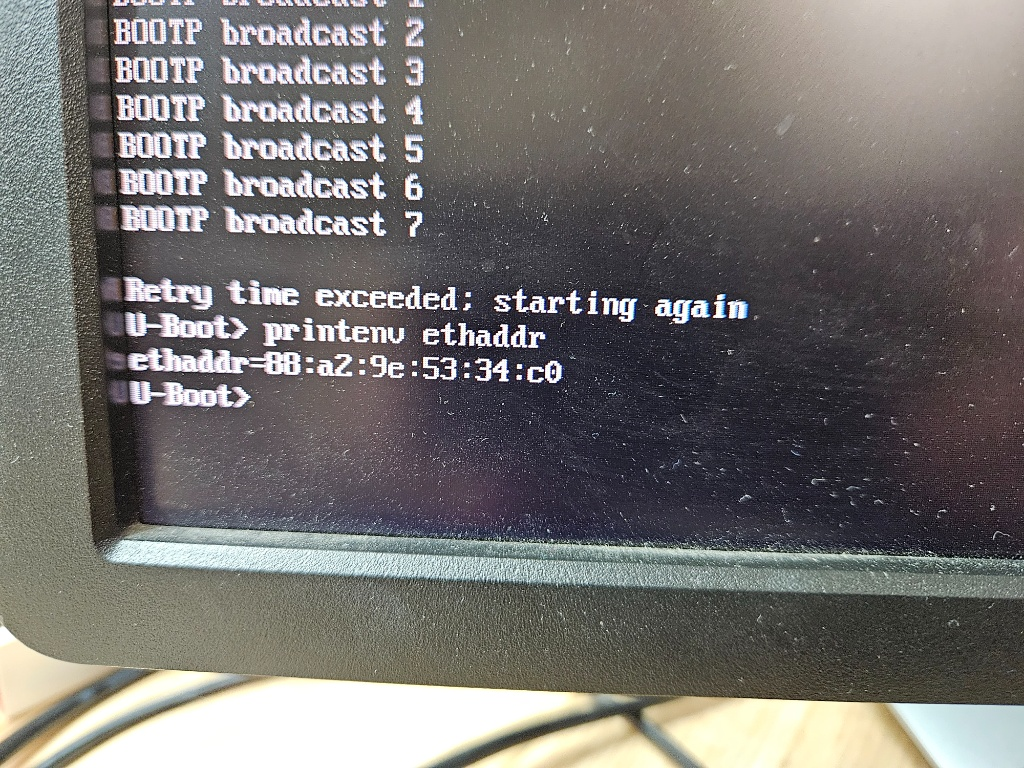
One more thing to check at the
U-Boot>prompt, since it costs ten seconds:printenv ethaddrIt must read
88:a2:9e:53:34:c0. U-Boot takes it from the firmware; if for any reason it shows something else, OPNsense’s reservation won’t match, and if your DHCP scope has no dynamic pool that alone would produce exactly this. I don’t expect it, but it’s cheap to rule out.Once DHCP binds, the rest of the path is already proven on your server, so this really is the last gate before you see FOS boot.
- Nothing at all from
-
This post is deleted! -
-
@Jeremy That capture is the answer we’ve been missing. Thank you — text from a terminal is exactly what I needed.
Read it with me:
13:58:46.427and13:58:46.457: two packets from88:a2:9e:53:34:c0, 30 ms apart. That’s the Pi firmware’s DHCP: discover, then request. A clean, complete exchange in under a second (the offer and ack come back unicast, so the FOG server doesn’t see those, which is fine).13:59:53.647: one packet. That’s during U-Boot’s phase. But your screen shows U-Boot broadcasting fifteen or more times across its retry cycles. Only one of them reached the network segment the FOG server is on, and that one wasn’t answered as far as U-Boot could tell.
So: the DHCP server is fine, the reservation is fine,
ethaddris correct (thanks for checking), and FOG’s side is proven. What’s broken is that almost every frame U-Boot sends is disappearing between the Pi and the rest of the LAN, while the firmware’s frames, seconds earlier on the same cable, all get through. That is not a FOG problem and not an OPNsense problem. It’s either the managed switch port treating U-Boot’s traffic differently (broadcast storm control, DHCP snooping rate limits, port security, or STP re-evaluating the port), or U-Boot’s Ethernet driver failing to put most of its packets on the wire. Both are real possibilities, and one test separates them, which is the one I asked for on the 4th and still haven’t seen:Put a cheap unmanaged switch between the Pi and the wall. Wall cable into the little switch, Pi into the little switch. Power-cycle the Pi with the same tcpdump running on the FOG server.
- If U-Boot’s DHCP now binds and you see its broadcasts arriving in the capture → the managed port is the problem. Give your colleagues the two captures side by side (with and without the little switch) and the port number; that’s everything they need.
- If it still fails and the capture still shows almost nothing from the Pi during U-Boot’s phase → it’s U-Boot’s driver on this board, and we look at which U-Boot build you’re running (
versionat the prompt, paste the first two lines).
One more piece for Monday, since it’s free: ask whoever runs OPNsense to look at its DHCP log for
88:a2:9e:53:34:c0around13:59:53today. If OPNsense saw that one packet and sent an offer that never made it back, that’s the switch dropping traffic in both directions, and it’s another line of evidence for the port. -
I can’t modify the company’s switches or other hardware since the system is in production. I’m currently rebuilding the FOG server on a VM on my PC and doing everything locally; it’ll be easier to troubleshoot that way. Gemini has wiped out all the previous messages and is giving me nonsense—I can’t seem to recreate the environment up to the capture stage anymore. Could you give me a rundown of everything that needs to be done—downloads, decompressing specific files in binary mode, etc.?
Thanks.