Latest dev version - You're running the latest dev-branch version: 1.5.10.2191 odd ram-0 error
-
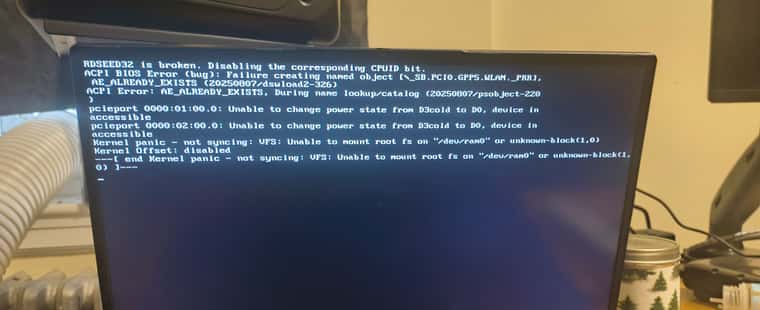
Everything working fine until this latest FOG update. Using a Strix Point laptop with a USB Ethernet adaptor. Also trying to install different kernels through the web UI no longer works. HTTP ERROR 500
I tried installing master branch. Failed, couldn’t even boot to memtest. I restored the FOG VM from a back up made a few days ago. 1.5.10.2144 - everything is working as normal now. Afraid to update
Just thinking, sometime between the 1.5.10.2144 backup, there were tons of dev updates, and one time when I did a git pull on FOG, it deleted a bunch of things. But since the gui worked, I assumed it was okay
-
@Fog_Newb I’m unsure why you’re seeing that issue though we usually see The FOG COnfiguration -> FOG Settings -> Kernel Ramdisk Size as a culprit. 275000 is what we “ship out the gate”
if that’s not large enough you could try 512000 or something like it (this is the ram the Init + bzImage need to load) - I tested everything best I could (VM wise) after all the work this weekend and things still loaded/worked/images but maybe my box doesn’t need something yours does and that’s sending the memory > 275(ish) MB needed
As to the 500 error you were seeing, can you provide the error log?
I’m running 2 1.5 boxes (albeit those are on Rocky 9/10) and I’m not seeing any issues with the UI loading on 2191. Was there a specific page?
-
@Fog_Newb As to “a bunch of stuff deleted”
Yes, in the past we shipped all the ipxe binaries we natively built with FOG, then those would end up being rebuilt if https.
The process is still the same, but I decided to update to iPXE 2.0.0 and split the repo so we have a central point for new builds (similar to now Kernels/Inits are done as well) and worked very hard to begin basic level support for Secure boot capabilities.
The SB enabled part still (as it stands today) requires enrolling the key on each machine (so still tedious) but we build the key, provide a UI bit of information to what needs to do and that was part of why you see the “many files deleted” in short.
So yes, lots of changes, all expected.
I would ask, if you don’t mind, upgrading to 1.6 and see if that fairs a little better as all these new things also got put in there, but there’s also a lot more I think most poeple might actually enjoy.
-
@Tom-Elliott I’m sorry. I restored a previous version of the FOG server and no longer have any error logs from when all this happened. I can go to 1.6… IIRC there is a change that needs to be made to SSHD conf or something. The last time I went to 1.6 FOG was unable to see the default storage node.
-
@Tom-Elliott Maybe I should mention I am using basic DHCP from pihole and dnsmasq on the FOG server is handling the ipxe stuff. Which has been working well up until now? I read something else about the tfpboot directory being redirected to https using the newer versions?
Don’t function as a DNS server:
port=0
Log lots of extra information about DHCP transactions.
log-dhcp
Set the root directory for files available via FTP.
tftp-root=/tftpboot
The boot filename, Server name, Server Ip Address
dhcp-boot=undionly.kpxe,10.1.1.100
Disable re-use of the DHCP servername and filename fields as extra
option space. That’s to avoid confusing some old or broken DHCP clients.
dhcp-no-override
inspect the vendor class string and match the text to set the tag
dhcp-vendorclass=BIOS,PXEClient:Arch:00000
dhcp-vendorclass=UEFI32,PXEClient:Arch:00006
dhcp-vendorclass=UEFI,PXEClient:Arch:00007
dhcp-vendorclass=UEFI64,PXEClient:Arch:00009Set the boot file name based on the matching tag from the vendor class (above)
dhcp-boot=net:UEFI32,i386-efi/snponly.efi,10.1.1.100
dhcp-boot=net:UEFI,snponly.efi,10.1.1.100
dhcp-boot=net:UEFI64,snponly.efi,10.1.1.100PXE menu. The first part is the text displayed to the user. The second is the timeout, in seconds.
pxe-prompt=“Booting FOG Client”, 1
The known types are x86PC, PC98, IA64_EFI, Alpha, Arc_x86,
Intel_Lean_Client, IA32_EFI, BC_EFI, Xscale_EFI and X86-64_EFI
This option is first and will be the default if there is no input from the user.
pxe-service=X86PC, “Boot to FOG”, undionly.kpxe
pxe-service=X86-64_EFI, “Boot to FOG UEFI”, snponly.efi
pxe-service=BC_EFI, “Boot to FOG UEFI PXE-BC”, snponly.efidhcp-range=10.1.1.100,proxy
-
@Fog_Newb Forgive me but:
Have you updated to the latest dev-branch and having the same issue or?
What about working-1.6?
Can you test if it’s reproducable with a test system (understanding you have a need for stability at least and the last time you did update was anything but).
