Latest dev version - You're running the latest dev-branch version: 1.5.10.2191 odd ram-0 error [resolved now with 1.5.10.2218]
-
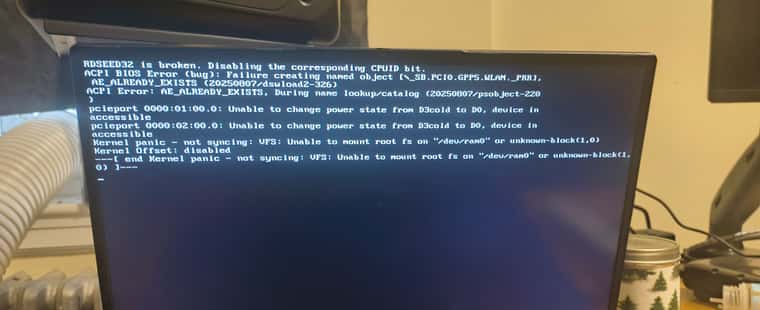
Everything working fine until this latest FOG update. Using a Strix Point laptop with a USB Ethernet adaptor. Also trying to install different kernels through the web UI no longer works. HTTP ERROR 500
I tried installing master branch. Failed, couldn’t even boot to memtest. I restored the FOG VM from a back up made a few days ago. 1.5.10.2144 - everything is working as normal now. Afraid to update
Just thinking, sometime between the 1.5.10.2144 backup, there were tons of dev updates, and one time when I did a git pull on FOG, it deleted a bunch of things. But since the gui worked, I assumed it was okay
-
@Tom-Elliott Tom, looks like everything has been resolved after going from 2144 to 1.5.10.2218! No errors and I was able to capture no problem. Thanks
-
@Fog_Newb I’m unsure why you’re seeing that issue though we usually see The FOG COnfiguration -> FOG Settings -> Kernel Ramdisk Size as a culprit. 275000 is what we “ship out the gate”
if that’s not large enough you could try 512000 or something like it (this is the ram the Init + bzImage need to load) - I tested everything best I could (VM wise) after all the work this weekend and things still loaded/worked/images but maybe my box doesn’t need something yours does and that’s sending the memory > 275(ish) MB needed
As to the 500 error you were seeing, can you provide the error log?
I’m running 2 1.5 boxes (albeit those are on Rocky 9/10) and I’m not seeing any issues with the UI loading on 2191. Was there a specific page?
-
@Fog_Newb As to “a bunch of stuff deleted”
Yes, in the past we shipped all the ipxe binaries we natively built with FOG, then those would end up being rebuilt if https.
The process is still the same, but I decided to update to iPXE 2.0.0 and split the repo so we have a central point for new builds (similar to now Kernels/Inits are done as well) and worked very hard to begin basic level support for Secure boot capabilities.
The SB enabled part still (as it stands today) requires enrolling the key on each machine (so still tedious) but we build the key, provide a UI bit of information to what needs to do and that was part of why you see the “many files deleted” in short.
So yes, lots of changes, all expected.
I would ask, if you don’t mind, upgrading to 1.6 and see if that fairs a little better as all these new things also got put in there, but there’s also a lot more I think most poeple might actually enjoy.
-
@Tom-Elliott I’m sorry. I restored a previous version of the FOG server and no longer have any error logs from when all this happened. I can go to 1.6… IIRC there is a change that needs to be made to SSHD conf or something. The last time I went to 1.6 FOG was unable to see the default storage node.
-
This post is deleted! -
@Fog_Newb Forgive me but:
Have you updated to the latest dev-branch and having the same issue or?
What about working-1.6?
Can you test if it’s reproducable with a test system (understanding you have a need for stability at least and the last time you did update was anything but).
-
I also was getting an error 500 when trying to update the kernel.
I had to change the following lines in /var/www/fog/lib/fog/fogpage.class.php around line 2746 to the following.
protected static function secureBootStagingDir()
{
// Patch: Define FOG_BASE_DIR if the core failed to load it
if (!defined(‘FOG_BASE_DIR’)) {
define(‘FOG_BASE_DIR’, ‘/opt/fog’);
}// GH-850: the base path is installer-driven, so these must be derived // from FOG_BASE_DIR rather than written as /opt/fog literals. The // installer places both under $fogprogramdir; hardcoding the default // meant that on a server installed anywhere else this returned '' and // signing silently never happened -- leaving Secure Boot clients with // an unsigned kernel and nothing on the server to say why. $helper = FOG_BASE_DIR . DS . 'bin' . DS . 'fog-sign-kernel'; $stagedir = FOG_BASE_DIR . DS . 'secureboot-staging'; if (!is_executable($helper) || !is_dir($stagedir)) { return ''; } return $stagedir; }Mat
-
Apologies, this one’s on me.
There’s a constant, FOG_BASE_DIR, that the Secure Boot signing code uses to find where FOG is installed. On 1.6 the installer writes that value out for PHP to read. When I ported the signing code back to 1.5 I brought the half that uses the constant and not the half that sets it. On PHP 7 that’s a warning nobody sees. On PHP 8 it’s a hard fatal, which is where the 500 comes from.
@MatMurdock thank you, you found exactly the right line and your patch is sound.
@Fog_Newb your bisect nailed it. 2144 good, 2191 bad, and the commit that broke it is 2179. That saved me a lot of digging.
The proper fix is merged and is in 1.5.10.2213 on dev-branch. Update and re-run the installer. I’ve confirmed the fatal is gone, but I haven’t been able to reproduce your setup end to end, so please let me know either way whether the kernel page behaves for you now. If it still 500s, grab the Apache error log or php-fpm log around the failure and post it, because then it’s something else and I want to see it.
Two things on the boot problem:
I still can’t reproduce the ram-0 error and I don’t want to guess at it. Can you get a photo of the screen when it fails? The exact wording matters. And let me know if that laptop is booting UEFI or legacy BIOS.
If it’s legacy BIOS, there’s a separate bug that was also live in your window. 2191 shipped an iPXE build with a batch of commands disabled that our boot menu needs. Symptom is params: command not found then Could not boot: Exec format error. That went in at 2208, but the server won’t heal itself, /tftpboot/undionly.kkpxe only gets replaced when the installer runs again.
Worth trying the ramdisk size too since it’s quick. FOG Configuration → FOG Settings → Kernel Ramdisk Size, bump it to 512000.
-
Hello, I’m taking the liberty of jumping into this conversation because I’ve been having a similar issue for the past few days: everything was working fine a month ago, but I’ve updated FOG several times since then (currently on 2218) and I’ve realized I can no longer deploy images; I get an error message:
No filesystem could mount root, tried ext4
Kernel panic - not syncing: VFS: Unable to mount root fs on "/dev/ram0" or unknown-block(1,0)
Kernel Offset: disabled
---[ end Kernel panic - not syncing: VFS: Unable to mount root fs on "/dev/ram0" or unknown-block(1,0)
I modified the “Kernel Ramdisk Size” value to 512000, tested various EFI/iPXE boot files (snp, snponly, intel), and tried rolling back to the master or stable versions (running “git pull” followed by “./installfog.sh -Y” each time), but I encounter this message in every case.
I had to restore my Veeam backup (dev-branch version 1894) to get it working again (I didn’t test other intermediate versions).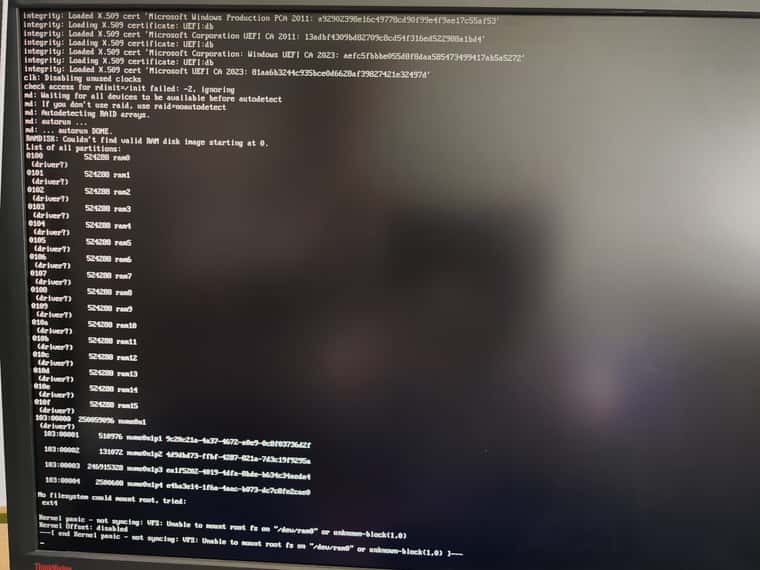
-
@Matthiman Your issue appears similar to an issue that’s being described here:
https://forums.fogproject.org/topic/18213/version-1-6-0-beta-3187-ipxe-2-0-0-x-problemsThough they seem to indicate changing to an older bootfile (snponly.efi/ipxe.efi whatever) worked so it’s not a kernel/init issue that’s happening causing this to occur.
This may be what’s happening with everyone in this thread as well, but the first image that I see from Fog_Newb looks more like what I’d expect where there’s not enough ram available to load.
-
@Tom-Elliott Hello Tom, I had posted a pic of the RAM0 error. Since I reverted to a backup of 2144. I no longer get any errors so I can’t take a new pic but here is the original pic with 2191 installed - (see below). I will try 1.5.10.2213 as soon as I can. Perhaps tomorrow evening?
The laptop is booting UEFI. It runs windows 11 with secure boot disabled and TPM requirements disabled during install.
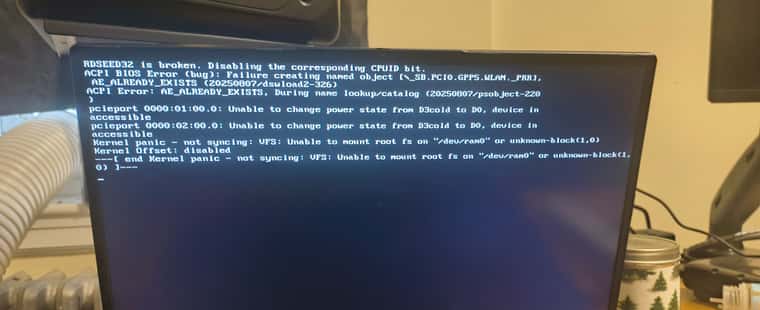
Here is a text translation of the error in case you are unable to view attached photo.
RDSEED32 is broken. Disabling the corresponding CPUID bit.
ACPI BIOS Error (bug): Failure creating named object [_SB.PCI0.GPP5.WLAN._PRR],
AE_ALREADY_EXISTS (20250807/dswload2-326)
ACPI Error: AE_ALREADY_EXISTS, During name lookup/catalog (20250807/psobject-220
)
pcieport 0000:01:00.0: Unable to change power state from D3cold to D0, device in
accessible
pcieport 0000:02:00.0: Unable to change power state from D3cold to D0, device in
accessible
Kernel panic - not syncing: VFS: Unable to mount root fs on “/dev/ram0” or unknown-block(1,0)
Kernel Offset: disabled
—[ end Kernel panic - not syncing: VFS: Unable to mount root fs on “/dev/ram0” or unknown-block(1,
0) ]—“2144 good, 2191 bad”
Yes, that is the kind of in-depth analysis I am known for.

-
@Tom-Elliott Tom, looks like everything has been resolved after going from 2144 to 1.5.10.2218! No errors and I was able to capture no problem. Thanks
-
 T Tom Elliott has marked this topic as solved on