• Recent
    • Unsolved
    • Tags
    • Popular
    • Users
    • Groups
    • Search
    • Register
    • Login

    Windows 11 | 65x HP Z2 Tower G1i | UPDATE -

    Scheduled Pinned Locked Moved Unsolved FOG Problems
    37 Posts 3 Posters 2.4k Views
    Loading More Posts
    • Oldest to Newest
    • Newest to Oldest
    • Most Votes
    Reply
    • Reply as topic
    Log in to reply
    This topic has been deleted. Only users with topic management privileges can see it.
    • K
      kratkale @kratkale
      last edited by

      @kratkale OK—I’ll try to explain it more clearly:
      FOG

      FOG clones (as you can see in the image) to nvme1. No host device was specified here. So FOG correctly identified the NVMe order and didn’t clone to nvme0, but to the wrong nvme1.
      I noticed that this happens with all devices where the NVMe serial number starts with a number. For those where the NVMe serial number starts with a letter, it clones correctly to nvme0. The NVMe on the data drive is a different brand and only has numbers as serial numbers.

      Clonzilla

      Clonzilla always gave me a choice between nvme0 and nvme1 when cloning. Here, the NVMe installed in the first slot in the PC was always nvme0, and the one installed in the second slot was always nvme1—so Clonzilla always correctly identifies which is the data drive and which is the system drive. The system drive is always installed in the first slot, and the data drive is always in the second.

      1 Reply Last reply Reply Quote 0
      • K
        kratkale @Tom Elliott
        last edited by

        @Tom-Elliott
        Of course, if I change the image, for example, I have to use groups as well. Otherwise, I’d have to change the image on every PC by hand.
        In that case, I think it would be helpful if you could protect the “Host Primary Disk” entry on the host so that this information isn’t lost.

        Tom ElliottT 1 Reply Last reply Reply Quote 0
        • Tom ElliottT
          Tom Elliott @kratkale
          last edited by

          @kratkale I’m unsure I understand?

          If the Group Primary Disk is empty, nothing should be changing on the hosts within the groups.

          Just update the group’s Image, and save.

          Please help us build the FOG community with everyone involved. It's not just about coding - way more we need people to test things, update documentation and most importantly work on uniting the community of people enjoying and working on FOG! Get in contact with me (chat bubble in the top right corner) if you want to join in.

          Web GUI issue? Please check apache error (debian/ubuntu: /var/log/apache2/error.log, centos/fedora/rhel: /var/log/httpd/error_log) and php-fpm log (/var/log/php*-fpm.log)

          Please support FOG if you like it: https://wiki.fogproject.org/wiki/index.php/Support_FOG

          K 2 Replies Last reply Reply Quote 0
          • K
            kratkale @kratkale
            last edited by

            @kratkale
            as a feature request I would suggest to have the possibility to fix the host primary disk like the “protected” in Image General - just to be fail safe.

            1 Reply Last reply Reply Quote 0
            • K
              kratkale @Tom Elliott
              last edited by

              @Tom-Elliott
              I can confirm, that it works to insert the serial number in Host Management | Host gernal | Host Primary Disk. You can take the value you get from booting with a clonzilla stick (Switch to the second console) and use lsblk -pdno SERIAL,SIZE
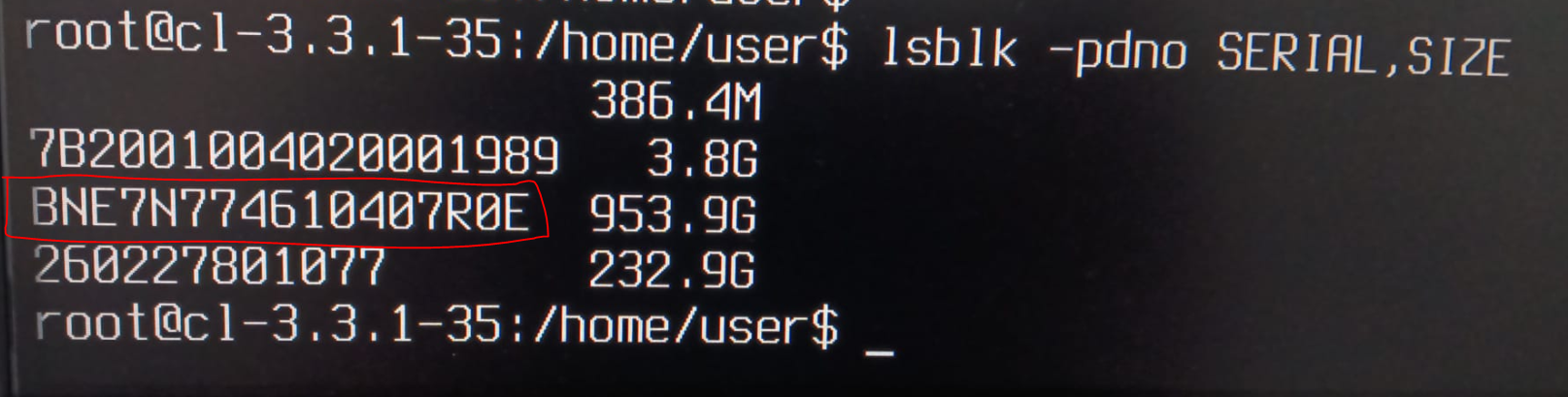
              25f30722-887b-43b8-acee-09ee45f61e35-grafik.png
              5e3f517f-4f09-4933-bef6-728f0ee59f72-grafik.png
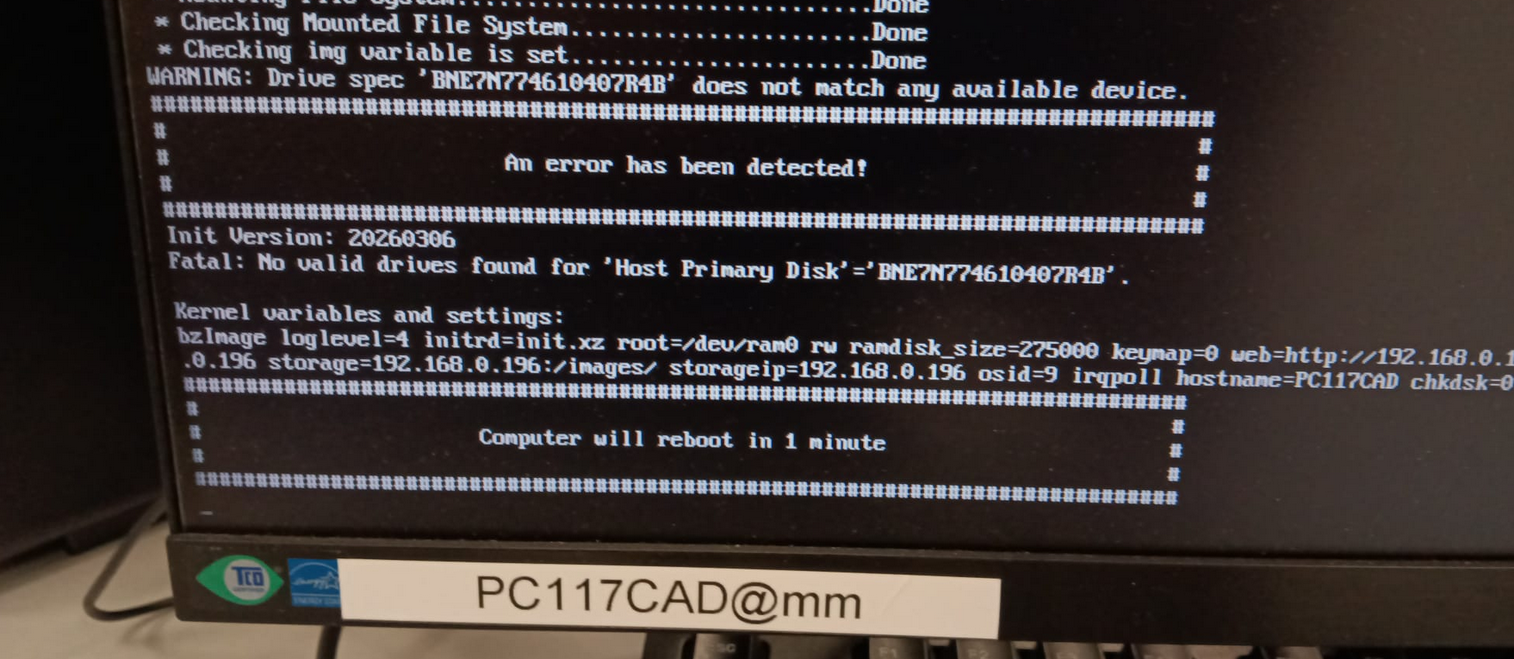
              I did a test and used the wrong number in Host Primary Disk and start to clone:
              345998be-1406-4020-9c18-1878608eebae-grafik.png

              So it seems to work.

              1 Reply Last reply Reply Quote 0
              • K
                kratkale @Tom Elliott
                last edited by

                @Tom-Elliott
                Tom Thank you for your great support.

                Tom ElliottT 1 Reply Last reply Reply Quote 0
                • Tom ElliottT
                  Tom Elliott @kratkale
                  last edited by

                  @kratkale You don’t need the clonezilla to see this information though admittedly it’s not exactly straight forward.

                  You can load FOG into debug mode and it will drop you to a shell where you can then run the lsblk command as well.

                  That said, if booting to clonezilla isn’t that difficult a thing, then it’s all good either way.

                  Please help us build the FOG community with everyone involved. It's not just about coding - way more we need people to test things, update documentation and most importantly work on uniting the community of people enjoying and working on FOG! Get in contact with me (chat bubble in the top right corner) if you want to join in.

                  Web GUI issue? Please check apache error (debian/ubuntu: /var/log/apache2/error.log, centos/fedora/rhel: /var/log/httpd/error_log) and php-fpm log (/var/log/php*-fpm.log)

                  Please support FOG if you like it: https://wiki.fogproject.org/wiki/index.php/Support_FOG

                  K 3 Replies Last reply Reply Quote 0
                  • K
                    kratkale @Tom Elliott
                    last edited by

                    @Tom-Elliott
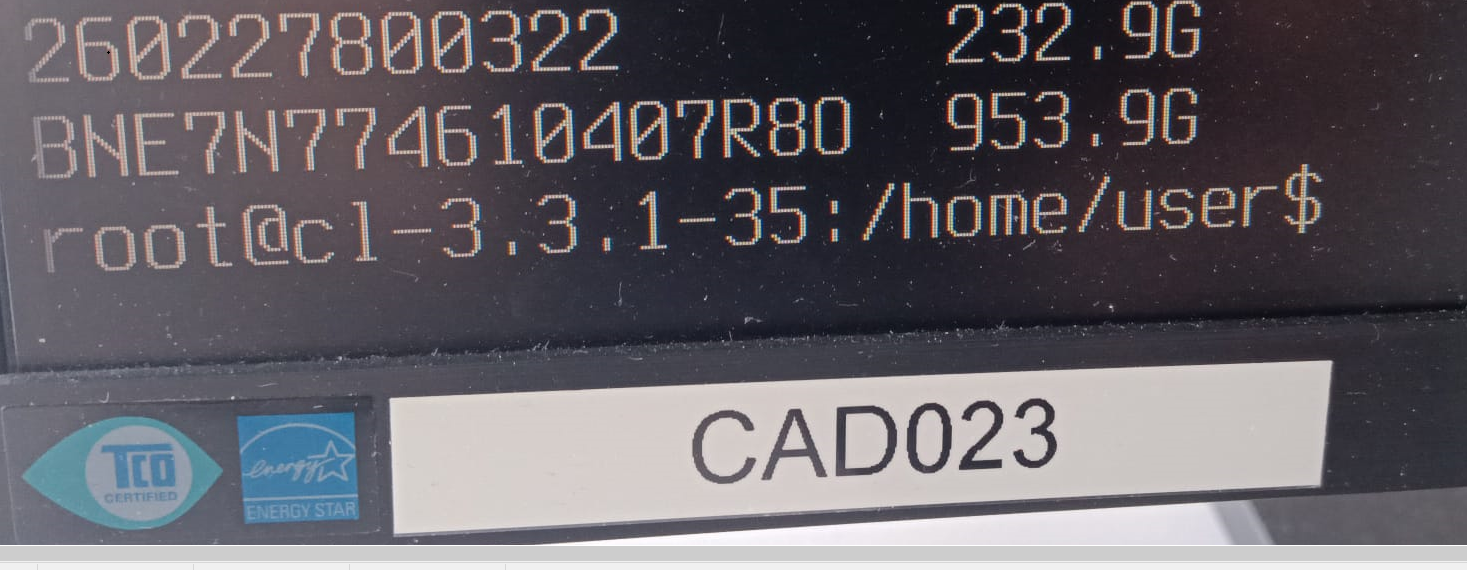
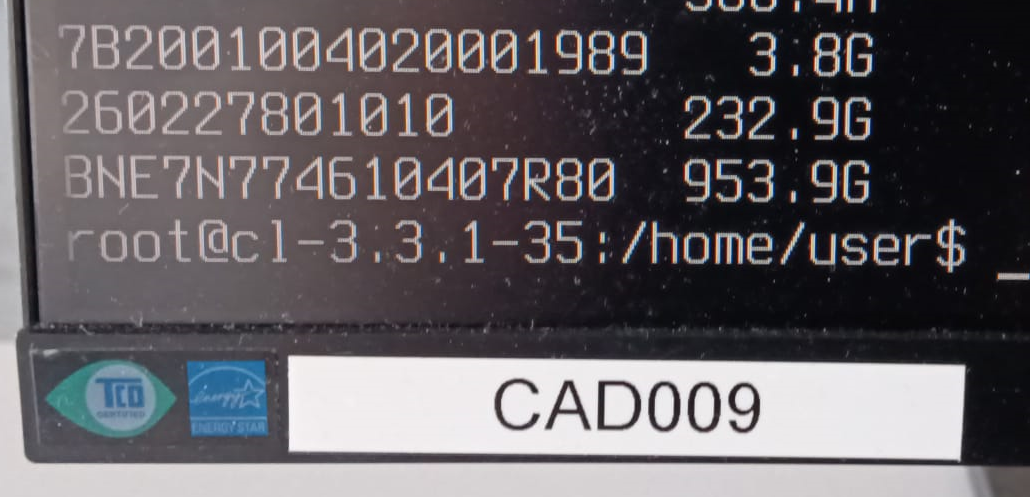
                    Here’s something else funny—the serial numbers aren’t unique! I have a duplicate…
                    Two differnt PC’s CAD009 and CAD023 🙂
                    5e43beca-4446-409b-9356-47c18f02bfc4-grafik.png
                    698a0dc5-b91c-4d0b-86d2-daf589282279-grafik.png

                    1 Reply Last reply Reply Quote 0
                    • K
                      kratkale @Tom Elliott
                      last edited by

                      @Tom-Elliott
                      Today again the Serial numbers of the nvme are lost in the FOG Database - I don’t know why …
                      Thats why I again cloned the file system to the wrong nvme 😞

                      K 1 Reply Last reply Reply Quote 0
                      • K
                        kratkale @Tom Elliott
                        last edited by

                        @Tom-Elliott
                        to make a backup I use now sql in bash

                        root@fog:~# mysql -u root -N -B -e “USE fog; SELECT CONCAT(‘UPDATE hosts SET hostDevice = ‘’’, hostDevice, ‘’’ WHERE hostID = ', hostID, ‘;’)FROM hosts;” > restore_hostdevice.sql

                        and restore with
                        root@fog:~# mysql -u root fog < restore_hostdevice.sql

                        1 Reply Last reply Reply Quote 0
                        • K
                          kratkale @kratkale
                          last edited by

                          @Tom-Elliott
                          Again Serial Numbers lost: checking with:

                          mysql -u root fog -e “SELECT hostName FROM hosts WHERE hostDevice IS NULL OR hostDevice = ‘’;”

                          root@fog:~/NVME_Problem# ./anzeigen
                          ±---------+
                          | hostName |
                          ±---------+
                          | PC116CAD |
                          | PC118CAD |
                          | PC121CAD |
                          | PC110CAD |
                          | PC112CAD |
                          | PC034CAD |
                          | PC026CAD |
                          | PC015CAD |
                          | PC016CAD |
                          | pc101cad |
                          | pc008cad |
                          ±---------+
                          root@fog:~/NVME_Problem#

                          I’ve no idea what happend.

                          Tom ElliottT 1 Reply Last reply Reply Quote 0
                          • Tom ElliottT
                            Tom Elliott @kratkale
                            last edited by

                            @kratkale I’m confused what you mean their serial numbers are erased?

                            FOG isn’t overwriting the serial numbers on these devices.

                            Furthermore, Serial numbers aren’t stored directly on the host, they’re stored on the inventory table.

                            That column (hostDevice) is about storing what device a host will be using to image against.

                            If somebody is updating the group, the empty hostDevice (Group device for groups) would likely be overwriting it.

                            I’ve pushed a code change to hopefully address this particular issue in the latest dev-branch.

                            Please help us build the FOG community with everyone involved. It's not just about coding - way more we need people to test things, update documentation and most importantly work on uniting the community of people enjoying and working on FOG! Get in contact with me (chat bubble in the top right corner) if you want to join in.

                            Web GUI issue? Please check apache error (debian/ubuntu: /var/log/apache2/error.log, centos/fedora/rhel: /var/log/httpd/error_log) and php-fpm log (/var/log/php*-fpm.log)

                            Please support FOG if you like it: https://wiki.fogproject.org/wiki/index.php/Support_FOG

                            K 3 Replies Last reply Reply Quote 0
                            • K
                              kratkale @Tom Elliott
                              last edited by

                              @Tom-Elliott
                              I need the Serial Number of the nvme to clone to the correct device. (2 nvme in every PC)
                              As I had problems I now use the following command to check if all Serial Numbers are available:
                              mysql -u root fog -e “SELECT hostName FROM hosts WHERE hostDevice IS NULL OR hostDevice = ‘’;”
                              Yesterday finally (see previous post) there was no number missing - now one is missing again:
                              ±---------+
                              | hostName |
                              ±---------+
                              | PC002CAD |
                              ±---------+
                              As I can also see it in the host general:
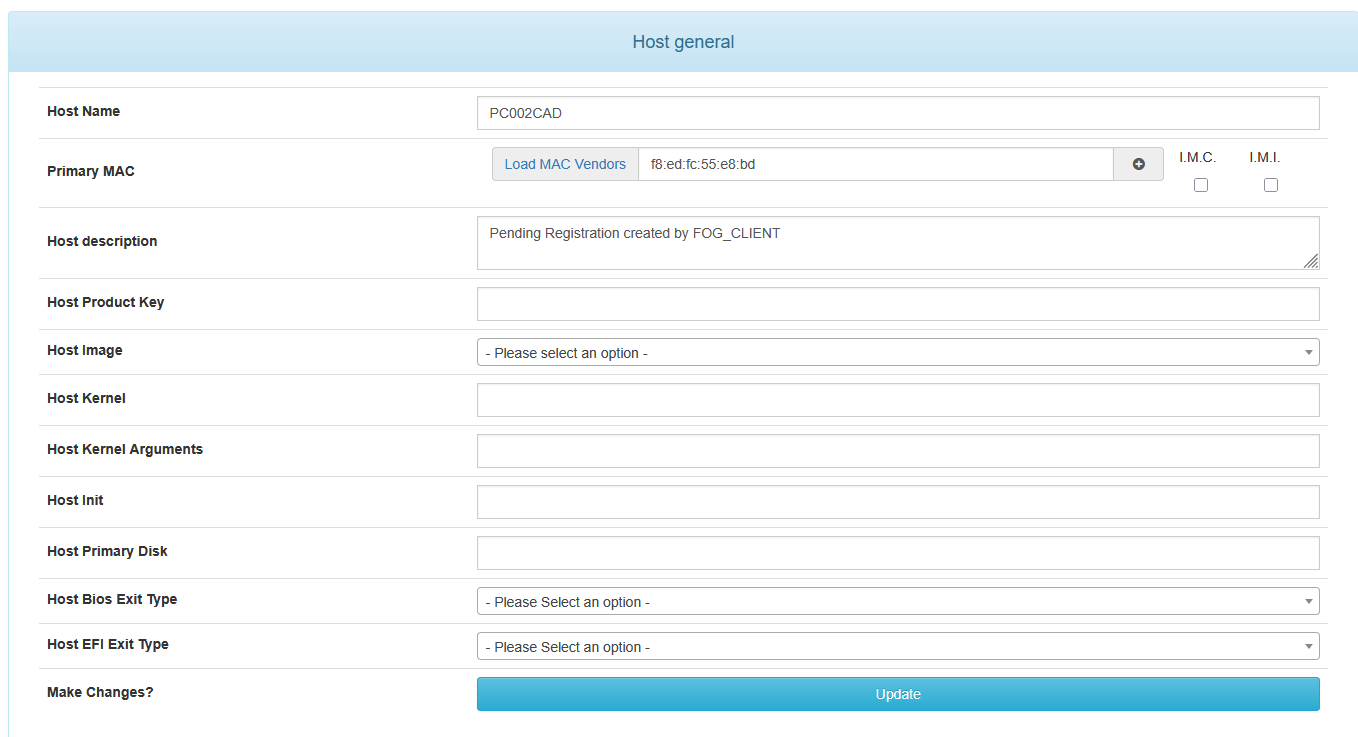
                              dc21f9e4-0f6b-46c8-a90c-fcd3093006e5-grafik.png
                              There was no interaction between yesterday and today on the web interface … Fog an the PC’s where on their own … Booting in the morning …
                              now I replace it again with:
                              UPDATE hosts SET hostDevice = ‘BNE7N774910207S3G’ WHERE hostID = 61;
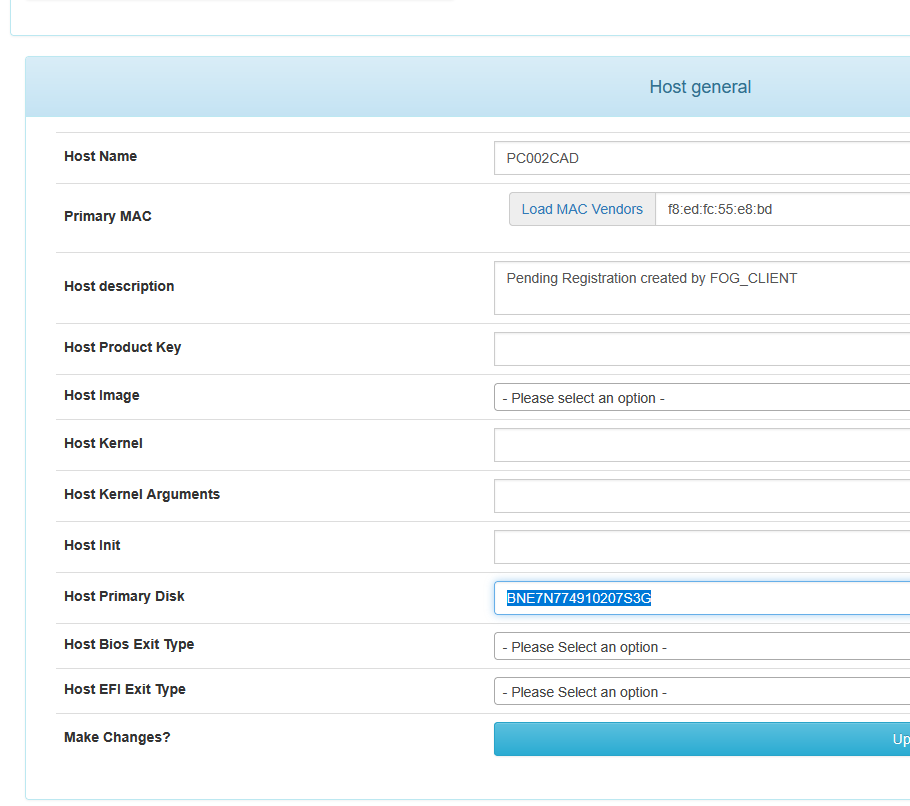
                              9a2d5ab9-d0f7-4a7b-9389-7534701e641e-grafik.png

                              So some update

                              1 Reply Last reply Reply Quote 0
                              • K
                                kratkale @Tom Elliott
                                last edited by

                                @Tom-Elliott
                                in the inventorry table mostly the other (for me wrong - secondarry Data) nvme is stored
                                Here are also some without an IHdserial
                                mysql -u root fog -e “SELECT iCASEserial FROM inventory WHERE iHdserial IS NULL OR iHdserial = ‘’;”
                                root@fog:~/NVME_Problem/inventory# ./anzeigen
                                ±------------+
                                | iCASEserial |
                                ±------------+
                                | CZC5477HVZ |
                                | CZC5477HT0 |
                                | CZC5477HTK |
                                | CZC5477JMZ |
                                ±------------+
                                The Host now lost the Serial Number is the CZC5477HSX
                                CZC5477HSX
                                WDGreenSN350250GB2G0C
                                236050WD
                                260227800933
                                so in the inventory table the Data Disk is stored

                                1 Reply Last reply Reply Quote 0
                                • K
                                  kratkale @Tom Elliott
                                  last edited by

                                  @Tom-Elliott
                                  Your version of FOG is up to date. You’re running the latest stable version: 1.5.10.1826

                                  Tom ElliottT 1 Reply Last reply Reply Quote 0
                                  • Tom ElliottT
                                    Tom Elliott @kratkale
                                    last edited by

                                    @kratkale Install using dev-branch

                                    Please help us build the FOG community with everyone involved. It's not just about coding - way more we need people to test things, update documentation and most importantly work on uniting the community of people enjoying and working on FOG! Get in contact with me (chat bubble in the top right corner) if you want to join in.

                                    Web GUI issue? Please check apache error (debian/ubuntu: /var/log/apache2/error.log, centos/fedora/rhel: /var/log/httpd/error_log) and php-fpm log (/var/log/php*-fpm.log)

                                    Please support FOG if you like it: https://wiki.fogproject.org/wiki/index.php/Support_FOG

                                    K 2 Replies Last reply Reply Quote 0
                                    • K
                                      kratkale @Tom Elliott
                                      last edited by

                                      @Tom-Elliott
                                      fyi:
                                      again no interaction with the web interface - today another PC lost the hostDevice.
                                      root@fog:~/NVME_Problem/hostDevice# ./anzeigen
                                      ±---------+
                                      | hostName |
                                      ±---------+
                                      | PC102CAD |
                                      ±---------+
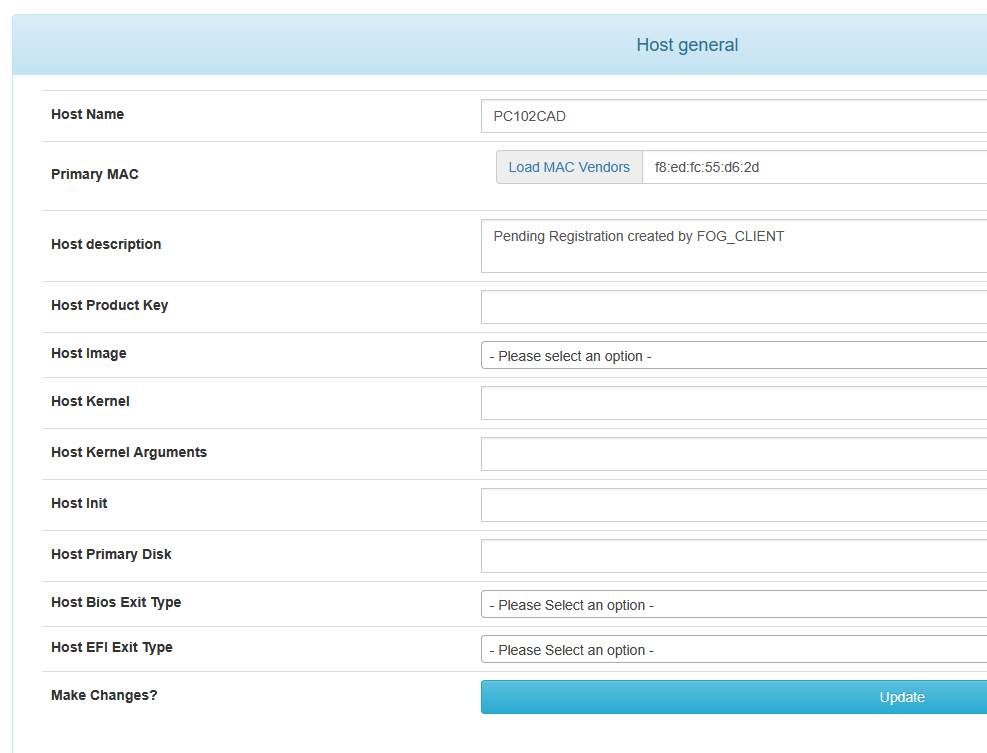
                                      f48d8e63-b439-411c-8caa-e64d1764887a-grafik.png
                                      Yesterday it was PC002CAD today PC102CAD.

                                      @Tom-Elliott said in Windows 11 | 65x HP Z2 Tower G1i | UPDATE -:

                                      dev-branch

                                      ok
                                      Your version of FOG is up to date.
                                      You’re running the latest dev-branch version: 1.5.10.1858

                                      1 Reply Last reply Reply Quote 0
                                      • K
                                        kratkale @Tom Elliott
                                        last edited by

                                        @Tom-Elliott
                                        since yesterday no devices lost

                                        Tom ElliottT 1 Reply Last reply Reply Quote 0
                                        • Tom ElliottT
                                          Tom Elliott @kratkale
                                          last edited by

                                          @kratkale So things are working under the latest with dev-branch?

                                          Please help us build the FOG community with everyone involved. It's not just about coding - way more we need people to test things, update documentation and most importantly work on uniting the community of people enjoying and working on FOG! Get in contact with me (chat bubble in the top right corner) if you want to join in.

                                          Web GUI issue? Please check apache error (debian/ubuntu: /var/log/apache2/error.log, centos/fedora/rhel: /var/log/httpd/error_log) and php-fpm log (/var/log/php*-fpm.log)

                                          Please support FOG if you like it: https://wiki.fogproject.org/wiki/index.php/Support_FOG

                                          K 3 Replies Last reply Reply Quote 0
                                          • K
                                            kratkale @Tom Elliott
                                            last edited by

                                            @Tom-Elliott
                                            at the moment no lost devices. I did my test at the moment. But no cloning - or other tasks - next week I’ll start to test …

                                            1 Reply Last reply Reply Quote 0
                                            • 1
                                            • 2
                                            • 2 / 2
                                            • First post
                                              Last post

                                            94

                                            Online

                                            12.7k

                                            Users

                                            17.6k

                                            Topics

                                            156.6k

                                            Posts
                                            Copyright © 2012-2026 FOG Project