• Recent
    • Unsolved
    • Tags
    • Popular
    • Users
    • Groups
    • Search
    • Register
    • Login

    Windows 11 | 65x HP Z2 Tower G1i | UPDATE -

    Scheduled Pinned Locked Moved Unsolved FOG Problems
    136 Posts 3 Posters 36.9k Views
    Loading More Posts
    • Oldest to Newest
    • Newest to Oldest
    • Most Votes
    Reply
    • Reply as topic
    Log in to reply
    This topic has been deleted. Only users with topic management privileges can see it.
    • Tom ElliottT
      Tom Elliott @kratkale
      last edited by

      @kratkale The problem is Snapins are not a basic feature:

      They require the FOG Client + knowledge of what a snapin is and does (at a base level)

      The “basic” for FOG is imaging at its core.

      Snapins are a way of getting the machine to do additional things: install software, run a script (or set of scripts) etc… - Please note I’m not saying it’s not a useful feature, just saying that it’s more than a “Basic” thing.

      You can do a curl request to schedule a snapin task which might be better, though you would need to know what MAC Address to use for the host in question.

      Please help us build the FOG community with everyone involved. It's not just about coding - way more we need people to test things, update documentation and most importantly work on uniting the community of people enjoying and working on FOG! Get in contact with me (chat bubble in the top right corner) if you want to join in.

      Web GUI issue? Please check apache error (debian/ubuntu: /var/log/apache2/error.log, centos/fedora/rhel: /var/log/httpd/error_log) and php-fpm log (/var/log/php*-fpm.log)

      Please support FOG if you like it: https://wiki.fogproject.org/wiki/index.php/Support_FOG

      K 1 Reply Last reply Reply Quote 0
      • Tom ElliottT
        Tom Elliott @kratkale
        last edited by Tom Elliott

        @kratkale said in Windows 11 | 65x HP Z2 Tower G1i | UPDATE -:

        I mean, why do I need to connect to the web interface? I don’t have to do anything there during the update, do I?

        The URL you see is because the installer doesn’t know if (or not) there’s a Schema Update.

        It always shows that on every install. If you don’t want to see that, now that FOG is installed, you can just run your installer with:

        sudo ./installfog.sh -y
        

        If there is a schema update, this will do the update for you automatically, if not, the doesn’t matter, the main update just goes through the normal process.

        Please help us build the FOG community with everyone involved. It's not just about coding - way more we need people to test things, update documentation and most importantly work on uniting the community of people enjoying and working on FOG! Get in contact with me (chat bubble in the top right corner) if you want to join in.

        Web GUI issue? Please check apache error (debian/ubuntu: /var/log/apache2/error.log, centos/fedora/rhel: /var/log/httpd/error_log) and php-fpm log (/var/log/php*-fpm.log)

        Please support FOG if you like it: https://wiki.fogproject.org/wiki/index.php/Support_FOG

        K 1 Reply Last reply Reply Quote 0
        • K
          kratkale @Tom Elliott
          last edited by

          @Tom-Elliott
          Automatic snap-ins (connected to the group or the PC) don’t always work well, e.g., when the PC is busy with itself and the Microsoft ecosystem after cloning. For example: the PC isn’t ready for the snap-in yet because it’s currently installing an update, isn’t in the domain yet, etc.
          That’s why, over the years, I’ve gotten into the habit of first checking whether the PC is in the domain, letting it boot up completely, and only then running my “one” snap-in per PC. In that single Snap-in, I gather everything I need to set up the PC: for example, a student PC needs a Veyon client, the student proxy server, etc. => Student Snap-in; a teacher PC needs the Veyon Master and the fast teacher proxy => a separate Snap-in for teacher PCs

          1 Reply Last reply Reply Quote 0
          • K
            kratkale @Tom Elliott
            last edited by

            @Tom-Elliott
            I think sorting by name would be better than sorting by ID

            68b0f8e3-4ffc-4e20-8d74-130efa8498b0-grafik.png

            Tom ElliottT 2 Replies Last reply Reply Quote 0
            • Tom ElliottT
              Tom Elliott @kratkale
              last edited by

              @kratkale I’m having it do a sort on “name” then by start time (newest first) if there’s a tie.

              I think it is because the snapinLink is what you see as the name, and that link built by sorting by the IDs rather than the names.

              For the active tasks table I figured sorting by the time adds a level of understanding so you always know who was the newest one to the party (so to speak).

              Please help us build the FOG community with everyone involved. It's not just about coding - way more we need people to test things, update documentation and most importantly work on uniting the community of people enjoying and working on FOG! Get in contact with me (chat bubble in the top right corner) if you want to join in.

              Web GUI issue? Please check apache error (debian/ubuntu: /var/log/apache2/error.log, centos/fedora/rhel: /var/log/httpd/error_log) and php-fpm log (/var/log/php*-fpm.log)

              Please support FOG if you like it: https://wiki.fogproject.org/wiki/index.php/Support_FOG

              1 Reply Last reply Reply Quote 0
              • Tom ElliottT
                Tom Elliott @kratkale
                last edited by

                @kratkale This has now been pushed.

                Please help us build the FOG community with everyone involved. It's not just about coding - way more we need people to test things, update documentation and most importantly work on uniting the community of people enjoying and working on FOG! Get in contact with me (chat bubble in the top right corner) if you want to join in.

                Web GUI issue? Please check apache error (debian/ubuntu: /var/log/apache2/error.log, centos/fedora/rhel: /var/log/httpd/error_log) and php-fpm log (/var/log/php*-fpm.log)

                Please support FOG if you like it: https://wiki.fogproject.org/wiki/index.php/Support_FOG

                K 3 Replies Last reply Reply Quote 0
                • K
                  kratkale @Tom Elliott
                  last edited by

                  @Tom-Elliott

                  Sometimes I come across these “ghost” tasks—I have no idea how I end up with them.
                  15cc4c2a-0906-4ae5-bd17-229482fde34c-grafik.png

                  1 Reply Last reply Reply Quote 0
                  • K
                    kratkale @Tom Elliott
                    last edited by kratkale

                    @Tom-Elliott
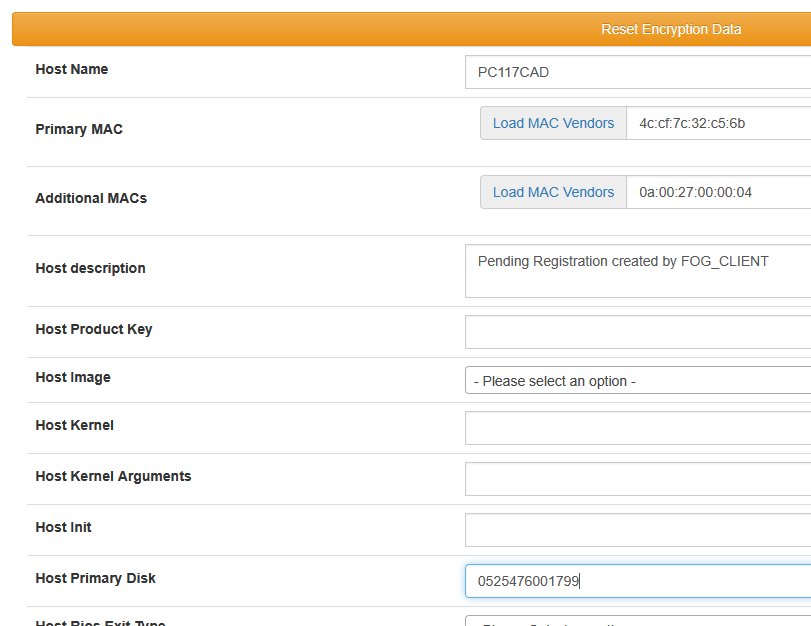
                    Unfortunately, the “Reset Encryption Data” feature doesn’t work very well for me. Right now, it seems like I have to press the “Reset” button during the cloning process every time I clone a PC. If I don’t, the Fog Client doesn’t work, and I have to go to the PC in person.
                    To make sure the PCs are still usable, I’ve moved the steps for renaming the PC, connecting it to the domain, and installing the Veyon Client to c:\windows\Setup\Scripts\SetupComplete.cmd. This makes the cloning process go more smoothly for me. I also install the Fog Client at the same time.

                    Despite all these efforts, I’m not getting anywhere:
                    01.07.2026 18:34:53 Middleware::Communication Download: http://192.168.0.196/fog/management/other/ssl/srvpublic.crt
                    01.07.2026 18:34:53 Middleware::Authentication Cert OK
                    01.07.2026 18:34:53 Middleware::Authentication No token found at C:\Program Files (x86)\FOG\token.dat, this is expected if the client has not authenticated before
                    01.07.2026 18:34:53 Middleware::Authentication ERROR: Could not get security token
                    01.07.2026 18:34:53 Middleware::Authentication ERROR: Die Datei “C:\Program Files (x86)\FOG\token.dat” konnte nicht gefunden werden.
                    01.07.2026 18:34:53 Middleware::Communication POST URL: http://192.168.0.196/fog/management/index.php?sub=requestClientInfo&authorize&newService
                    01.07.2026 18:34:53 Middleware::Communication ERROR: Failed to POST data
                    01.07.2026 18:34:53 Middleware::Communication ERROR: Der Remoteserver hat einen Fehler zurückgegeben: (401) Nicht autorisiert.
                    01.07.2026 18:34:53 Middleware::Response Success

                    01.07.2026 18:34:53 Client-Info ERROR: Failed to authenticate, will not run Module Looper.

                    1 Reply Last reply Reply Quote 0
                    • K
                      kratkale @Tom Elliott
                      last edited by

                      @Tom-Elliott
                      Tom—I just can’t get this to work. I’ve been trying to set up a multicast with 6 PCs here: PC013CAD through PC018CAD. They’re all identical devices, and sometimes one set works, then the other. I think the problem is somehow with the client. In this log, I automatically installed the client after cloning (c:\Windows\setup\ … ), then uninstalled it and reinstalled it—but I still can’t get a connection.
                      01.07.2026 23:39:12 Main Overriding exception handling
                      01.07.2026 23:39:12 Main Bootstrapping Zazzles
                      01.07.2026 23:39:12 Controller Initialize
                      01.07.2026 23:39:12 Controller Start

                      01.07.2026 23:39:12 Service Starting service
                      01.07.2026 23:39:14 Bus Became bus server
                      01.07.2026 23:39:14 Bus Emmiting message on channel: Status
                      01.07.2026 23:39:14 Service Invoking early JIT compilation on needed binaries

                      Authentication--------------------------------

                      01.07.2026 23:39:15 Client-Info Version: 0.13.0
                      01.07.2026 23:39:15 Client-Info OS: Windows
                      01.07.2026 23:39:15 Middleware::Authentication Waiting for authentication timeout to pass
                      01.07.2026 23:39:15 Middleware::Communication Download: http://192.168.0.196/fog/management/other/ssl/srvpublic.crt
                      01.07.2026 23:39:15 Middleware::Authentication Cert OK
                      01.07.2026 23:39:15 Middleware::Authentication No token found at C:\Program Files (x86)\FOG\token.dat, this is expected if the client has not authenticated before
                      01.07.2026 23:39:15 Middleware::Authentication ERROR: Could not get security token
                      01.07.2026 23:39:15 Middleware::Authentication ERROR: Die Datei “C:\Program Files (x86)\FOG\token.dat” konnte nicht gefunden werden.
                      01.07.2026 23:39:15 Middleware::Communication POST URL: http://192.168.0.196/fog/management/index.php?sub=requestClientInfo&authorize&newService
                      01.07.2026 23:39:15 Middleware::Communication ERROR: Failed to POST data
                      01.07.2026 23:39:15 Middleware::Communication ERROR: Der Remoteserver hat einen Fehler zurückgegeben: (401) Nicht autorisiert.
                      01.07.2026 23:39:15 Middleware::Response Success

                      Authentication--------------------------------

                      01.07.2026 23:39:15 Client-Info Version: 0.13.0
                      01.07.2026 23:39:15 Client-Info OS: Windows
                      01.07.2026 23:39:15 Middleware::Authentication Waiting for authentication timeout to pass

                      Tom ElliottT 1 Reply Last reply Reply Quote 0
                      • Tom ElliottT
                        Tom Elliott @kratkale
                        last edited by

                        @kratkale I’m unsure if I follow:

                        So if you reset encryption data, things will start and continue to work, but fresh after imaging it does not?

                        Please help us build the FOG community with everyone involved. It's not just about coding - way more we need people to test things, update documentation and most importantly work on uniting the community of people enjoying and working on FOG! Get in contact with me (chat bubble in the top right corner) if you want to join in.

                        Web GUI issue? Please check apache error (debian/ubuntu: /var/log/apache2/error.log, centos/fedora/rhel: /var/log/httpd/error_log) and php-fpm log (/var/log/php*-fpm.log)

                        Please support FOG if you like it: https://wiki.fogproject.org/wiki/index.php/Support_FOG

                        K 1 Reply Last reply Reply Quote 0
                        • K
                          kratkale @Tom Elliott
                          last edited by kratkale

                          @Tom-Elliott
                          I’m still testing to see if it works. I have a group of 6 PCs: PC013 through PC018.
                          They are all identical PCs.
                          I start the cloning process—reset encryption.
                          3 to 4 PCs work perfectly, but 1 to 2 PCs cannot connect to the FOG server.
                          The FOG client is now installed after cloning.
                          On the next attempt, the other PCs work.

                          I don’t see any systematic pattern either

                          Tom ElliottT 1 Reply Last reply Reply Quote 0
                          • Tom ElliottT
                            Tom Elliott @kratkale
                            last edited by Tom Elliott

                            @kratkale Is it possible DHCP IPs are all used up and the device that fails doesn’t have a proper IP address to be able to even communicate with your FOG Server?

                            It is very odd that one machine works where another seems to fail.

                            Nope, because 401 isn’t the same as that’s a client side error saying “we failed to prove we can talk to the fog server.”

                            Please help us build the FOG community with everyone involved. It's not just about coding - way more we need people to test things, update documentation and most importantly work on uniting the community of people enjoying and working on FOG! Get in contact with me (chat bubble in the top right corner) if you want to join in.

                            Web GUI issue? Please check apache error (debian/ubuntu: /var/log/apache2/error.log, centos/fedora/rhel: /var/log/httpd/error_log) and php-fpm log (/var/log/php*-fpm.log)

                            Please support FOG if you like it: https://wiki.fogproject.org/wiki/index.php/Support_FOG

                            K 2 Replies Last reply Reply Quote 0
                            • K
                              kratkale @Tom Elliott
                              last edited by kratkale

                              @Tom-Elliott
                              DHCP works perfectly—it runs on IP Fire—and this system has proven itself.

                              OK—I have a proxy server running. I’ve only specified my IT students’ HTTP server as a proxy exception. All HTTP pages running on the network are inaccessible to the students in their browsers because “the proxy is configured incorrectly”… Of course, this isn’t foolproof—but most students can’t access HTTP pages from IP Fire, Shellies, AP etc., this way. After all, they’re mechanical engineers, not computer scientists. I then set the proxy exceptions correctly in my browser on my computer and can work.
                              I’ll go ahead and add the Fog Server to the proxy exceptions.

                              If the website stays open for a while, there should be some way to tell that you need to log in again.
                              ecc2a8c8-014d-4683-937d-0431aefd0806-grafik.png
                              The tab at the top says “Zero”—the image below doesn’t load. Now you have to change the URL to the base URL, and then the login page will appear.

                              K 1 Reply Last reply Reply Quote 0
                              • K
                                kratkale @kratkale
                                last edited by kratkale

                                @kratkale
                                aa0b4191-1472-48fa-8eaf-11fce1912e86-grafik.png
                                After cloning, all IP addresses are OK.
                                CAD013.PNG
                                CAD014.PNG
                                CAD015.PNG
                                CAD016.PNG
                                CAD017.PNG
                                CAD018.PNG The Fog Logs are quite different, after all
                                ff0bf71b-39bc-4a22-a5f5-1572f6a2141a-grafik.png
                                Where can I upload the logs?

                                K 1 Reply Last reply Reply Quote 0
                                • K
                                  kratkale @kratkale
                                  last edited by

                                  @Tom-Elliott
                                  I’m finding all this back-and-forth here pretty confusing—can we structure our communication differently? I think there was a new message from you for a moment—but I don’t see it right now.

                                  K 1 Reply Last reply Reply Quote 0
                                  • K
                                    kratkale @kratkale
                                    last edited by

                                    @kratkale
                                    065ff127-3e60-4679-a229-8dc2dc193ff9-grafik.png
                                    Here in the Tasks, there are those weird snap-ins again—I have no idea where they’re coming from

                                    1 Reply Last reply Reply Quote 0
                                    • K
                                      kratkale @Tom Elliott
                                      last edited by kratkale

                                      @Tom-Elliott
                                      It seems that Machine 17 is the one having the problem with the FOG client—I can’t fix the issue there even by reinstalling it.

                                      Why does the PC have so many network cards?
                                      4b371f64-b608-44df-9f98-69df64096c3b-grafik.png

                                      I’m having Samba problems with the others

                                      K 1 Reply Last reply Reply Quote 0
                                      • K
                                        kratkale @kratkale
                                        last edited by

                                        @Tom-Elliott
                                        8acd0564-2b05-4bfc-b496-2e38a1372d8f-grafik.png
                                        The button does not reveal the password.

                                        K 1 Reply Last reply Reply Quote 0
                                        • K
                                          kratkale @kratkale
                                          last edited by kratkale

                                          @Tom-Elliott
                                          Conclusion:

                                          1. It’s unclear why the malfunctioning PC had multiple network cards.
                                          2. Domain Join does not work in this version.
                                            (Note: This applies only if the PCs are not present in the domain—that is, if they have been deleted or have never been joined to the domain. Another group of PCs, PC001CAD through PC006CAD, were known to the DC and have joined the domain.)

                                          The experiments leading to this conclusion are as follows:

                                          OK, PC017CAD has been deleted and recreated. I searched for any other “duplicate” PCs using the following SQL queries.
                                          mysql -u root fog -e “SELECT hmHostID, h.hostName, hm.hmMAC FROM hosts h JOIN hostMAC hm ON hm.hmHostID = h.hostID ORDER BY h.hostName ASC;”
                                          mysql -u root fog -e " SELECT hmMAC, COUNT() AS anzahl FROM hostMAC GROUP BY hmMAC HAVING COUNT() > 1; "
                                          mysql -u root fog -e " SELECT h.hostID, h.hostName, hm.hmMAC FROM hosts h JOIN hostMAC hm ON hm.hmHostID = h.hostID WHERE h.hostID IN ( SELECT hmHostID FROM hostMAC GROUP BY hmHostID HAVING COUNT(*) > 1) ORDER BY h.hostName, hm.hmMAC; "

                                          Trying again

                                          Of course, I forgot to select “Reset Encryption Data” again!!! Couldn’t that be set automatically when cloning??? It’s annoying me a little. But it’s probably the same as with the single snap-in—there must be a reason behind it that I just don’t understand 😞

                                          03.07.2026 20:49:54 Main Overriding exception handling
                                           03.07.2026 20:49:55 Main Bootstrapping Zazzles
                                           03.07.2026 20:49:55 Controller Initialize
                                           03.07.2026 20:49:55 Controller Start
                                          
                                           03.07.2026 20:49:55 Service Starting service
                                           03.07.2026 20:50:02 Bus Became bus server
                                           03.07.2026 20:50:02 Bus Emmiting message on channel: Status
                                           03.07.2026 20:50:02 Service Invoking early JIT compilation on needed binaries
                                          
                                          ------------------------------------------------------------------------------
                                          --------------------------------Authentication--------------------------------
                                          ------------------------------------------------------------------------------
                                           03.07.2026 20:50:02 Client-Info Version: 0.13.0
                                           03.07.2026 20:50:02 Client-Info OS:      Windows
                                           03.07.2026 20:50:02 Middleware::Authentication Waiting for authentication timeout to pass
                                           03.07.2026 20:50:02 Middleware::Communication Download: http://192.168.0.196/fog/management/other/ssl/srvpublic.crt
                                           03.07.2026 20:50:02 Middleware::Authentication Cert OK
                                           03.07.2026 20:50:02 Middleware::Authentication No token found at C:\Program Files (x86)\FOG\token.dat, this is expected if the client has not authenticated before
                                           03.07.2026 20:50:02 Middleware::Authentication ERROR: Could not get security token
                                           03.07.2026 20:50:02 Middleware::Authentication ERROR: Die Datei "C:\Program Files (x86)\FOG\token.dat" konnte nicht gefunden werden.
                                           03.07.2026 20:50:02 Middleware::Communication POST URL: http://192.168.0.196/fog/management/index.php?sub=requestClientInfo&authorize&newService
                                           03.07.2026 20:50:02 Middleware::Communication ERROR: Failed to POST data
                                           03.07.2026 20:50:02 Middleware::Communication ERROR: Der Remoteserver hat einen Fehler zurückgegeben: (401) Nicht autorisiert.
                                           03.07.2026 20:50:02 Middleware::Response Success
                                          

                                          More ghost tasks again… ?
                                          2e36c51f-61c7-466b-8e10-fcf36253a0f4-grafik.png

                                          The workstations were not created on the DC.
                                          a50abb17-761d-4b63-b1e6-e0d125076c0c-grafik.png
                                          even though required
                                          3cd8a956-00fe-46f6-b8b1-08c0feaf98f1-grafik.png

                                          ------------------------------------------------------------------------------
                                          --------------------------------HostnameChanger-------------------------------
                                          ------------------------------------------------------------------------------
                                           03.07.2026 20:52:03 Client-Info Client Version: 0.13.0
                                           03.07.2026 20:52:03 Client-Info Client OS:      Windows
                                           03.07.2026 20:52:03 Client-Info Server Version: 1.6.0-beta.2571
                                           03.07.2026 20:52:03 Middleware::Response Success
                                           03.07.2026 20:52:03 HostnameChanger Checking Hostname
                                           03.07.2026 20:52:03 HostnameChanger Renaming host to PC018CAD
                                           03.07.2026 20:52:03 HostnameChanger Joining domain
                                           03.07.2026 20:52:20 HostnameChanger The parameter is incorrect, code =  87
                                           03.07.2026 20:52:20 Power Creating shutdown command in 60 seconds
                                           03.07.2026 20:52:20 Bus Emmiting message on channel: Power
                                          ------------------------------------------------------------------------------
                                          

                                          Check in the database whether the username and, most importantly, the password were entered correctly
                                          mysql -u root fog -e " SELECT DISTINCT HostUseAD, hostADDomain, hostADUser, hostADPass FROM hosts; "
                                          c72cf8df-5df8-4659-9274-d0686d47e766-grafik.png

                                          Joining the domain in PowerShell as a local administrator works

                                          $domain = "MM.HTLWIEN10.AT"
                                          $username = "MM.HTLWIEN10.AT\adminfog"
                                          $password = "xxxxx" | ConvertTo-SecureString -AsPlainText -Force
                                          $credential = New-Object System.Management.Automation.PSCredential($username, $password)
                                          
                                          Add-Computer -DomainName $domain -Credential $credential -Restart
                                          

                                          Ghost Snapins are still there…
                                          I’m going to delete them now
                                          50078adb-ee82-4132-8e80-fe8cacdfc1ca-grafik.png

                                          Created a PowerShell script for domain joining and released it as a snap-in.
                                          samba-tool computer list | sort
                                          Hooray—the PCs are back online!
                                          5d18888f-867f-4b7c-9249-e6e42d82fc79-grafik.png

                                          Hooray—all 6 PCs are now set up in Veyon—so they’ve all successfully joined the domain, and the “Student” snap-in for the Veyon client was also successful…
                                          5ded8175-2699-4d07-a341-9b65a3b081e0-grafik.png

                                          K 1 Reply Last reply Reply Quote 0
                                          • K
                                            kratkale @kratkale
                                            last edited by kratkale

                                            @Tom-Elliott
                                            b84014d1-7395-4026-a760-e122f62708bf-grafik.png

                                            I actually think that’s a bit of a contradiction—or rather, the header isn’t worded very well…
                                            The fields are “pre-filled,” so you might not be familiar with them…
                                            Perhaps a good solution would be: Hosts: (varies) e.g. /dev/md0
                                            Everything below the text box, and the text box itself remains empty

                                            Tom ElliottT 1 Reply Last reply Reply Quote 0
                                            • 1
                                            • 2
                                            • 3
                                            • 4
                                            • 5
                                            • 6
                                            • 7
                                            • 1 / 7
                                            • First post
                                              Last post

                                            64

                                            Online

                                            12.7k

                                            Users

                                            17.6k

                                            Topics

                                            156.9k

                                            Posts
                                            Copyright © 2012-2026 FOG Project