Slow computer listing and high CPU with version 1.5.1.01798
-
@Tom-Elliott Error.log on the ‘non working’ UI
[Wed Mar 18 13:56:12.727237 2026] [proxy:error] [pid 907:tid 907] (111)Connection refused: AH00957: FCGI: attempt to connect to 127.0.0.1:9000 (127.0.0.1:9000) failed [Wed Mar 18 13:56:12.727296 2026] [proxy_fcgi:error] [pid 907:tid 907] [client 10.72.228.101:56843] AH01079: failed to make connection to backend: 127.0.0.1 [Wed Mar 18 13:56:12.727758 2026] [mpm_prefork:notice] [pid 865:tid 865] AH00163: Apache/2.4.66 (Debian) OpenSSL/3.5.5 configured -- resuming normal operations [Wed Mar 18 13:56:12.727797 2026] [core:notice] [pid 865:tid 865] AH00094: Command line: '/usr/sbin/apache2' [Wed Mar 18 13:56:13.201595 2026] [proxy_fcgi:error] [pid 910:tid 910] [client 10.72.233.20:57281] AH01071: Got error 'PHP message: PHP Fatal error: Uncaught Error: Call to a member function lastInsertId() on false in /var/www/fog/lib/db/pdodb.class.php:615\nStack trace:\n#0 /var/www/fog/lib/fog/fogcontroller.class.php(521): PDODB->insertId()\n#1 /var/www/fog/lib/fog/hookmanager.class.php(62): FOGController->save()\n#2 /var/www/fog/lib/fog/fogpage.class.php(223): HookManager->processEvent()\n#3 /var/www/fog/lib/pages/schemaupdaterpage.class.php(39): FOGPage->__construct()\n#4 /var/www/fog/lib/fog/fogpagemanager.class.php(381): SchemaUpdaterPage->__construct()\n#5 [internal function]: FOGPageManager->{closure:FOGPageManager::loadPageClasses():350}()\n#6 /var/www/fog/lib/fog/fogpagemanager.class.php(386): array_map()\n#7 /var/www/fog/lib/fog/fogpagemanager.class.php(79): FOGPageManager->loadPageClasses()\n#8 [internal function]: FOGPageManager->__construct()\n#9 /var/www/fog/lib/fog/fogbase.class.php(481): ReflectionClass->newInstanceArgs()\n#10 /var/www/fog/management/index.php(25): FOGBase::getClass()\n#11 {main}\n thrown in ...' [Wed Mar 18 14:07:08.496309 2026] [proxy_fcgi:error] [pid 910:tid 910] (70007)The timeout specified has expired: [client 10.72.233.20:57353] AH01075: Error dispatching request to : (polling), referer: http://10.72.233.19/fog/management/index.php?node=host [Wed Mar 18 14:08:06.685207 2026] [proxy_fcgi:error] [pid 908:tid 908] (70007)The timeout specified has expired: [client 10.72.233.20:57373] AH01075: Error dispatching request to : (polling), referer: http://10.72.233.19/fog/management/index.php?node=host [Wed Mar 18 14:09:03.333452 2026] [proxy_fcgi:error] [pid 1210:tid 1210] (70007)The timeout specified has expired: [client 10.72.233.20:57396] AH01075: Error dispatching request to : (polling), referer: http://10.72.233.19/fog/management/index.php?node=host [Wed Mar 18 14:09:06.698197 2026] [proxy_fcgi:error] [pid 907:tid 907] (70007)The timeout specified has expired: [client 10.72.233.20:57397] AH01075: Error dispatching request to : (polling), referer: http://10.72.233.19/fog/management/index.php?node=host -
No problem with Fog 1.5.10.1763
Very slow with Fog 1.5.10.1798 and nothing in the logsIt’s the second server I’ve updated and the problem is the same.
-
Hello @Tom-Elliott
I have the same issue,
I try to install a new server and restore my dumped database.
The new server is not contacted by any fog client. This is slow as hell. I try to check on /etc/apache2/error.log, I got nothing.
My fog.history doesn’t show anything around the stuck time.I enabled the slow log in fpm.
I got this showing my hosts list :[19-Mar-2026 16:24:55] [pool www] pid 51249 script_filename = //var/www/fog/management/index.php [0x00007f869de13d40] filter_var() /var/www/fog/commons/init.php:25 [0x00007f869de13cc0] {closure:Initiator::setSanitize():23}() /var/www/fog/commons/init.php:28 [0x00007f869de13c50] array_walk() /var/www/fog/commons/init.php:28 [0x00007f869de13bd0] {closure:Initiator::setSanitize():23}() /var/www/fog/commons/init.php:115 [0x00007f869de13b60] array_walk() /var/www/fog/commons/init.php:115 [0x00007f869de13ad0] sanitizeItems() /var/www/fog/lib/fog/fogbase.class.php:1399 [0x00007f869de13a20] arrayChangeKey() /var/www/fog/lib/fog/fogcontroller.class.php:1095 [0x00007f869de13950] setQuery() /var/www/fog/lib/fog/fogcontroller.class.php:1107 [0x00007f869de137f0] setQuery() /var/www/fog/lib/fog/fogcontroller.class.php:140 [0x00007f869de13710] __construct() /var/www/fog/lib/fog/fogmanagercontroller.class.php:415 [0x00007f869de13420] find() /var/www/fog/lib/router/route.class.php:479 [0x00007f869de13300] listem() /var/www/fog/lib/fog/fogpage.class.php:497 [0x00007f869de13200] index() /var/www/fog/lib/fog/fogpagemanager.class.php:220 [0x00007f869de130e0] render() /var/www/fog/management/index.php:69I can see that fpm www is taking a huge amount of CPU.
I don’t understand what is going on if you need any log I can provide them.
Thank you.
-
Can you all edit /var/www/fog/lib/db/pdodb.class.php at line -> 125:
change:
PDO::ATTR_EMULATE_PREPARES => false,to:
PDO::ATTR_EMULATE_PREPARES => true,I’m pretty sure this is going to break other things, but it will give me a data point I’m trying to narrow down.
-
Hello @Tom-Elliott
From my side nothing changes. I tried on my production server and my fresh server with production database.
I still have some stucking time when I show hosts.
I checked on logs files, nothing new
-
No improvement after changing the PDO::ATTR_EMULATE_PREPARES value.
(I did a reboot of the server to be sure.) -
@Tom-Elliott I modified the file. No change.
-
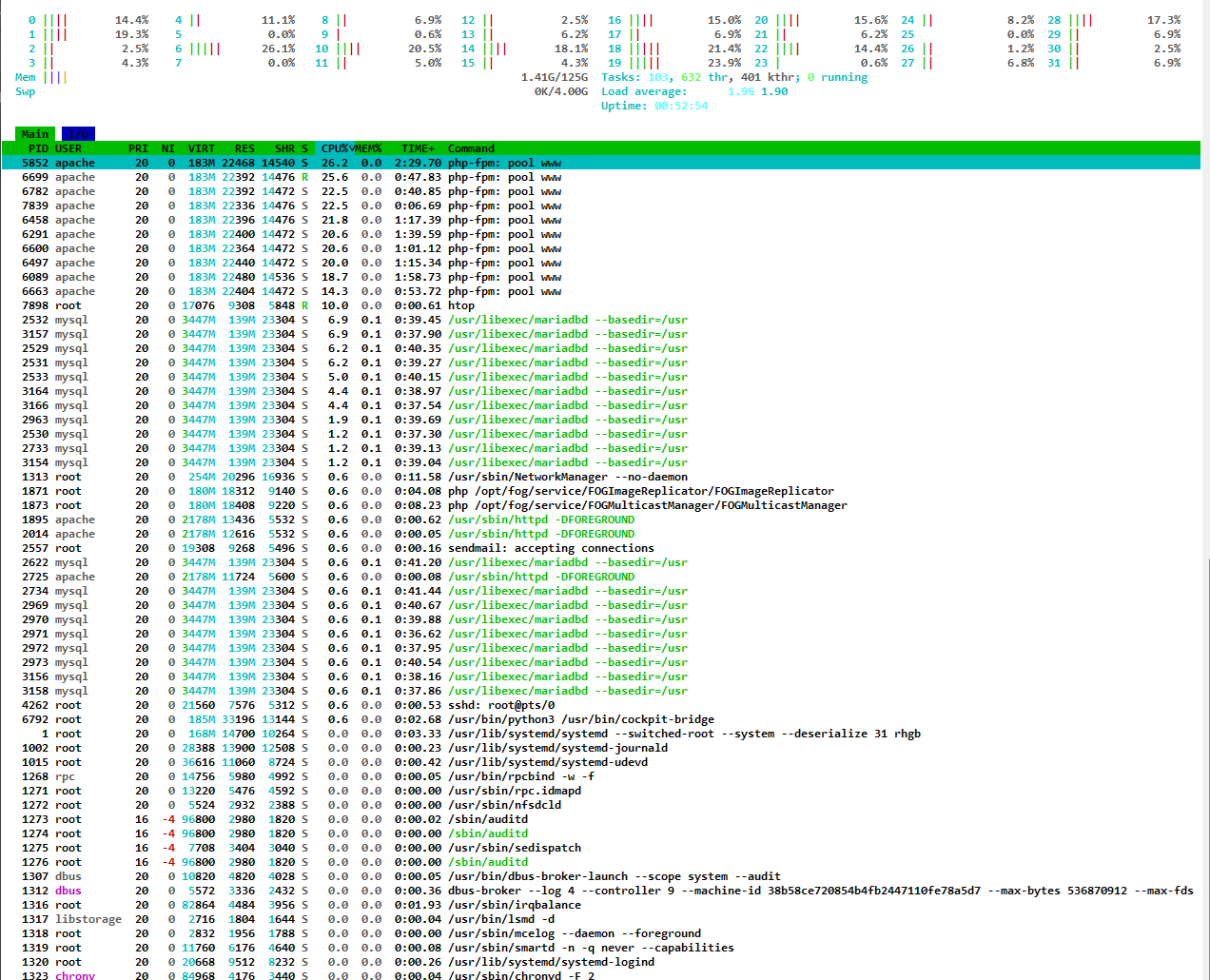
@Infojoe I am getting this exact same issue. Very long load times on the “Hosts” and “FOG Configuration” pages. Additionally there is a number now appended to the front of all the hosts for some reason.
I updated to the latest dev branch version 1.5.10.1804 hoping for a fix, but alas, no change. I applied patches to Alma Linux 9.7 and rebooted but still seeing high CPU on several processes including apache. I am happy to test anything and everything to assist in fixing this issue.
-
@rogalskij The number in front of all hosts (and groups/snapins/images/etc…) is the Database ID of the object in question, that’s expected.
I’m trying to follow what caused this and I’m having a difficult time reproducing it.
Please help us build the FOG community with everyone involved. It's not just about coding - way more we need people to test things, update documentation and most importantly work on uniting the community of people enjoying and working on FOG! Get in contact with me (chat bubble in the top right corner) if you want to join in.
Web GUI issue? Please check apache error (debian/ubuntu: /var/log/apache2/error.log, centos/fedora/rhel: /var/log/httpd/error_log) and php-fpm log (/var/log/php*-fpm.log)
Please support FOG if you like it: https://wiki.fogproject.org/wiki/index.php/Support_FOG
-
@Tom-Elliott Thank you for looking into this. Are there any log files from my setup I can provide that would help you? For reference, my server environment is:
Dell Poweredge R620
2x Intel Xeon E5-2640vs 2ghz CPUs
128 Gb ram
Alma Linux 9.7
Fog 1.5.10.1804 (was 1798) -
@rogalskij I don’t know OS:
PHP error logs
/var/log/php-fpm/www-error.log (redhat based)
/var/log/apache2/error.log (debian based)SQL:
SELECT * FROM history;I doubt the sql will be of much help, but anything is better than nothing.
Most of the logs I’ve gotten this far don’t appear to have anything and maybe none of them do, in which case I don’t know when the issue was directly introduced.
If anyone is able to bisect known good and the obvious current as the starting bad to figure out when it got introduced?
I’m assuming we’ve all tried reverting to the first known good and verified it is still “good” as well?
Basically if someone doens’t mind taking where they know they’re broken, and iterating back to when it works great to exactly when it fails, it may help us figure out where to start otherwise I’m currently flying blind.
Please help us build the FOG community with everyone involved. It's not just about coding - way more we need people to test things, update documentation and most importantly work on uniting the community of people enjoying and working on FOG! Get in contact with me (chat bubble in the top right corner) if you want to join in.
Web GUI issue? Please check apache error (debian/ubuntu: /var/log/apache2/error.log, centos/fedora/rhel: /var/log/httpd/error_log) and php-fpm log (/var/log/php*-fpm.log)
Please support FOG if you like it: https://wiki.fogproject.org/wiki/index.php/Support_FOG
-
@Tom-Elliott I collected both log files and sent them to you directly via “Chat”. you should see all of them in there. Thanks so much for investigating this issue.
-
Is everyone having this particular problem consistently using the LDAP plugin by chance?
Please help us build the FOG community with everyone involved. It's not just about coding - way more we need people to test things, update documentation and most importantly work on uniting the community of people enjoying and working on FOG! Get in contact with me (chat bubble in the top right corner) if you want to join in.
Web GUI issue? Please check apache error (debian/ubuntu: /var/log/apache2/error.log, centos/fedora/rhel: /var/log/httpd/error_log) and php-fpm log (/var/log/php*-fpm.log)
Please support FOG if you like it: https://wiki.fogproject.org/wiki/index.php/Support_FOG
-
@Tom-Elliott Yes we utilize the LDAP Plugin for all logins. Version 1.5.5, I will tried logging in with a local account but the slowness persisted.
-
A test for anyone having this issue. I did a little trouble shooting, and if you go to: Reports > Pending Mac List and approve all the pending mac addresses at once, performance improved somewhat.
I am unsure if this is coincidental but for me my “Hosts” tab is now much more responsive. Same thing with the “Fog Settings” tab. Give that a try. Certainly worked for me for the moment.
-
Hi,
dev-branch 1.5.10.1754 was OK.
dev-branch and stable 1.5.10.1798 is not OK.Running on Debian VM 13.4 in Proxmox.
Everything is OK until I click “Hosts” . PHP-FPM starts eating taking 100% of CPU for minutes but gives no errors in apache2 or php8.4-fpm logs.
Other listings and dashboard are OK. Report/Pending Mac List is slow too.Approve All Pending MACs for All Hosts returned the speed of server back to normal. Thanks @rogalskij!
Host IDs are showed in front of names like this: (271) - DELL-AT-WORK
Installed PlugIns
accesscontrol
persistentgroups
site
tasktypeeditI have got a plenty of these warnings but it is problem of old plugin, I suppose:
[Sat Mar 21 06:28:04.452523 2026] [proxy_fcgi:error] [pid 781:tid 781] [client 172.28.99.2:54436] AH01071: Got error ‘PHP message: PHP Warning: Undefined array key 0 in /var/www/html/fog/lib/plugins/site/hooks/addsitefiltersearch.hook.php on line 220’, referer: https://**********/fog/management/index.php?node=task&sub=active -
Unfortunately solved just for a moment.
No pending MACs but the Hosts listing is very slow again.
Peter -
@Tom-Elliott No LDAP here.
-
Hello @Tom-Elliott
No LDAP plugin, logins are local
I don’t have any pending mac to approve.Thank you for your time @Tom-Elliott
-
@Infojoe Unfortunately my test environment where I would normally work on these things hasn’t been behaving nicely.
Luckily, however, a fellow developer @rodluz was able to narrow the “what” and I believe I have fixed it.
The issue at least based on what was found:
PHP 8.1 deprecated the FILTER_SANITIZE_STRING feature and I replaced it with FILTER_SANITIZE_SPECIAL_CHARS or something alike to it.
This was the expected change at the time, but forgot that special characters may show up in Session variables (among other variables)
So say an
&would get created, well FILTER_SANITIZE_SPECIAL_CHARS would encode&to&which would then see the&again and perform the same trick over and over and over in a recursive loop.This is what was causing the CPU spikes, my apologies for that oversite. This has been addressed within the latest dev-branch if anyone would like to kick the tires?
Thank you!