FOG: 1.5.4 -> How to setup NAS - Synology DiskStation as Master Node
-
@george1421 After thinking about this I looked at my tutorial on setting up a synology nas as a storage node and my guess in the previous post was correct, the FTP path should just be /images as seen in this post: https://forums.fogproject.org/topic/9430/synology-nas-as-fog-storage-node/28
-
Hello George
Actually it was the path in ftp Path.
My image capture works. and I thank you very much.
now I meet the problem attached when downloading the image : - /
-
@jeremyvdv But this part worked before. This is the NFS side. The image was getting to the NAS but it was failing to move to the /images2 directory. That was/is an FTP issue. Now its failing to upload the image, which is an nfs issue.
Ah, I see it. From my notes I have your nas at IP 10.1.5.8 your storeIP is 10.16.3.129 your fog server. Did you change the storage node configuration? Your nas server needs to be the master in the storage group. Here is the kernel line you collected from the debug session I saved.
cat /proc/cmdline
loglevel=4 initrd=init.xz root=/dev/ram0 rw ramdisk_size=275000 web=http://10.16.3.129/fog/ consoleblank=0 rootfstype=ext4 mac=30:8d:99:14:a4:e6
ftp=10.1.5.8 storage=10.1.5.8:/volume1/images2/dev/ storageip=10.1.5.8 osid=5 irqpoll hostname=LP0045 chkdsk=0
img=test10 imgType=n imgPartitionType=all imgid=5 imgFormat=5 PIGZ_COMP=-10 hostearly=1 pct=5
ignorepg=1 isdebug=yes type=up
See how it differs from the picture you posted?
-
I did not change anything at the storage level …
And I have never tested the download of an image since I have never been able to create until now

-
@jeremyvdv Ah, OK I missed in the screen shot the
type=down.Then what its doing is picking the FOG server as the download node. If you go into the storage configuration and pick the default storage node (the fog server) change the max clients field to 0. Make sure the max clients field on the NAS is set to something higher than 0 (10 is default).
-
ok I try max client on fog a 0 and on the nas a 10 … I keep you informed.
Thank you -
Hello
so I check the parameters but I still have the same problem. -
-
@jeremyvdv I’m sorry I don’t have a good answer for you. With the fog server max clients at 0 and other nodes greater than 0, the code should use the available storage nodes and not the FOG server for image delivery.
-
@Alex78 What do we need to do to gain access to the images? When clicking any of the links, I get “Not Found”.
-
Hello everyone,
I am facing an issue with image capturing after performing an upgrade on my FOG server from 1.5.10 to 1.5.10.1886. Before the update, everything worked fine for me. The images were stored directly on the Synology NAS.
My Setup:
FOG Server: IP 192.168.10.220 (Debian 13)

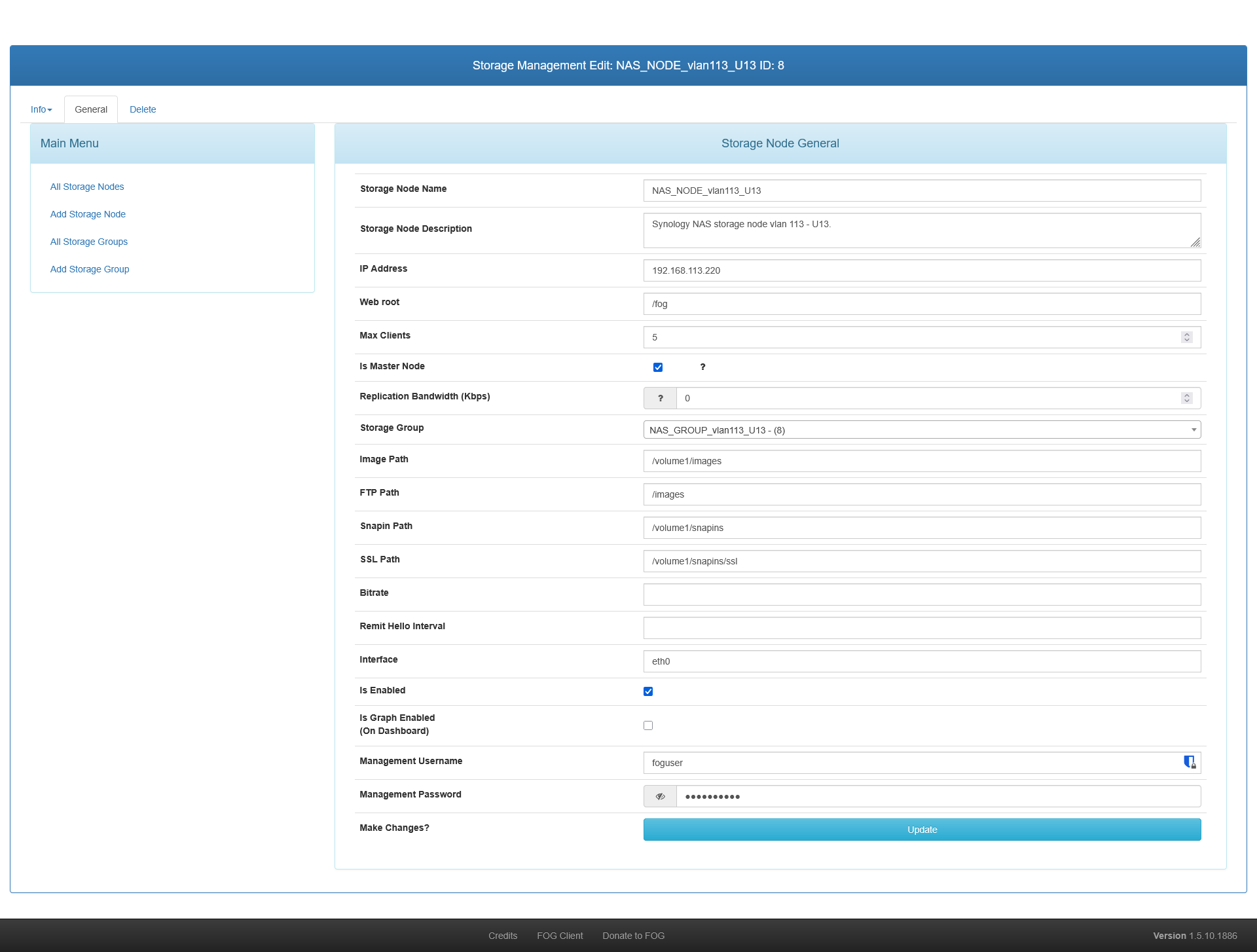
Storage: External Synology NAS with multiple virtual IPs (192.168.109.220 and 192.168.110.220).

Storage Configuration: The Synology NAS is configured in FOG web UI as the Master Node for its storage group. The local Default storage node is NOT the master.

Clients: Multiple clients on different subnets (e.g., 192.168.109.23 and 192.168.110.23).
The Problem:
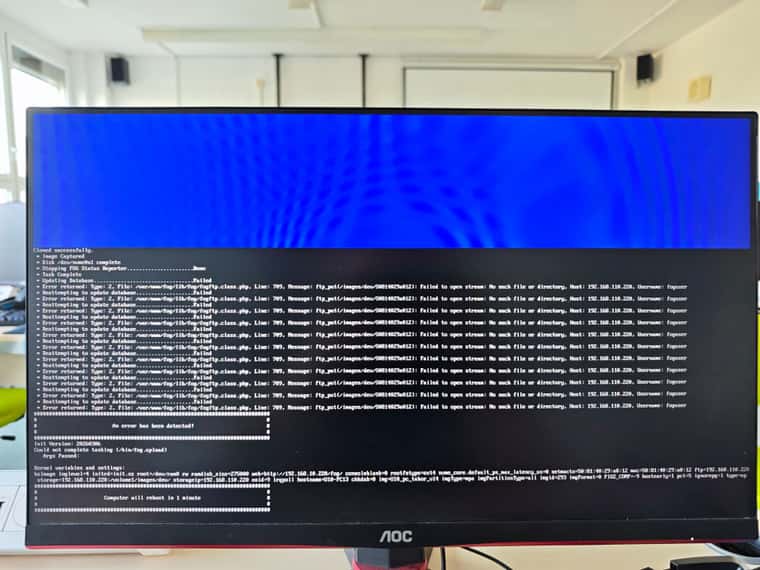
The Partclone phase finishes successfully on the client machine. The image files are correctly uploaded via NFS directly to the Synology NAS into the /images/dev/[MAC_ADDRESS] folder.However, right after Partclone reaches 100%, the task gets stuck in the FOG Web UI (at around 70%), and the client screen shows the following PHP FTP error:
Error returned: Type: 2, File: /var/www/html/fog/lib/fog/fogftp.class.php, Line: 709, Message: ftp_put(/images/dev/[MAC]): Failed to open stream: No such file or directory, Host: 192.168.110.220, Username: foguser
What I have verified:
I tested the FTP connection manually via CMD/PowerShell from a PC using the same foguser credentials. I am able to log in, mkdir, rename, and rmdir inside the /images and /images/dev directories on the NAS without any permission errors.

If I move and rename the MAC folder manually inside Synology File Station from /images/dev/[MAC] to /images/[Image_Name], the image works fine.

This setup worked flawlessly before the FOG server upgrade. The /images directory is NOT mounted locally on the FOG server itself (and never had to be).

Verified FTP username and password on NAS and FOG. It's same.
It seems that fogftp.class.php is incorrectly triggering ftp_put (trying to read a local file from the FOG server) instead of doing a remote ftp_rename directly on the NAS storage node.
Has anyone encountered this bug after a recent upgrade, or is there a specific setting in the new version that I missed?
Thank you for any help.
Storage Node for NAS
Error on PC
-
UPDATE 07/17/2026
After some experimentation and examining the fogftp.class.php file, I found that FOG calls ftp_rename to move files from the /image/dev/<mac_host> folder to the /image/<image_name> folder.
Finally, it helped me to connect with a regular ftp client (WinSCP) and try to move the folders manually. This is how I found out that the problem was in the permissions set on the folders.
So I found out that from my original version 1.5.10.10 to the current 1.5.10.1903 there was a change in the file
/lib/reg-task/taskqueue.class.phpin the private function _moveUpload() method it was previously
->chmod(0777, $dest)

and now it is

->chmod(0775, $dest)
That (maybe) could be the reason why it stopped working for me. Thanks to this post https://forums.fogproject.org/post/156271
chown -R fog:users /volume1/images/
#set inheritance to the dev folder
chmod g+s /volume1/images/dev/
I connected to the NAS with ssh and fixed the permissions over the folders. Now it’s working fine again.
