iPXE boot doing nothing after update to 1.6.0.158
-
Apologies for the flurry of questions. I don’t know which version of FOG I was running before the upgrade, but it’s been several months, maybe even a year. Everything’s changed and I’m lost

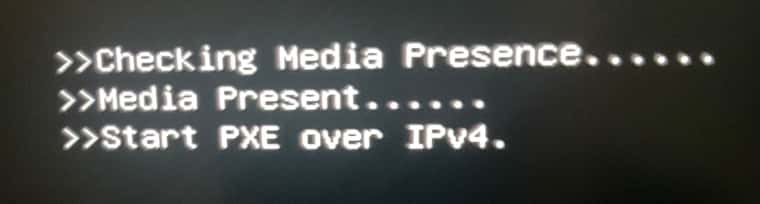
Having done the upgrade, my PC now simply fails to PXE boot, there’s no error message, it’s as if it’s not getting any reply from the server.
DHCP is working, since when it boots to WIndows it gets an IP address. But on boot it does this , sits for a while, then boots to Windows. Secure boot is disabled.
-
@MarkG Your screenshot stops at “Start PXE over IPv4.” The firmware never shows a “Station IP address” line. That means the PXE request gets no usable DHCP answer. TFTP and FOG never come into it. Windows can still get an address because a plain lease is not a boot offer.
FOG’s update does not change your DHCP server. But your server also moved to Ubuntu 26.04 during this upgrade, so check that first.
Which machine serves DHCP on that network: the FOG server, a router, or Windows DHCP?
If it is the FOG server, check that the DHCP service still runs:
sudo systemctl status isc-dhcp-server dnsmasqIf it is another server, check that it still sends option 66 (the FOG server IP) and option 67 (the boot file, for example snponly.efi for UEFI).
To see what really reaches the client, run this on the FOG server while the PC tries to boot, and post the output:
sudo tcpdump -i any -n port 67 or port 68 or port 69 or port 4011 -
@Tom-Elliott Thanks. Actually the update complete rewrote my dhcpd.conf (I know it backed the old one up) and that seems to be the problem. The dhcp server won’t start with that config, but it won’t tell me what the problem is. I replaced it with my old file and that works.
# DHCP Server Configuration file\n#see /usr/share/doc/dhcp*/dhcpd.conf.sample # This file was created by FOG #Definition of PXE-specific options # Code 1: Multicast IP Address of bootfile # Code 2: UDP Port that client should monitor for MTFTP Responses # Code 3: UDP Port that MTFTP servers are using to listen for MTFTP requests # Code 4: Number of seconds a client must listen for activity before trying # to start a new MTFTP transfer # Code 5: Number of seconds a client must listen before trying to restart # a MTFTP transfer option space PXE; option PXE.mtftp-ip code 1 = ip-address; option PXE.mtftp-cport code 2 = unsigned integer 16; option PXE.mtftp-sport code 3 = unsigned integer 16; option PXE.mtftp-tmout code 4 = unsigned integer 8; option PXE.mtftp-delay code 5 = unsigned integer 8; option arch code 93 = unsigned integer 16; use-host-decl-names on; ddns-update-style interim; ignore client-updates; # Specify subnet of ether device you do NOT want service. # For systems with two or more ethernet devices. # subnet 136.165.0.0 netmask 255.255.0.0 {} subnet 195.168.0.0 netmask 255.255.255.0{ option subnet-mask 255.255.255.0; range dynamic-bootp 195.168.0.10 195.168.0.254; default-lease-time 5000000; max-lease-time 5000000; option routers 195.168.0.1; option domain-name-servers 8.8.8.8,8.8.4.4; option domain-search "local"; option domain_name "local"; next-server 195.168.0.1; } class "Legacy" { match if substring(option vendor-class-identifier, 0, 20) = "PXEClient:Arch:00000"; filename "undionly.kkpxe"; } class "UEFI-32-2" { match if substring(option vendor-class-identifier, 0, 20) = "PXEClient:Arch:00002"; filename "i386-efi/snponly.efi"; } class "UEFI-32-1" { match if substring(option vendor-class-identifier, 0, 20) = "PXEClient:Arch:00006"; filename "i386-efi/snponly.efi"; } class "UEFI-64-1" { match if substring(option vendor-class-identifier, 0, 20) = "PXEClient:Arch:00007"; filename "secureboot/snponly-shimx64.efi"; } class "UEFI-64-2" { match if substring(option vendor-class-identifier, 0, 20) = "PXEClient:Arch:00008"; filename "secureboot/snponly-shimx64.efi"; } class "UEFI-64-3" { match if substring(option vendor-class-identifier, 0, 20) = "PXEClient:Arch:00009"; filename "secureboot/snponly-shimx64.efi"; } class "UEFI-ARM64" { match if substring(option vendor-class-identifier, 0, 20) = "PXEClient:Arch:00011"; filename "secureboot/arm64-efi/snponly-shimaa64.efi"; } class "SURFACE-PRO-4" { match if substring(option vendor-class-identifier, 0, 32) = "PXEClient:Arch:00007:UNDI:003016"; filename "secureboot/snponly-shimx64.efi"; } class "Apple-Intel-Netboot" { match if substring(option vendor-class-identifier, 0, 14) = "AAPLBSDPC/i386"; option dhcp-parameter-request-list 1,3,17,43,60; if (option dhcp-message-type = 8) { option vendor-class-identifier "AAPLBSDPC"; if (substring(option vendor-encapsulated-options, 0, 3) = 01:01:01) { # BSDP List option vendor-encapsulated-options 01:01:01:04:02:80:00:07:04:81:00:05:2a:09:0D:81:00:05:2a:08:69:50:58:45:2d:46:4f:47; filename "snponly.efi"; } } } # Two alternatives to the UEFI boot file above, if you need them. # Uncomment one and narrow the match to the affected machines. Both are # DHCP-only changes -- nothing is renamed on this server. # # This file is regenerated by every install and upgrade, so an edit here # does not survive the next one. To change the boot file for every UEFI # client, re-run the installer with --uefi-bootfile ipxe (or snponly). # # 1. The chain loads but the network never comes up, or the FOS kernel # hangs at the handoff: that is the firmware's own UEFI SNP driver, # so use iPXE's built-in drivers instead. # On arm64, secureboot/arm64-efi/ipxe-shimaa64.efi. #class "FOG-UEFI-64-IpxeDrivers" { # match if substring(option vendor-class-identifier, 0, 20) = "PXEClient:Arch:00007"; # filename "secureboot/ipxe-shimx64.efi"; #} # # 2. You want FOG's own builds rather than upstream's signed pair. They # are in the TFTP root; on arm64, arm64-efi/snponly.efi. They carry # this server's own signature, so a Secure Boot client refuses them # until that certificate is enrolled on it. #class "FOG-UEFI-64-FogBuild" { # match if substring(option vendor-class-identifier, 0, 20) = "PXEClient:Arch:00007"; # filename "snponly.efi"; #} -
Further to the previous reply, I edited my old dhcpd.conf with the new filenames, and this is still working. I’m at a loss to explain this.
# DHCP Server Configuration file\n#see /usr/share/doc/dhcp*/dhcpd.conf.sample
# This file was created by FOG
#Definition of PXE-specific options
# Code 1: Multicast IP Address of bootfile
# Code 2: UDP Port that client should monitor for MTFTP Responses
# Code 3: UDP Port that MTFTP servers are using to listen for MTFTP requests
# Code 4: Number of seconds a client must listen for activity before trying
#         to start a new MTFTP transfer
# Code 5: Number of seconds a client must listen before trying to restart
#         a MTFTP transfer
option space PXE;
option PXE.mtftp-ip code 1 = ip-address;
option PXE.mtftp-cport code 2 = unsigned integer 16;
option PXE.mtftp-sport code 3 = unsigned integer 16;
option PXE.mtftp-tmout code 4 = unsigned integer 8;
option PXE.mtftp-delay code 5 = unsigned integer 8;
option arch code 93 = unsigned integer 16;
use-host-decl-names on;
ddns-update-style interim;
ignore client-updates;
# Specify subnet of ether device you do NOT want service.
# For systems with two or more ethernet devices.
# subnet 136.165.0.0 netmask 255.255.0.0 {}
subnet 195.168.0.0 netmask 255.255.255.0{
    authoritative;
    option subnet-mask 255.255.255.0;
    range dynamic-bootp 195.168.0.10 195.168.0.252;
    default-lease-time 5000000;
    max-lease-time 5000000;
    option routers 195.168.0.1;
    option domain-name-servers 8.8.8.8,8.8.4.4;
    option domain-search "local";
    option domain-name "local";
    next-server 195.168.0.1;

    # To make a specific rule based on a MAC address follow this pattern
    class "AlanPartridge" {
       match if binary-to-ascii(16,8,":",substring(hardware, 1, 6)) = "50:eb:f6:b7:8a:b0";
       filename "snp.efi";
    }


    class "Legacy" {
        match if substring(option vendor-class-identifier, 0, 20) = "PXEClient:Arch:00000";
        filename "undionly.kkpxe";
    }
    # To make a specific rule based on a MAC address follow this pattern
    # class "ThunderAMD" {
    #    match if binary-to-ascii(16,8,":",substring(hardware, 1, 6)) = "a8:a1:59:42:15:08";
    #    filename "snp.efi";
    #}
    class "UEFI-32-2" {
        match if substring(option vendor-class-identifier, 0, 20) = "PXEClient:Arch:00002";
        filename "i386-efi/ipxe.efi";
    }
    class "UEFI-32-1" {
        match if substring(option vendor-class-identifier, 0, 20) = "PXEClient:Arch:00006";
        filename "i386-efi/ipxe.efi";
    }
    class "UEFI-64-1" {
        match if substring(option vendor-class-identifier, 0, 20) = "PXEClient:Arch:00007";
#        filename "snp.efi";
	filename "secureboot/snponly-shimx64.efi";
   }
    class "UEFI-64-2" {
        match if substring(option vendor-class-identifier, 0, 20) = "PXEClient:Arch:00008";
#        filename "snp.efi";
        filename "secureboot/snponly-shimx64.efi";

    }
    class "UEFI-64-3" {
        match if substring(option vendor-class-identifier, 0, 20) = "PXEClient:Arch:00009";
#        filename "snp.efi";
         filename "secureboot/snponly-shimx64.efi";
    }
    class "UEFI-ARM64" {
        match if substring(option vendor-class-identifier, 0, 20) = "PXEClient:Arch:00011";
#        filename "arm64-efi/snponly.efi";
        filename "secureboot/arm64-efi/snponly-shimaa64.efi";
    }
    class "SURFACE-PRO-4" {
        match if substring(option vendor-class-identifier, 0, 32) = "PXEClient:Arch:00007:UNDI:003016";
#        filename "ipxe.efi";
        filename "secureboot/snponly-shimx64.efi";
   }
    class "Apple-Intel-Netboot" {
        match if substring(option vendor-class-identifier, 0, 14) = "AAPLBSDPC/i386";
        option dhcp-parameter-request-list 1,3,17,43,60;
        if (option dhcp-message-type = 8) {
            option vendor-class-identifier "AAPLBSDPC";
            if (substring(option vendor-encapsulated-options, 0, 3) = 01:01:01) {
                # BSDP List
                option vendor-encapsulated-options 01:01:01:04:02:80:00:07:04:81:00:05:2a:09:0D:81:00:05:2a:08:69:50:58:45:2d:46:4f:47;
                filename "snponly.efi";
            }
        }
    }
}