LDAP broken since upgrade to 1.6
-
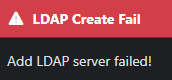
Upgraded to version 1.6, couldn’t login to LDAP. Updated the plugin, but everytime i try to add in a new LDAP server I get an error that says “Failed to add LDAP Server”
We use on prem LDAP, it has both port 389 and 636 but I truthfully don’t care which it uses. Any ideas I should check? This is our normal method here on campus for logging into FOG
-
@rogalskij Can you please take a look at if there’s an update for the ldap plugin on your machine?
I’m suspecting you just need to do the upgrade:
Plugin Management Page -> LDAP -> Update button.
Please help us build the FOG community with everyone involved. It's not just about coding - way more we need people to test things, update documentation and most importantly work on uniting the community of people enjoying and working on FOG! Get in contact with me (chat bubble in the top right corner) if you want to join in.
Web GUI issue? Please check apache error (debian/ubuntu: /var/log/apache2/error.log, centos/fedora/rhel: /var/log/httpd/error_log) and php-fpm log (/var/log/php*-fpm.log)
Please support FOG if you like it: https://wiki.fogproject.org/wiki/index.php/Support_FOG
-
@Tom-Elliott I was able to update the plugin and create a brand new LDAP that saves correctly, but having some trouble with associating the group itself. Where do I add the actual search DN for AD for the group to match to?
Under LDAP Groups, it just asks for a common name. Am I supposed to do this in "LDAP Group User Group Associations? Or is that for something else?
-
@rogalskij Good, the save works now.
The group search DN is on the LDAP server, not on the LDAP Group. Open LDAP Management, pick your server, and set Group Search DN to the OU that holds your groups, for example
OU=Groups,DC=campus,DC=edu. On the same page, Group Name Attribute is the attribute FOG matches the group name against. For AD, usecn.An LDAP Group is only the group’s name, as that attribute holds it. For example,
FOG Admins, not the full DN.Then give the group access. Open the LDAP Group:
- Role Association tab: pick the role its members get.
- User Group Association tab: pick the FOG user group its members join.
A member of that AD group can then sign in with their AD username, and gets the access you associated.
Please help us build the FOG community with everyone involved. It's not just about coding - way more we need people to test things, update documentation and most importantly work on uniting the community of people enjoying and working on FOG! Get in contact with me (chat bubble in the top right corner) if you want to join in.
Web GUI issue? Please check apache error (debian/ubuntu: /var/log/apache2/error.log, centos/fedora/rhel: /var/log/httpd/error_log) and php-fpm log (/var/log/php*-fpm.log)
Please support FOG if you like it: https://wiki.fogproject.org/wiki/index.php/Support_FOG
-
@Tom-Elliott Getting closer, but something is still off. I felt like I had to add an AD group somewhere specifically, for example if the 3 IT staff are part of the “ITStaff” group, shouldn’t I reference that somewhere within FOG itself? Instead of it pointing directly to an OU that could contain many groups? How does it know to look in ITStaff only for the users?
How does it know where to choose from? Also, do i still use just the samAccountName to login with?
Sorry I know you are swamped with requests today most likely.