ASSERT_EFI_ERROR Ubuntu 26.04.1 FOG Server 1.5.10.2518
-
Hi;
Objective: Build a “standalone” FOG server environment i.e. one machine as the FOG server and three others as hosts of FOG tasks such as full wipes/capture/deploy I am trying to get the while screen so I can do a registration of a “target” machine. However I am getting the following error(s) instead which I cannot get past.
**iPXE initialising devices…•
autoexec.ipxe… Not found (https://ipxe.org/2d12618e)
/autoexec. ipxe… Not found (https://ipxe.org/2d12618e)
ASSERT c:tedk2\udk2010.sr1.x2\MdeModulePkg\Library\UefiHiilib\Hiilib.c(257): Hii
Handle != ((void ж) 0)ASSERT_EFI_ERROR (Status = Not Found)
ASSERT c:ledk2\udk2010.sr1.x2\MdeModulePkg\Library\Uef1H11L1b\H11Lib.c(259): IEF
I_ERROR (Status)
ASSERT c:sedk2\udk2010.sr1.x2\MdePkg\Library \BaseL ib\LinkedList.c(60): List 1= ( .(void ) o)*Reproduction Steps:
Build FOG Server
- Perform a clean Ubuntu Desktop 26.04.1 installation (then reboot machine)
- Open UBUNTU App Centre and perform an Update All to ensure all applications are up to date (reboot machine)
- Run Firmware Updater to bring firmware up to date (reboot machine)
- Open terminal:
execute sudo apt update && sudo apt upgrade -y
execute sudo apt autoremove -y
Reboot machine
2)Install FOG
Based on current installation instructions for FOG 1.5:
Install git
clone fog project from github
run the ./installfog.sh bash script- Try to register “target” machine
Check BIOS for
latest version
UEFI boot enabled
PXE boot enabled
Set boot order so IPv4 and IPv6 are first in boot order
Restart machine and hope for white screen to Register a Host. Get above error. Please note I have tried more flavours of the reproduction steps than Baskin Robbins has ice cream flavours e.g. with/without SecureBoot, DHCP, DNS, router even Ubuntu 24.04.5 and Ubuntu 26.04.1 all with the same errors on my host machine. I even broke down and did an RTFM of fog docs, wiki, and forums.
Fog install log files:
fog_error_1.5.10.2518.log
foginstall.log -
@Paladin1 Thanks for the full logs. The
autoexec.ipxe ... Not foundlines are normal for your install. The installer removes that file from the TFTP root on purpose.The
ASSERT ... udk2010 ... HiiLib.clines do not come from FOG or iPXE. They come from the target machine’s own UEFI firmware. iPXE starts, then the firmware fails an internal check and stops.To narrow it down, please tell us:
- The make and model of the target machine, and its BIOS version.
- A photo of the whole screen, from the first line. We need the line that starts with “iPXE” and shows its version.
- Is any other DHCP server active on that network, such as your router? If yes, what boot file (option 67) does it give out?
- Does the target boot to the FOG menu in Legacy/CSM mode, with UEFI off?
-
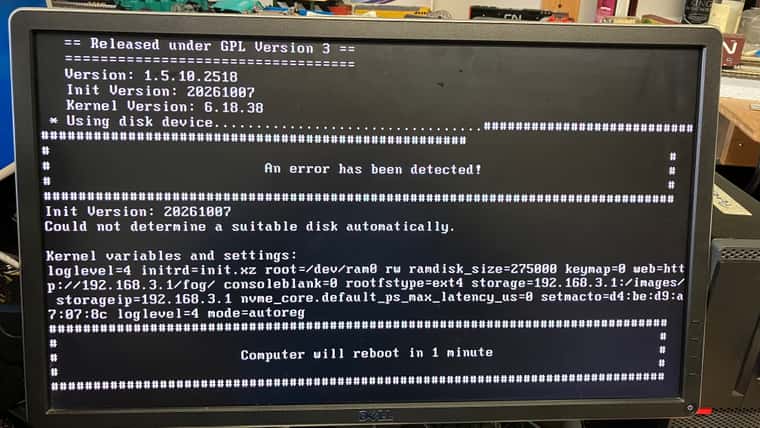
Switching to Legacy worked but I went from white screen to black screen for non registered hosts very quickly.
How do I keep the white screen around longer?
Registration fails but I can’t attach video. Photo below:
Peter
-
For sake of documentation here is the info @Tom-Elliott asked for:
- The make and model of the target machine, and its BIOS version.
- Dell Model: XPS 8400 BIOS: A14
- A photo of the whole screen, from the first line. We need the line that starts with “iPXE” and shows its version.
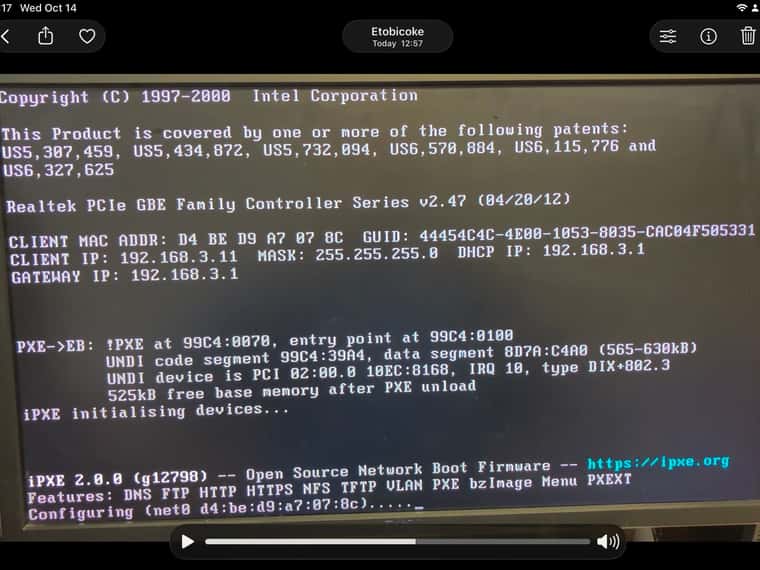
- Is any other DHCP server active on that network, such as your router? If yes, what boot file (option 67) does it give out?
-
No the server and hosts are connected to a 5 port unmanaged Gigabit switch with DHCP handled by FOG server.
-
Server IPv4 interface is hard coded with address 192.168.3.1 255.255.255.0 (in Settings/Network/Wired Connection 1 IPv4) tab gateway 192.168.3.1
-
Other home network is 192.168.2.0 /24 and is only used, via wifi, on periodic basis to download updates.
- Does the target boot to the FOG menu in Legacy/CSM mode, with UEFI off?
- Yes it boots in successfully but errors out as in reply above.
- Manually adding host on the FOG server, the host boots fine and I successfully captured an image.
-
@Paladin1 Thanks, that answers it.
UEFI: Legacy boots and UEFI does not, so the ASSERT is the XPS 8400’s own UEFI firmware. FOG and iPXE cannot fix that. Use Legacy boot for this model.
Menu timeout: In the web UI, go to FOG Configuration > iPXE General Configuration. Set “Menu Timeout” to a larger number of seconds. The default is 3.
Registration error: “Could not determine a suitable disk automatically” means the registration found no disk at that moment. Your capture on the same machine did find a disk, so I need a little more:
- Does registration fail every time, or did it fail once?
- In the BIOS, what is the SATA mode: AHCI, RAID, or ATA/IDE?
- Please run a debug task on that host: Hosts > (the host) > Basic Tasks > Advanced > Debug. At the shell, run
lsblk, thendmesg | grep -iE 'ata|sd'. Post a photo of both.
-
- Does registration fail every time, or did it fail once?
- With a disk attached registration works fine.
- With no disk attached it fails every time
- In the BIOS, what is the SATA mode: AHCI, RAID, or ATA/IDE?
- SATA mode is AHCI
- Please run a debug task on that host: Hosts > (the host) > Basic Tasks > Advanced > Debug. At the shell, run lsblk, then dmesg | grep -iE ‘ata|sd’. Post a photo of both.
- So I don’t have an image for legacy boot. I only brought home a drive with the UEFI image.
- I can either change the BIOS to UEFI and do a one time boot or I can install Ubuntu 26.04.1 on a different disk as Legacy boot.
- Which would you prefer; I am trying to minimize variables on the theory of only change one thing at a time…
-
@Paladin1 Thanks, that explains the registration error. Registration reads the machine’s disk, so it needs a disk attached. With no disk it stops with that message every time. That is expected, so you do not need the debug task.
For your question: neither. Do not reinstall anything yet.
The BIOS boot mode on this machine applies to both the network boot and the installed OS. Your image is a UEFI install, so this machine has to network boot in UEFI too. We can try a different iPXE file for UEFI that loads its own network driver. That can avoid the firmware error.
On the FOG server:
- Edit
/etc/kea/kea-dhcp4.conf. - In the classes
FOG-UEFI-64-1,FOG-UEFI-64-2,FOG-UEFI-64-3andFOG-Surface-Pro-4, change"boot-file-name": "snponly.efi"to"boot-file-name": "ipxe.efi". - Run
sudo systemctl restart kea-dhcp4-server. - Set the target BIOS back to UEFI and network boot it.
Tell us if you get the FOG menu or the same ASSERT. If it fails, change the file back. A re-run of the installer also puts
snponly.efiback. - Edit
