FOG Project Image Capture on Raspberry Pi 4 (ARM64) via U-Boot
-
Here is an update following our latest troubleshooting sessions and tests:
The !V@JL artifact: That part was indeed a leftover artifact from editing the file manually with nano. Once cleaned up, we hit a regression: the Raspberry Pi no longer downloads the 563-byte config file at all anymore. It now loops directly on BOOTP broadcast and times out without hitting the TFTP stage (Retrieving file... doesn't trigger anymore).

Goal & Architecture: The target deployment must remain 100% cardless (no local storage, no SD card, no USB drive used during boot), relying purely on the RPi 4 network boot EEPROM + OPNsense DHCP + FOG/U-Boot.

Regarding your earlier notes on TFTP/Firewall:

    We are running UFW on the FOG server, and we verified that nf_conntrack_tftp is active (lsmod | grep tftp confirmed).

    BOOT_external_tftp_server is not enabled (TFTP runs locally on the FOG box).

    The Pi and FOG server are on the same subnet, with no intermediate restrictive ACLs on that local segment.

The permission fix: We noted your mention about the file permissions fix for downloaded files not being set properly after upload in the working-1.6 branch. Could this regression (dropping back to infinite BOOTP loops instead of attempting the TFTP fetch) be tied to how the file is currently served or indexed, or is there a specific way U-Boot expects the handoff after DHCP?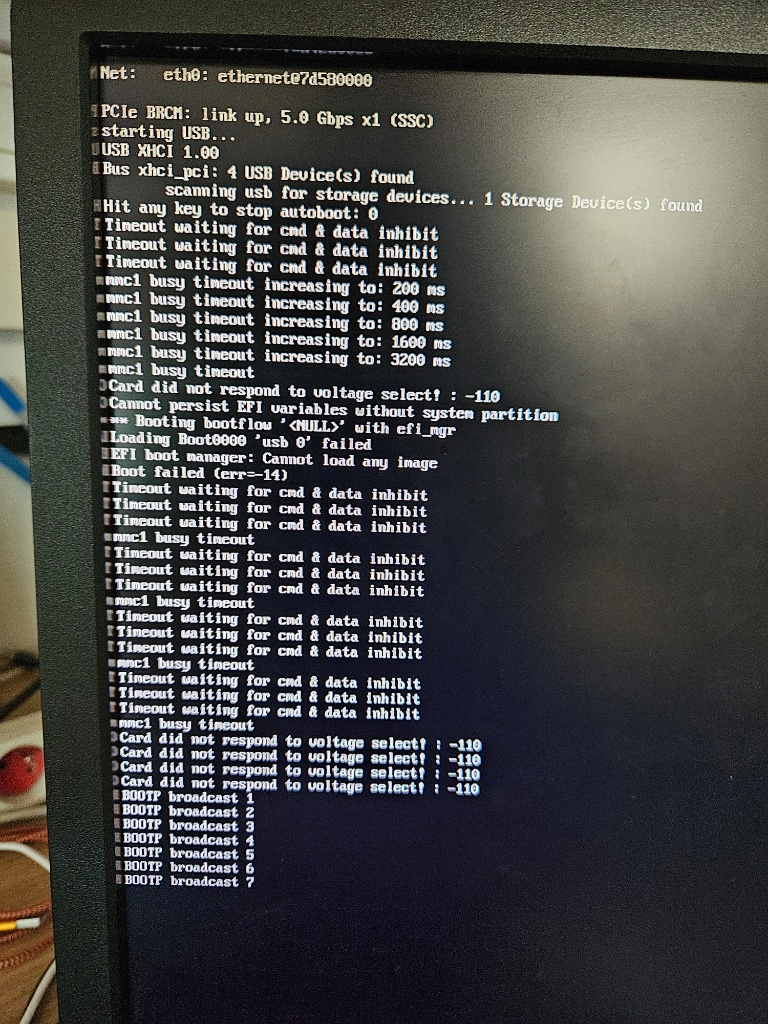
-
@Jeremy Good — that rules out the firewall/permissions angle cleanly, thanks for actually checking rather than taking my word for it.
The new symptom is a different failure than before, and it’s outside anything FOG serves: looping on BOOTP with no attempt at
Retrieving file...means it’s failing at DHCP/BOOTP negotiation, a step beforepxe getwould ever run. FOG can’t see that far back — the board never gets far enough to ask FOG anything.You’ve also moved to a materially different boot path than what we’d been testing: cardless, via the Pi’s own network-boot EEPROM, rather than typing commands by hand at the U-Boot prompt. That matters here, because the EEPROM’s automatic network-boot flow runs its own boot sequence, built into that U-Boot, not necessarily the
dhcp/pxe get/pxe bootlines from earlier in this thread — those were for a manually-typedbootcmd. If the EEPROM path usesbootpinstead ofdhcp, or expects OPNsense to hand it specific DHCP options, that’s a different thing to get right than what we tested manually.Two things I’d need to actually say anything useful here, since I can’t see either from where I’m sitting:
- What’s the board actually running right now — did the
nanoedit touch a persistedbootcmd(printenv bootcmd), or is this the EEPROM’s own default network-boot sequence with nothing custom in the loop at all? - In OPNsense’s DHCP config for that subnet, what are options 66 (
next-server) and 67 (filename/bootfile-name) set to? The EEPROM’s PXE client needs those to know where to send its own request in the first place — if they’re pointing at the wrong place, or missing, U-Boot never gets the chance to see FOG at all, and that would produce exactly a BOOTP loop with nothing after it.
That’ll tell us whether this is a boot-script problem (fixable on your end) or a DHCP-options problem (fixable in OPNsense) — right now I genuinely can’t tell which from here.
- What’s the board actually running right now — did the
-
Hi, I’m sending you the two screenshots—one from OPNsense and the other from the Raspberry Pi.
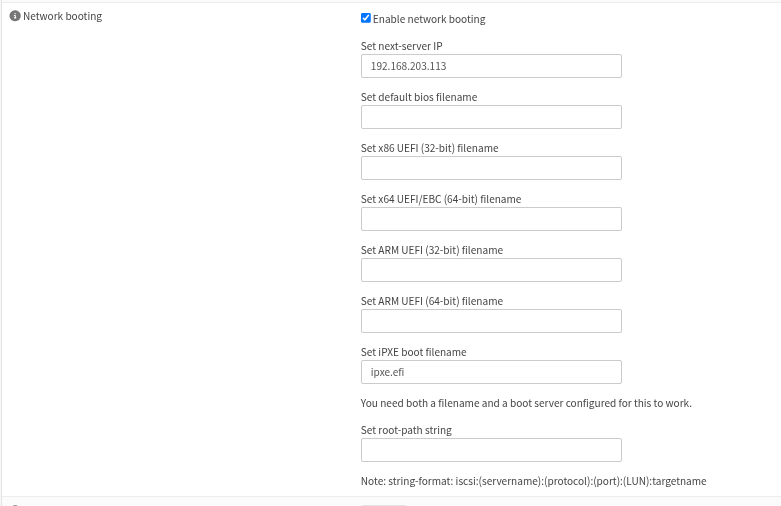
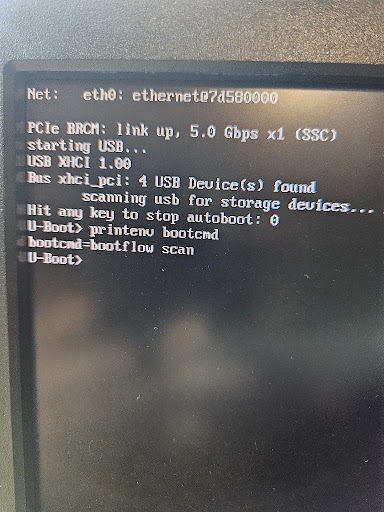
-
@Jeremy Thanks for the screenshots — they changed my read of this quite a bit, and I owe you a correction first.
Correction: earlier I said
pxe get“finding”pxelinux.cfg/01-88-a2-9e-53-34-c0proved the file-generation side worked. It didn’t. U-Boot printsRetrieving file: ...before it sends the request, and theLoading: T T T Tthat follows means the server never answered at all. A file that really is missing gives youTFTP error: 'File not found', not timeouts. So the file-side was never proven, and it turns out it was broken on my side of the fence.The FOG bug, now fixed: FOG was writing the
01-<mac>file under the directory it keeps the HTTP-served kernels in (/var/www/html/fog/service/ipxe/), not under/tftpboot. The TFTP daemon runs chrooted to/tftpboot, so the file existed but TFTP could never see it. That’s fixed inworking-1.6(PR #1664) with a new setting,FOG Settings → TFTP Server → FOG_TFTP_ROOT_DIR, which the installer sets to the real TFTP root. Run the updater once it’s merged and check that setting reads/tftpboot; after that, queue a task for the Pi and you should see/tftpboot/pxelinux.cfg/01-88-a2-9e-53-34-c0appear on the server. Please confirm that file is there before the next boot test — it’s the one thing I can check in code but not on your box.Your current boot loop is a different, earlier step. From the console shot: U-Boot itself loaded cardless, which means the Pi’s EEPROM network boot already pulled the firmware and
u-boot.binfrom/tftpbootover TFTP. That proves the OPNsensenext-server, the FOG TFTP service and the firewall are all fine for this client — so ignore my earlier firewall angle. What’s looping isbootcmd=bootflow scan: that’s U-Boot’s standard-boot sequence, which tries mmc, usb, then ethernet, and the ethernet step starts with U-Boot’s own DHCP request (BOOTP broadcast 1, 2, 3...). That DHCP never succeeds, and it’s never been shown to work in this thread — your earlier manual test setipaddr/serveripby hand and skipped DHCP entirely. The empty per-architecture filenames in OPNsense are fine, by the way: thepxeboot method doesn’t need a bootfile name at all. (Side note, unrelated to the Pi: the iPXE-class filename in OPNsense is what gets handed to a client that is already running iPXE, and FOG expectsdefault.ipxethere, notipxe.efi— withipxe.efiyour x86 UEFI clients will reload iPXE forever. Worth a look when you’re back on those.)Two things to try at the U-Boot prompt, and please paste the exact text rather than a screenshot if you can:
dhcpon its own. If it also loops on BOOTP, then U-Boot’s network driver isn’t getting a lease and we look at OPNsense’s DHCP log for that MAC (does the request even arrive, does it offer). If it does get an address, then:
pxe get
pxe boot
once the FOG update above is in and the
01-...file is confirmed on disk. If that works by hand,setenv bootcmd 'dhcp; pxe get; pxe boot'andsaveenvgets you the automated path —bootflow scanshould get there too, but the manual sequence tells us which step is at fault when it doesn’t. -
I do have the filename you requested.

When U-Boot starts, DHCP doesn’t work; it spends 8 seconds searching. Sometimes, when rebooting the Raspberry Pi, it manages to obtain an IP address, successfully detects the server’s IP, and downloads pxelinux, but then stops.
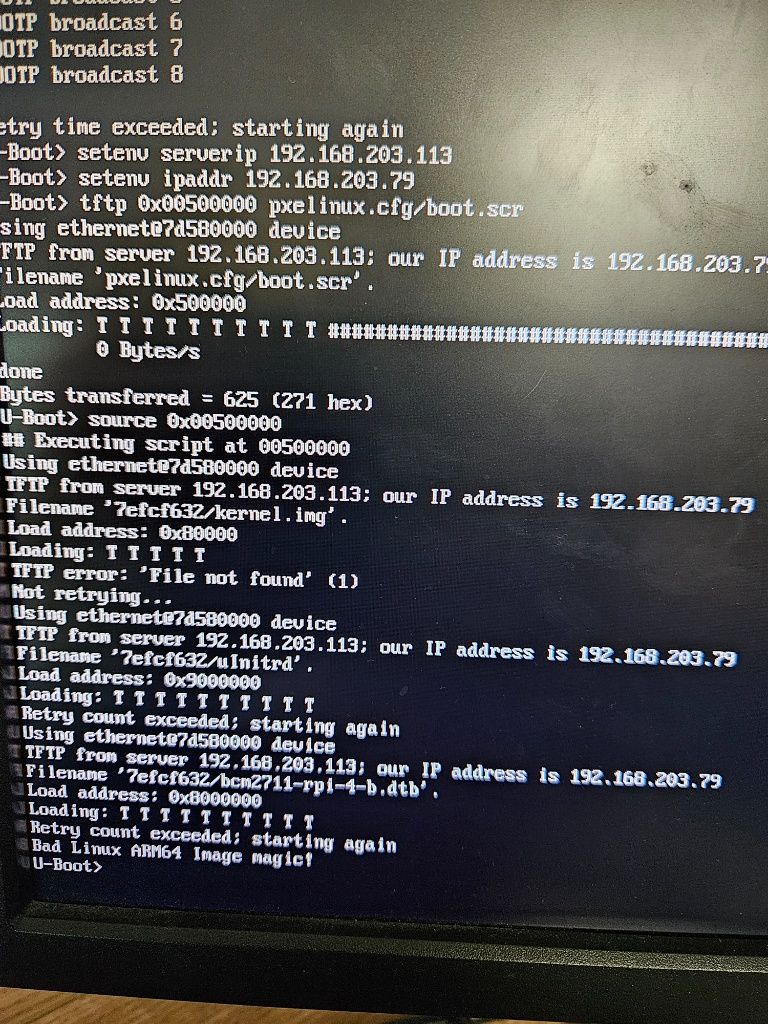
What I don’t understand is why U-Boot sometimes manages to get an IP address and sometimes doesn’t.
-
@Jeremy Do you happen to have STP on your network?
-
@Jeremy Good — the file being there confirms the
/tftpbootfix landed. Two separate things in your report, and one of them was mine again.“Downloads pxelinux, but then stops” — partly expected, partly another FOG bug, now fixed.
- If there was no task queued for the Pi at that moment, the file FOG writes says
localboot 0, which tells U-Boot “nothing to do, carry on to local disk”. That’s by design: no task, no imaging. So “stops” after a successfulpxe getis correct behavior unless you’d queued a capture first. - If there was a task queued, it would still have stopped, and that one is on me: the file named the kernel and init as
http://…URLs, which is what boards withwgetuse. Your U-Boot’spxecode can’t follow a URL — I checked U-Boot’s source (boot/pxe_utils.c every
every kernelandinitrdline is fetched over TFTP, relative to wherever the config came from, sokernel http://…became a TFTP request for a file literally called that. Fixed inworking-1.6(PR #1679): the file now sayskernel arm_Image/initrd arm_init.cpio.gz, and FOG copies those two files into/tftpbootitself the first time a task is queued for an ARM host, and again whenever the kernel is updated. Run the updater once more, queue a capture for the Pi, then on the server check that/tftpboot/pxelinux.cfg/01-88-a2-9e-53-34-c0containskernel arm_Imageand that/tftpboot/arm_Imageand/tftpboot/arm_init.cpio.gzexist.
The intermittent DHCP is a network-timing problem, not a FOG one, and Tom’s STP question is the right first suspect. On a switch port running classic spanning tree, the port doesn’t forward traffic for roughly 30 seconds after link-up (listening, then learning). U-Boot brings the link up and sends its DHCP discover immediately, retries for a few seconds, and gives up — that’s the “8 seconds searching”. The times it works are the times the port happened to already be forwarding. The Pi’s EEPROM boot succeeds because it retries for much longer. Two fixes, and I’d do both:
- On the switch: enable PortFast / edge-port (or RSTP) on the ports the Pis plug into. That’s the real fix and it helps every PXE client, not just the Pis.
- In U-Boot, so a slow port doesn’t kill the boot anyway:
setenv autoload no
setenv netretry yes
setenv bootcmd 'dhcp; pxe get; pxe boot'
saveenv
autoload nostopsdhcpfrom also trying to TFTP a bootfile it was never given (that’s an extra timeout and a spurious failure in your sequence).netretry yesmakes U-Boot keep retrying DHCP instead of giving up after a few seconds — the right call for a headless board that has nothing else to do, but be aware it means a Pi with no DHCP server on the wire will sit there retrying rather than dropping to the prompt.If DHCP still fails after that, the next read is OPNsense’s DHCP log for that MAC: whether the discover even arrives, and what it offers. And as before, pasted text beats a screenshot — the exact lines around
pxe bootare the ones I need next. - If there was no task queued for the Pi at that moment, the file FOG writes says
-
Hey, I’m sending you the screenshot of the test.
I’m also sending you the configs to see if I made a mistake.
My colleague told me that STP would be enabled on the switch but not in OPNsense.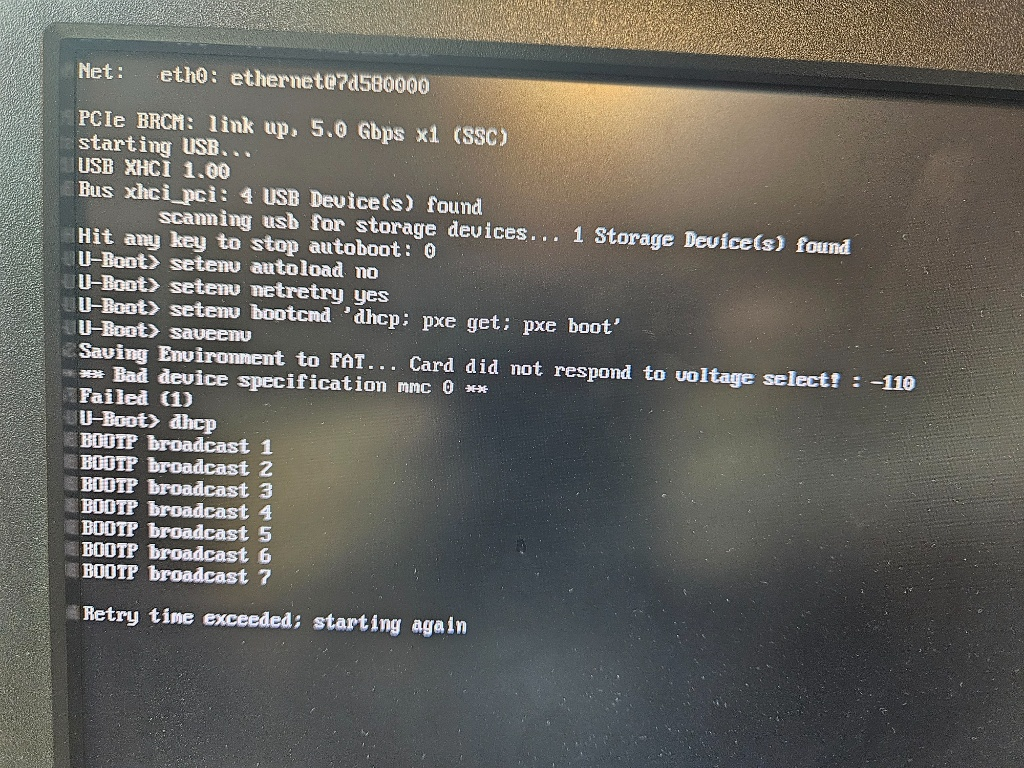
Config u-boot
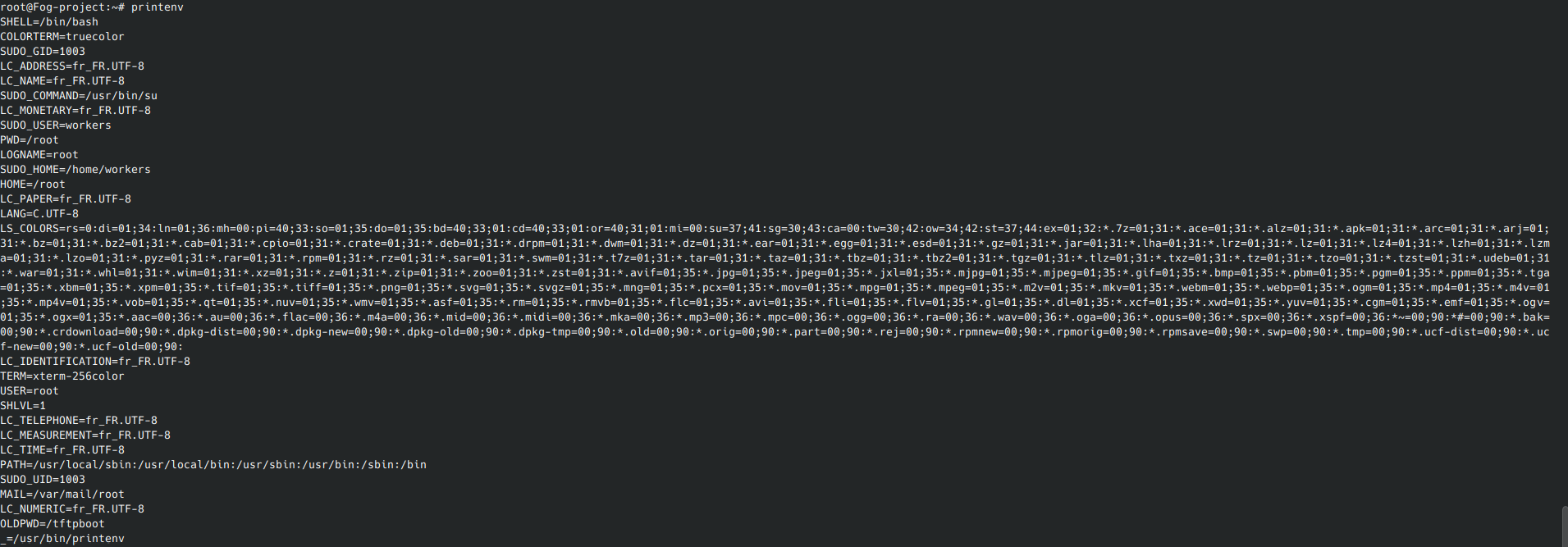
cat /tftpboot/pxelinux.cfg/01-88-a2-9e-53-34-c0

cat /tftpboot/pxelinux.cfg/boot.scr

cat /tftpboot/pxelinux.cfg/default

cat /tftpboot/pxelinux.cfg/default-arm

cat /tftpboot/pxelinux.cfg/default.bak

-
-
@Jeremy Thanks, the file contents are the most useful thing you’ve posted, because they show the
01-…file on your server is not FOG’s. I owe you a correction on that too: yesterday I took “the file is there” as proof the fix landed. It wasn’t — that file is yours.1. Everything in
/tftpboot/pxelinux.cfg/is hand-written, and it’s the wrong format forpxe boot.01-88-a2-9e-53-34-c0,boot.scr,defaultanddefault-armall contain a U-Boot script (setenv …,tftp …,booti …).pxe bootdoesn’t run scripts; it parses a PXELINUX-style config (label,kernel,initrd,append), finds no labels in yours, and does nothing. That’s your “downloads pxelinux, but then stops”, and it was never going to work regardless of the FOG bugs I fixed. Please don’t hand-write anything underpxelinux.cfg/: FOG owns the01-<mac>names there, and its periodic reconcile deletes any01-file whose host has no active task, so your file would vanish anyway. (boot.scr, if you ever wanted one, has to be amkimage-wrapped binary in the TFTP root, not text underpxelinux.cfg/. You don’t need it; thepxepath is the whole thing.)To get FOG’s file: run the updater once more (PR #1679 is merged), then in the web UI queue a Capture task for
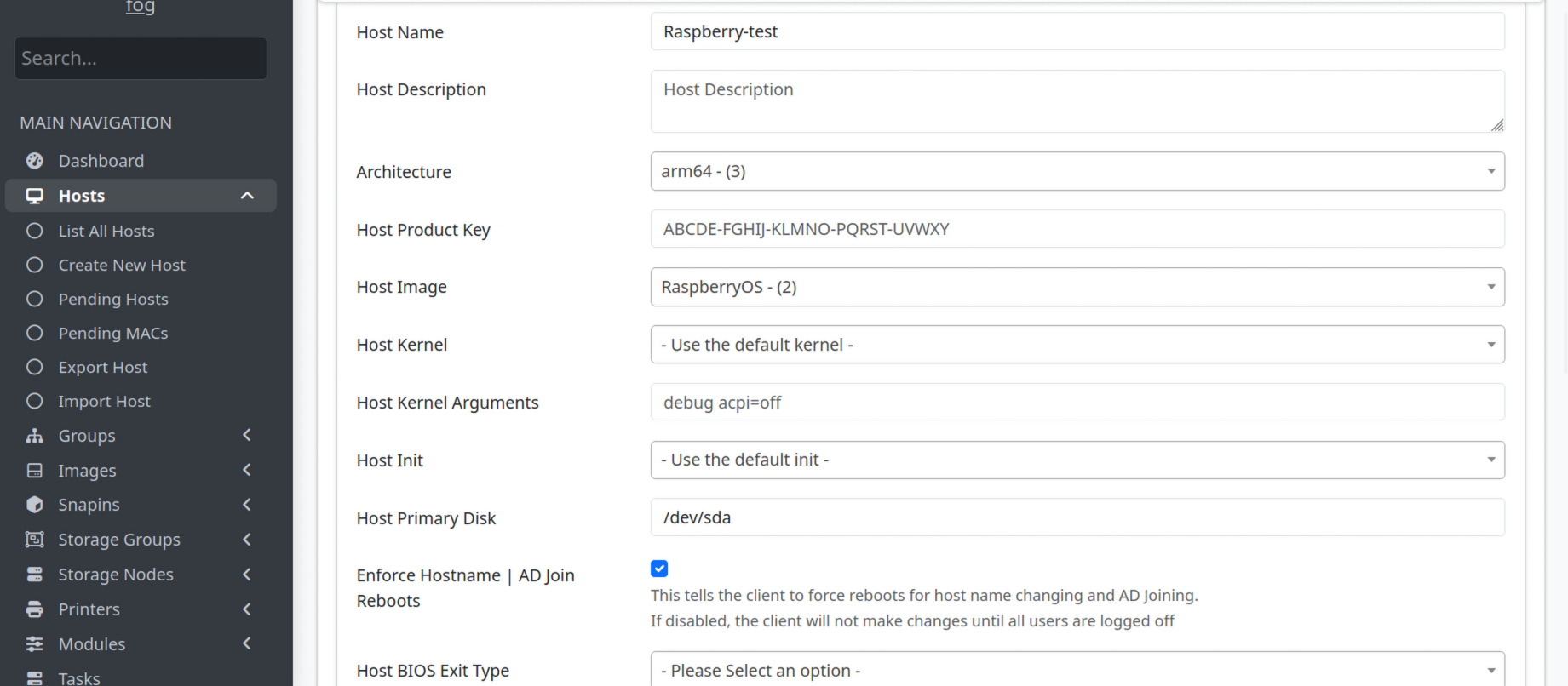
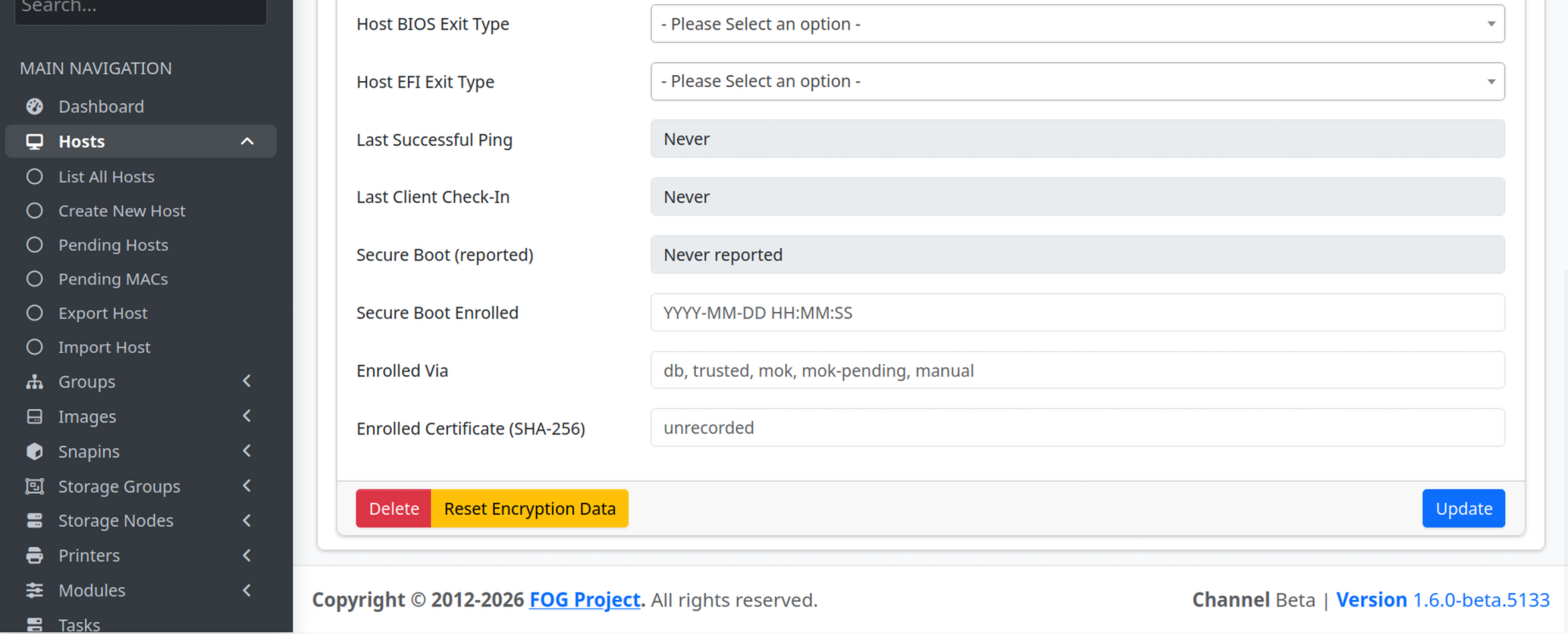
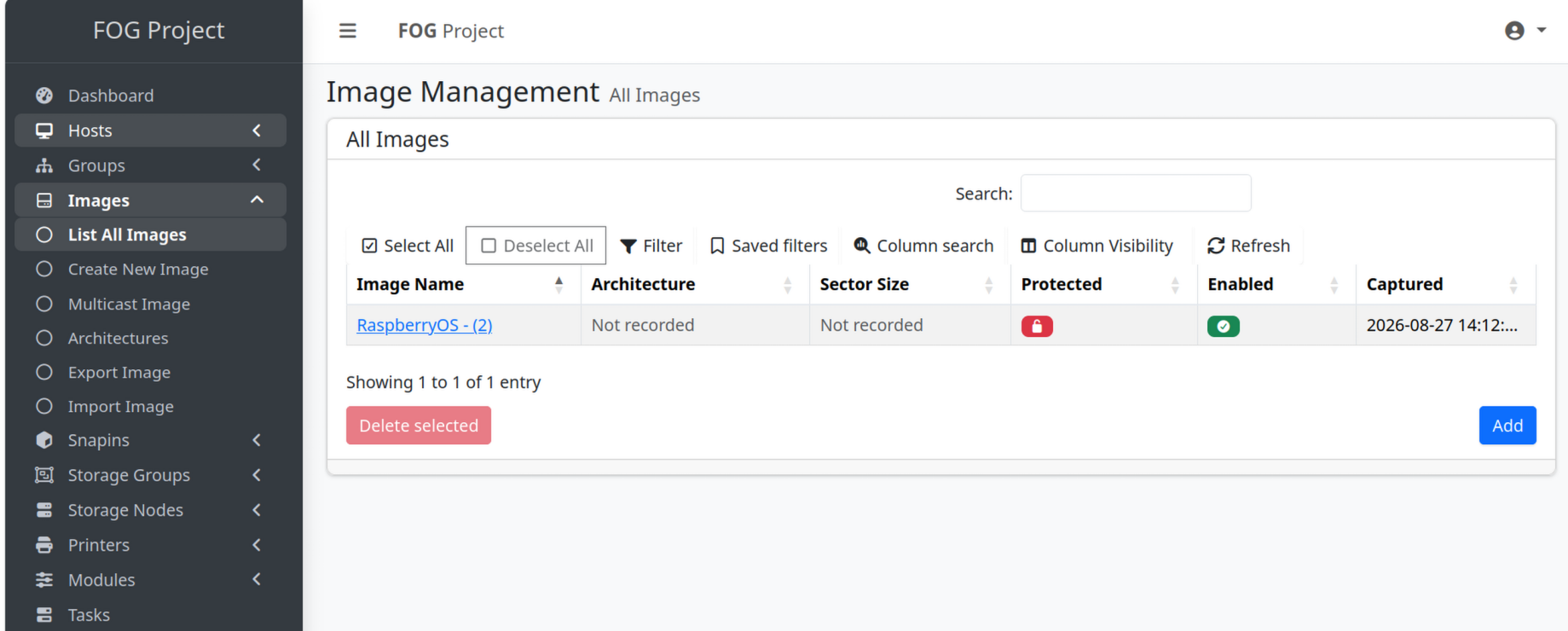
Raspberry-test. Within a moment/tftpboot/pxelinux.cfg/01-88-a2-9e-53-34-c0will be replaced by a file starting# Generated by FOG Projectwithkernel arm_Imageandinitrd arm_init.cpio.gz, and/tftpboot/arm_Imageand/tftpboot/arm_init.cpio.gzwill appear beside it. Paste that file back here. Your host settings are fine: arm64, image set, primary disk/dev/sda. (acpi=offin the kernel arguments does nothing on a Pi; harmless.)2.
saveenvfailed because there is no SD card, so nothing yousetenvsurvives a reboot. That’s actually fine for the end goal: the defaultbootcmd=bootflow scanalready does DHCP and thenpxe get/pxe booton its own, no environment needed. So for a cardless fleet you don’t needbootcmdat all. What you do need is DHCP to work inside U-Boot, which brings us to:3. DHCP.
netretry yeswas doing its job (“Retry time exceeded; starting again” is it retrying, not failing). With STP confirmed on the switch, the port is most likely blocking for the first ~30 seconds after U-Boot resets the NIC. One test settles it: runsetenv netretry yesthendhcp, and wait a full 60 seconds before judging. If it gets a lease on the second or third cycle, that’s STP, and the fix is PortFast / edge-port on the Pi ports (the defaultbootflow scanwon’t retry long enough on its own, and without an SD card you can’t persistnetretry). If it still has nothing after 60 seconds, then it isn’t timing: check OPNsense’s DHCP log (Services → DHCPv4 → Log) for88:a2:9e:53:34:c0during the attempt and tell me whether a DISCOVER arrives and whether an OFFER goes out.Once DHCP works and FOG’s file is in place,
bootflow scan(ordhcp; pxe get; pxe bootby hand) should pullarm_Imageand boot FOS. If it stops anywhere after that, the last lines on screen are what I need — pasted text, not a photo, if there’s any way to capture it. -
Hi, I ran into a problem: my VM completely crashed, so I have to start over from scratch. I’m still stuck at the capture stage; Gemini can’t review the entire conversation history we had to get to this point, though I had already reached U-Boot.
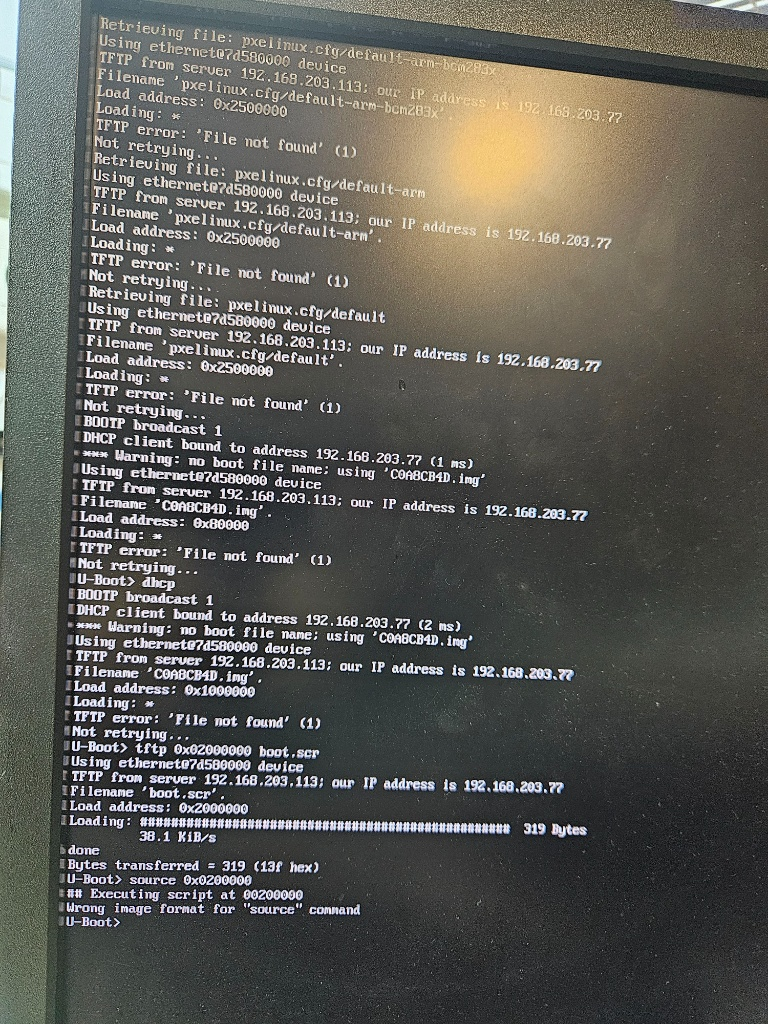
When I’ve completed this step, I’ll take a snapshot of the VM this time.
-
I finally managed to configure the Raspberry Pi image capture; now I just need to fine-tune it to avoid having to enter these commands in the U-Boot terminal:
dhcp
tftp ${scriptaddr} boot.scr
source ${scriptaddr}Now I’m back to working on the deployment, but I can’t seem to get an IP address via DHCP—I don’t understand why.
-
@Jeremy Sorry about the VM. Take the snapshot, and also export the host and image from the web UI (Hosts → Export Host, Images → Export Image), so the next rebuild is an import rather than a retype.
Your screenshot is actually the best news so far, and it answers your “fine-tune” question with “there is nothing to type”:
U-Boot’s DHCP works now.
DHCP client bound to address 192.168.203.77 (1 ms)— twice, once insidebootflow scanand once by hand. Whatever was blocking it on the old setup is gone. (TheC0A8CB4D.img“File not found” right after is harmless: with no bootfile from DHCP, U-Boot guesses a name from its IP and fails to fetch it.setenv autoload nosilences it, but you can’t save that without a card, and it costs nothing.)bootflow scanis already doing the FOG boot path for you. Look at the top of your screen: after DHCP it asked the TFTP server forpxelinux.cfg/default-arm-bcm283x, thendefault-arm, thendefault(and, above what’s visible,01-88-a2-9e-53-34-c0first). That ispxe get— U-Boot runs it by itself as part of standard boot, nobootcmd, no environment, noboot.scr. Every one came back “File not found” because FOG only writes the01-<mac>file while that host has a task queued, and nothing was queued. So the whole automation is: queue the task in the web UI, power the Pi on, done. No typing.Drop
boot.screntirely.Wrong image format for "source" commandis because yourboot.scris plain text;sourceonly runsmkimage-wrapped scripts. You don’t need to fix that, you need to stop using it — thepxepath replaces it.So, on the rebuilt server, please confirm two things and then do one test:
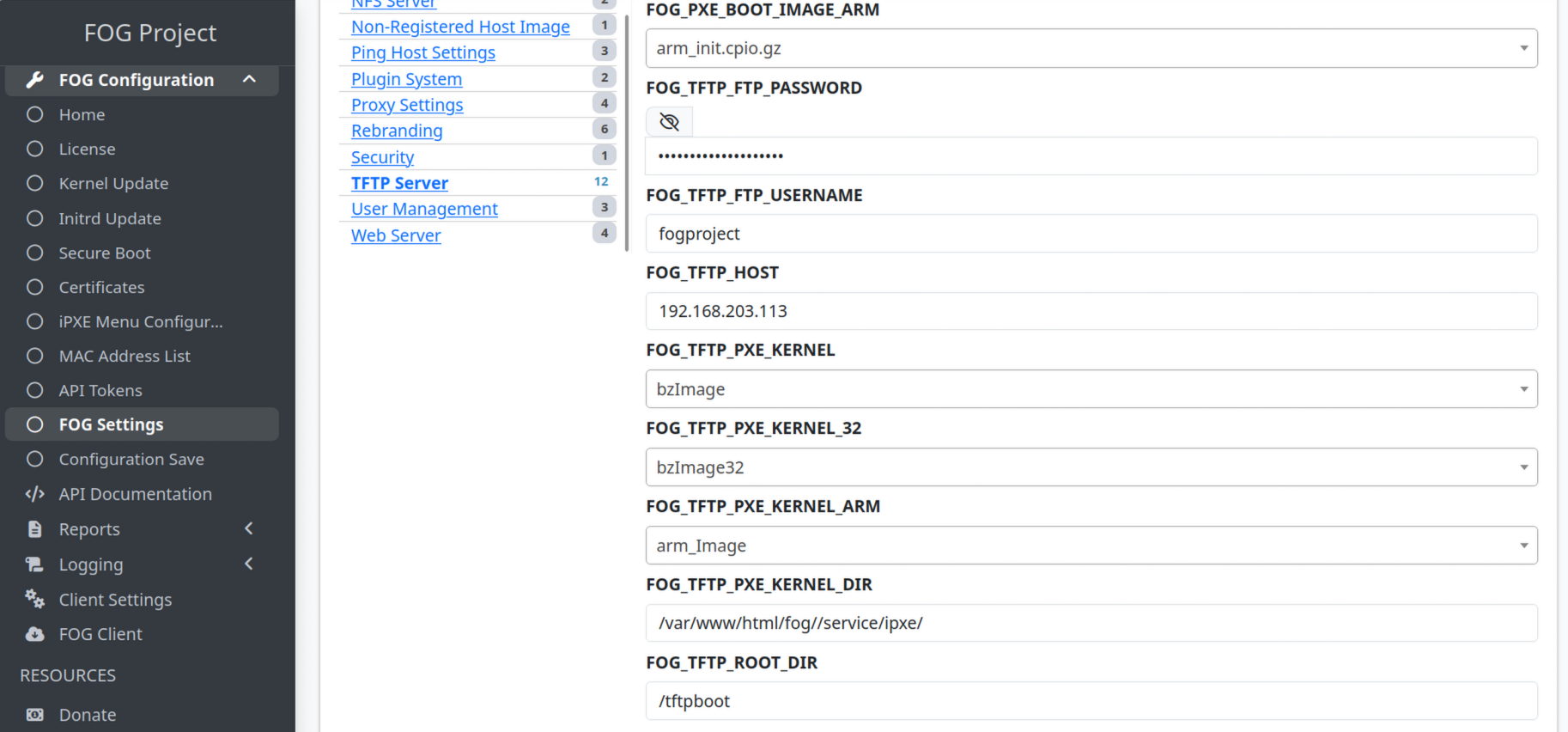
- FOG Settings → TFTP Server has a
FOG_TFTP_ROOT_DIRentry reading/tftpboot. If it doesn’t, the install is older than the fix; run the updater on the beta channel. - Queue a Deploy task for
Raspberry-test, then on the servercat /tftpboot/pxelinux.cfg/01-88-a2-9e-53-34-c0— it should start# Generated by FOG Projectand containkernel arm_Image— andls -l /tftpboot/arm_Image /tftpboot/arm_init.cpio.gz. Paste both here. - Then just power-cycle the Pi and let
bootflow scanrun. It should now find the01-file, pullarm_Image, and boot into FOS.
On “can’t get an IP via DHCP” during deployment: I need to know which DHCP. U-Boot’s is fine per your screenshot. If you mean FOS itself (after the kernel boots, the FOG banner,
Attempting to check innever coming), that’s a different network stack — tell me which kernel booted (FOG’sarm_Imagevia the01-file, orkernel8.imgfrom your old script) and paste the lines aroundudhcpc/eth0. Text rather than a photo if at all possible; a serial adapter on the Pi’s UART pins makes that easy and is worth the few euros for a 200-unit project. - FOG Settings → TFTP Server has a
-
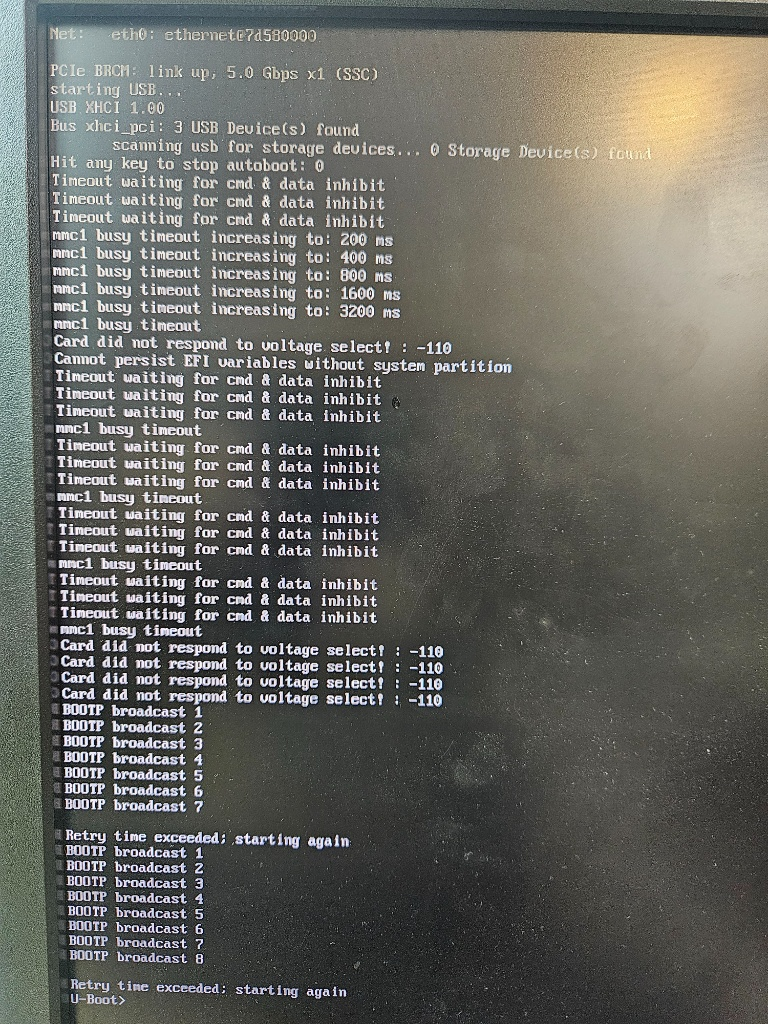
I created a new snapshot to avoid losing data again and having to start everything from scratch; right now, I’m stuck on this page on the Raspberry Pi.
-
@Jeremy That screen is the STP pattern, and I’m now fairly confident that’s your DHCP problem. Look at the timing:
bootflow scanstarts DHCP the instant the link comes up, retries for two cycles (about 20 seconds total), then gives up. Yesterday’s “1 ms” success was typed at the prompt after the board had been sitting there a while. A switch port running classic spanning tree drops everything for roughly 30 seconds after link-up. First 20 seconds: nothing gets through; a minute later: instant lease. That matches every screenshot you’ve posted.U-Boot can’t be made to wait longer without a saved environment, and without an SD card you can’t save one. So this is fixed on the switch, not on the Pi: ask whoever runs it to enable PortFast (Cisco) / edge port (most others) on the ports the Pis plug into, or move to RSTP. That is a normal setting for any PXE client, not a Pi special case. If you want proof before asking, plug the Pi into a dumb unmanaged switch for one boot; if
bootflow scangets a lease first time, you have your answer.Two more things from that screen:
0 Storage Device(s) found. Last time it found 1 (the USB SSD). If the SSD isn’t attached, there’s nothing to deploy to, so make sure it’s plugged in and powered for the deploy test.- I still need the three things from my last post, and I can’t go further without them: whether
FOG_TFTP_ROOT_DIRexists in FOG Settings → TFTP Server; the contents of/tftpboot/pxelinux.cfg/01-88-a2-9e-53-34-c0after you queue a Deploy task; andls -l /tftpboot/arm_Image /tftpboot/arm_init.cpio.gz. Those tell me whether the FOG side is doing its job on your rebuilt server. Everything else in this thread is now on the network side.
-
Regarding OPNsense, there isn’t anyone on the infrastructure team available to look into it right now; I can probably check on that Monday morning.
To be transparent with you, I’ve been retraining for a new career since February 2026 and only just obtained my IT diploma in July. What helps is that I’m persistent with projects and usually manage to get the job done. I’ll get back to you once I have the information regarding OPNsense.

-
@Jeremy If you can put a dumb switch between the Pi and the cable you currently connect into:
Connect the cable you normally plugin to the Pi into the 5 port switch then your pi to that switch and this should test the connectivity STP problem I believe is occurring.
-
Hi, I’m using a Proxmox bridged network interface, I can’t connect anywhere else because otherwise it wouldn’t be the same network, so we’re trying to find a solution on our end.
-
Hi, The blockage isn’t caused by a forgotten debug command, since that isn’t present in the deployment test; we have a managed switch right before the Raspberry Pi connection—that might be the issue. I’m discussing it with my colleagues at work to see how we can handle it.
-
This post is deleted!