I have solved my issue by changing the Host EFI Exit type:
REFIND_EFI for Windows images
SANBOOT for Ubuntu/Debian images
Xavier
I have solved my issue by changing the Host EFI Exit type:
REFIND_EFI for Windows images
SANBOOT for Ubuntu/Debian images
Xavier
more informations:
if I install a linux on the computer, then deploy the debian image on it: it’s OK
And the I can deploy the Ubuntu image with no problems
The issue only happend after i’ve deployed a Windows 11 image and then the debian image.
In order to make the WIndows image works, i had to do
cp refind.efi refind_x64.efi
(or I have a freeze with rEFInf -Initializing…"
Xavier
@Tom-Elliott Thank you for your awnser.
I have change /etc/fstab
#UUID=0de7609a-8431-428d-b5d0-42fdd92dced1 / ext4 errors=remount-ro 0 1
/dev/nvme0n1p2 / ext4 errors=remount-ro 0 1
#UUID=B991-AA35 /boot/efi vfat umask=0077 0 1
/dev/nvme0n1p1 /boot/efi vfat umask=0077 0 1
#UUID=ce1cee6a-69e5-4d74-812a-178758c02687 none swap sw 0 0
/dev/nvme0n1p3 none swap sw 0 0
But that doesn’t change the problem
Xavier
Hello,
I have an issue when i’m deploying a Debian 13 image on HP Elite mini 800 G9.
I have installed a new Fog instance (1.5.10.1763) on a debian 13 and migrated all the datas from a previous Fog Instance (1.5.9).
I can deploy Windows 11 image without problems
I can capture image without problem.
But, when I want to deploy a Debian 13 image, I have a kernel panic error when Debian try to boot (after fog menu)
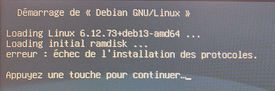
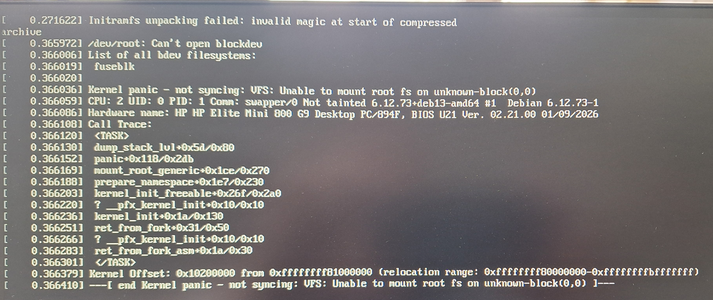
I have tried a fresh Debian 13 image, and same error.
I also tried with an Ubuntu 24.04 image, but same error
I have installed Kernel 6.12.35 and initrd 2025.02.4 from Fog Configuration.
I have tried diffrents kernels, but no change.
The deploiement was ok with the previous fog instance
Any ideas ?
Thanks
Xavier