AD join problems
-
Hi,
I’m running 1.6.0.158.
When I deploy a machine it does not join the domain and in the agent log I’m seeing “rejoin: blocked (directory_observation_unknown)”
On Fog server, in the host record, I’m seeing:
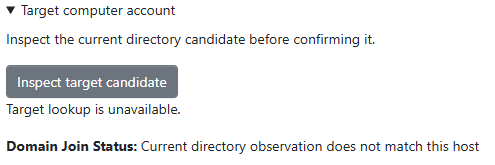
It’s the same for all hosts in my system.
I’ve confirmed the LDAP connection using ldapsearch.
Any help would be appreciated.
Thank you,
Adam
-
@AdamC Hi Adam,
directory_observation_unknownmeans the server does not know this PC is in a workgroup. A workgroup PC gets its own join path. Without that flag, the server waits for a domain controller and a secure channel that a fresh image does not have.The agent reports workgroup membership only when that report changes. If your agents first reported on 1.6.0 or 1.6.0.14, and you then upgraded to 1.6.0.158, the server never received the report in the form it now needs. That matches “the same for all hosts”.
Two questions:
- Did you upgrade this server from 1.6.0 or 1.6.0.14?
- Which fog-agent version do the hosts run?
This should make each agent send its report again on the next poll. It clears a cached hash only, no host data:
DELETE FROM hostFactState WHERE hfsKind = 'directory';Run it in the
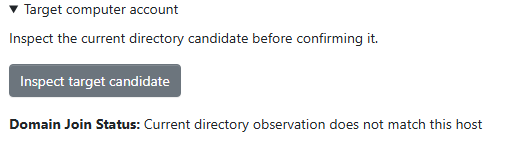
fogdatabase, then wait one agent poll. Tell us if the join starts.“Current directory observation does not match this host” is expected for a PC that is not joined yet. “Target lookup is unavailable” is a separate check for existing computer accounts. A workgroup join does not use it.
-
Hi Tom,
I did upgrade from 1.6.0.14.
I’ve tried almost every agent version from 1.20 to 1.28
I’m still seeing the same errors after running the database command you suggested.
Note that I get “Target lookup is unavailable” on all of my machines, and most of them are joined to the domain.
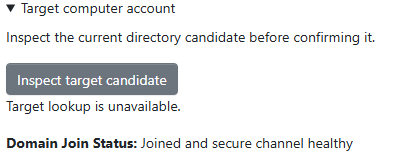
Is there a way to validate Fogs AD configuration?
Thanks,
Adam
-
@AdamC Hi Adam,
Thanks. The upgrade from 1.6.0.14 fits the cause, but the SQL should have cleared it. So something else is in play on your server.
“Target lookup is unavailable” is a separate issue. FOG does its own LDAP lookup from the server with the settings in FOG Configuration > FOG Settings > FOG Directory:
FOG_DIRECTORY_LDAP_URI,FOG_DIRECTORY_BIND_DN, the bind password,FOG_DIRECTORY_BASE_DN, andFOG_DIRECTORY_CA_CERT. Your ldapsearch test does not use those settings. If they are empty, or the bind fails, every host shows that line. That lookup finds an existing computer account for a rejoin or an OU move. A workgroup PC that joins does not use it, so it does not block the join.For one PC that does not join, please post:
- A screenshot of its Active Directory tab, the same view as your first picture.
- The lines that contain
rejoinordirectoryfromC:\ProgramData\FOG\fog-agent.log, from one poll after the SQL. - The output of this query, with that host’s name:
SELECT h.hostName, d.hdJoined, d.hdKind, d.hdDomain, d.hdRejoinState
FROM hosts h JOIN hostDirectory d ON d.hdHostID = h.hostID
WHERE h.hostName = 'PCNAME';
That shows what the agent reported and what the server stored.
-
directory rejoin: blocked (directory_observation_unknown)
| hostName | hdJoined | hdKind | hdDomain | hdRejoinState |
±------------±---------±----------±---------±--------------------------------------------------------------------------------------------------------------------------------------------------------------------------------------------------------------------------------------------------------------------------------------------------------------------------------------------------------------------------------------------------------------------------------------+
| gsb-240-w01 | 0 | workgroup | | {“version”:1,“protocol”:2,“placement_hold”:true,“observation”:{“current_name”:“gsb-240-w01”,“pending_name”:“gsb-240-w01”,“domain”:“”,“netbios”:“”,“role”:“workstation”,“secure_channel”:“unknown”,“boot”:{“marker”:“ce623c08-6eb4-49c0-8405-d70714c439e8”,“started”:“2026-11-25T13:55:17.5Z”},“revision”:“d048894c3d8e49235e320ea4a3b170d6”,“dc”:“<removed but valid - Adam>”,“dc_reachable”:true},“observed_at”:1795617039} | -
I should have noted, the machine in question does not currently have a domain account. So it’s trying to join, not rejoin.