Access denied: Master node
-
Virtual machine running Ubuntu 26.04 LTS with FOG 1.5.2518. The master node is another non-virtual machine running Ubuntu 20 LTS. Both machines are on the same subnet.
The FOG web interface cannot access the master node.
I used to have a virtual machine running Ubuntu 20 LTS and FOG 1.5.9, also with the master node on the other machine, on the same subnet. Everything was working fine until one day when the FOG web interface wouldn’t let me run tasks, telling me I had to update to version 1.5.10, which forced me to update it. At that time, the stable version was 1.5.10.2482; I installed it and, since then, I have been unable to access the Master Node, which is where we store all the images.
I’ve been trying to sort this out for days and can’t seem to find a solution.How can this be resolved?
-
After that error occurred on the master node, we tried to update Fog to version 1.5.10.2518, but it would NOT let us update the schema; the installation got stuck and didn’t complete.
-
@piaFOG26 There is nothing on fog that says “you must update” though most likely we’d have recommended it.
Ubuntu 20 LTS went EOL June 2026. That aside, we need more informaiton please.
Provide the install logs and maybe a screenshot of the actual error you’re seeing when trying to update.
Also, worthwhile, might be worth installing the 1.6.0-RC version (RC-14 is the current latest available) as likely by mid November, it will become the latest official available release.
Either way, please provide more information.
Thank you,
-
@Tom-Elliott
Computer running Ubuntu 20.04.3 LTS (GNU/Linux 5.4.0-89-generic x86_64) and fog 1.5.10.2518 WITHOUT COMPLETING THE INSTALLATION; it is a Master NODE
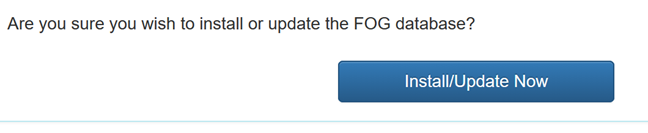
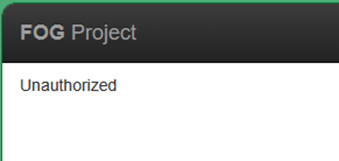
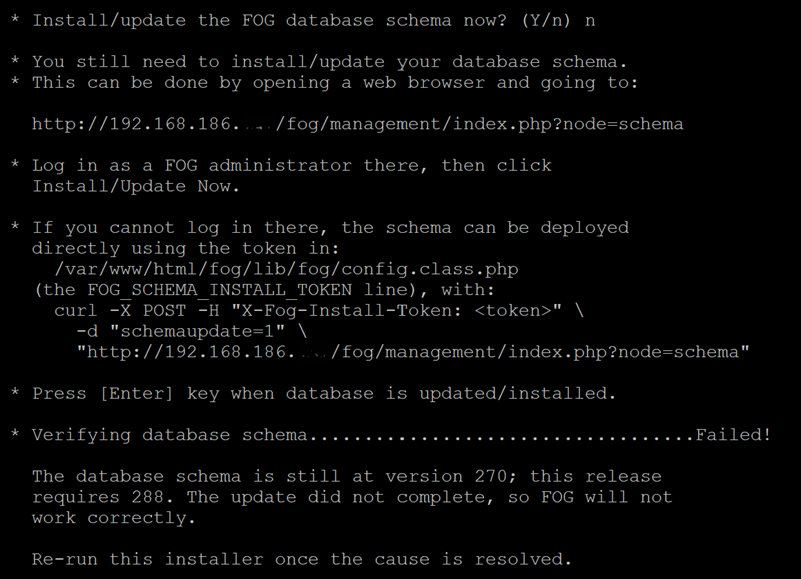
Virtual Machine with Ubuntu 26.04.1 LTS (GNU/Linux 7.0.0-38-generic x86_64) and fog 1.5.10.2518
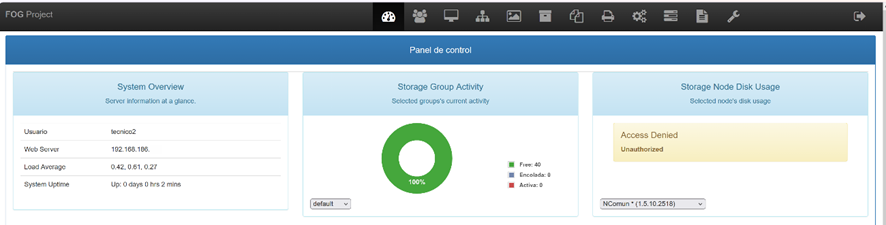
-
@piaFOG26 Thank you, the screenshots help. I still need the install logs.
Your master node (Ubuntu 20.04) has the 1.5.10.2518 files, but its database is still at schema 270. This release needs 288. In your screenshot, the installer asked “Install/update the FOG database schema now?” and you answered n.
Run the installer again on the master node and answer Y. The installer then updates the schema itself, and you do not need to log in to the web page.
The “Unauthorized” on the schema web page means the account you used is not a FOG administrator. Which user did you log in as?
If the installer fails again, please post the newest file from
/root/fogproject/bin/error_logs/. If you ran the installer from a different folder, use thebin/error_logs/folder in that location.Also, please tell us what fails on the master node other than the disk usage box on the dashboard. Can you still capture and deploy images?
Please help us build the FOG community with everyone involved. It's not just about coding - way more we need people to test things, update documentation and most importantly work on uniting the community of people enjoying and working on FOG! Get in contact with me (chat bubble in the top right corner) if you want to join in.
Web GUI issue? Please check apache error (debian/ubuntu: /var/log/apache2/error.log, centos/fedora/rhel: /var/log/httpd/error_log) and php-fpm log (/var/log/php*-fpm.log)
Please support FOG if you like it: https://wiki.fogproject.org/wiki/index.php/Support_FOG
-
@piaFOG26 One more item, about the “Access Denied” in the disk usage box on the VM dashboard.
Your VM and your master node are two full FOG servers, and each has its own database. The master node only trusts requests from the storage nodes in its own database, so it refuses the VM. I fixed this in FOG: a request signed with a shared node key is now accepted. The fix is on dev-branch now and reaches the stable release on November 11.
To use it, both servers must have the same key. First, finish the schema update on the master node. Then:
- Make a key on either machine:
openssl rand -hex 32 - On the VM, open Storage Management, then edit the master node (NComun). Paste the key into Node API Signing Key and click Update.
- On the master node, run this from the fogproject folder you installed from:
sudo php bin/fog-node-key.php --set <the same key>
If you need it before November 11, install dev-branch on the master node. The fix must be on the master node, because that is the server that checks the key.
- Make a key on either machine:
