• Recent
    • Unsolved
    • Tags
    • Popular
    • Users
    • Groups
    • Search
    • Register
    • Login

    Unable to capture image on NVME systems since 1.5.10

    Scheduled Pinned Locked Moved Solved FOG Problems
    7 Posts 2 Posters 508 Views
    Loading More Posts
    • Oldest to Newest
    • Newest to Oldest
    • Most Votes
    Reply
    • Reply as topic
    Log in to reply
    This topic has been deleted. Only users with topic management privileges can see it.
    • D
      DiegoP
      last edited by

      Hi,
      i’ve used FOG 1.5.9 for years now, and recently i’ve updated to the more recent releases, initially 1.5.10.1798 and currently running 1.5.10.1870.
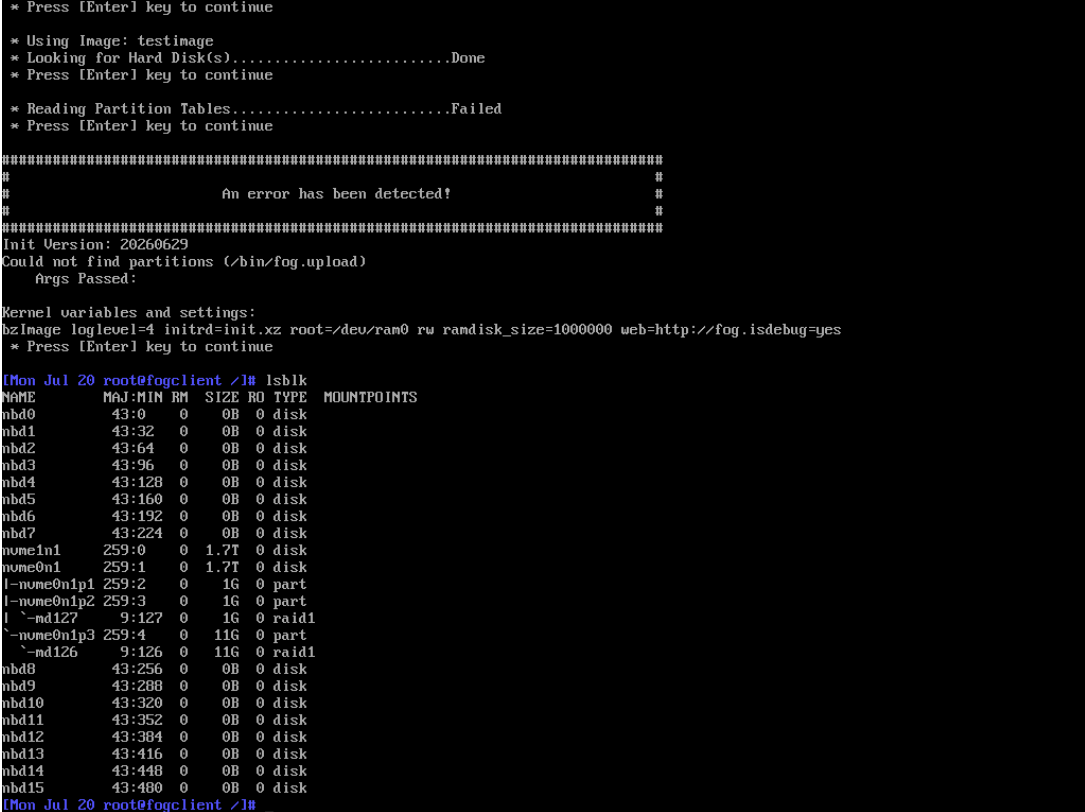
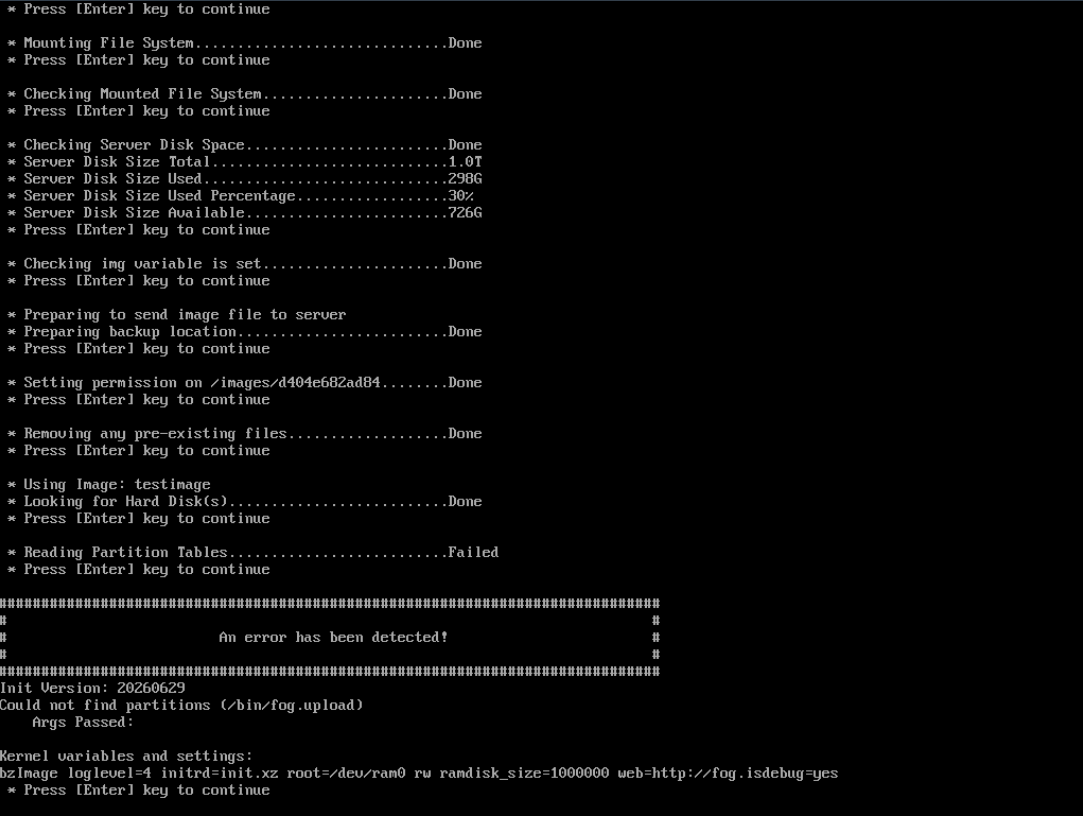
      Since i’m on 1.5.10, i’m not able to capture images from systems using NVME’s as you can see from the snips attached.
      I’ve also tried various version of fos and the issue is happening for both Windows and Linux installations. What it could be to cause this problem?
      Thank you very much
      caputre 1.png
      caputre 2.png

      Tom ElliottT 2 Replies Last reply Reply Quote 0
      • D
        DiegoP @Tom Elliott
        last edited by

        @Tom-Elliott
        Hi, the new EXP_20261001-163131 work like a charm without the postinit workaround. Thank you!

        1 Reply Last reply Reply Quote 1
        • Tom ElliottT
          Tom Elliott @DiegoP
          last edited by

          @DiegoP I feel like we don’t have enough context.

          We have many people using NVME drives, yours appears (from the lsblk output) to be a RAID mode?

          Maybe that’s part of why you’re running into issues?

          Please help us build the FOG community with everyone involved. It's not just about coding - way more we need people to test things, update documentation and most importantly work on uniting the community of people enjoying and working on FOG! Get in contact with me (chat bubble in the top right corner) if you want to join in.

          Web GUI issue? Please check apache error (debian/ubuntu: /var/log/apache2/error.log, centos/fedora/rhel: /var/log/httpd/error_log) and php-fpm log (/var/log/php*-fpm.log)

          Please support FOG if you like it: https://wiki.fogproject.org/wiki/index.php/Support_FOG

          D 1 Reply Last reply Reply Quote 0
          • D
            DiegoP @Tom Elliott
            last edited by

            @Tom-Elliott said in Unable to capture image on NVME systems since 1.5.10:

            Maybe that’s part of why you’re running into issues?

            Hi Tom, after your hint i’ve revised the settings for the windows images and now the capture is working.
            For the linux images i confirm the partitions contian part of a mdadm raid, back to the old fog versions, these images where captured without issues, now it seems tath the presence of mdadm won’t let the image capture start.
            I’ve tried to set the image type to raw and that work, but is wery inefficient.
            I’ve also tried to switch from partclone to partimage without success.
            Thank you

            Tom ElliottT 1 Reply Last reply Reply Quote 0
            • Tom ElliottT
              Tom Elliott @DiegoP
              last edited by

              @DiegoP I believe mdadm will still be allowed to work, but I think you’re supossed to use “mdraid=true” for a kernel argument. If this is not set, FOG won’t know to build the array. This would help explain why the disk couldn’t find a partition layout as well since it’s expecting to be part of an array (which then looks/acts as the disk you’re truly working with.

              As for “partclone to partimage” I’m not sure I understand.

              Fog moved FROM partimage -> partclone way back in the 1.0.0 days as partimage has been obsolete for quite some time now.

              Please help us build the FOG community with everyone involved. It's not just about coding - way more we need people to test things, update documentation and most importantly work on uniting the community of people enjoying and working on FOG! Get in contact with me (chat bubble in the top right corner) if you want to join in.

              Web GUI issue? Please check apache error (debian/ubuntu: /var/log/apache2/error.log, centos/fedora/rhel: /var/log/httpd/error_log) and php-fpm log (/var/log/php*-fpm.log)

              Please support FOG if you like it: https://wiki.fogproject.org/wiki/index.php/Support_FOG

              1 Reply Last reply Reply Quote 0
              • D
                DiegoP
                last edited by

                @Tom-Elliott
                Hi!
                Just to let you know that I’ve found a solution.
                I’ve added

                if ! grep -q 'mdraid=true' /proc/cmdline; then
                    echo "AUTO -all" > /etc/mdadm.conf
                    mkdir -p /etc/mdadm ; echo "AUTO -all" > /etc/mdadm/mdadm.conf
                    rm -f /lib/udev/rules.d/*md-raid* /etc/udev/rules.d/*md-raid* 2>/dev/null
                    udevadm control --reload 2>/dev/null
                    mdadm --stop --scan >/dev/null 2>&1
                fi
                

                to /images/dev/postinitscripts/fog.postinit and that prevent mdadm from interfeering with disk scan on precapture phase.
                Thank you

                1 Reply Last reply Reply Quote 0
                • Tom ElliottT
                  Tom Elliott @DiegoP
                  last edited by

                  @DiegoP Thanks, your workaround found the cause.

                  FOS installs mdadm’s udev rule, and that rule assembles every RAID member at boot. It ignored mdraid=true. The arrays then held nvme0n1p2/p3, so capture could not read the partitions.

                  FOS now assembles arrays only when mdraid=true is on the kernel command line. Without the flag, it leaves the member partitions alone. With the flag, nothing changes.

                  The fix is in the experimental FOS release EXP_20261001-163131: https://github.com/FOGProject/fos/releases/tag/EXP_20261001-163131. Replace /var/www/html/fog/service/ipxe/init.xz on your FOG server with that release’s init.xz. Then remove the postinit workaround and capture again. Please tell us whether it works.

                  Please help us build the FOG community with everyone involved. It's not just about coding - way more we need people to test things, update documentation and most importantly work on uniting the community of people enjoying and working on FOG! Get in contact with me (chat bubble in the top right corner) if you want to join in.

                  Web GUI issue? Please check apache error (debian/ubuntu: /var/log/apache2/error.log, centos/fedora/rhel: /var/log/httpd/error_log) and php-fpm log (/var/log/php*-fpm.log)

                  Please support FOG if you like it: https://wiki.fogproject.org/wiki/index.php/Support_FOG

                  D 1 Reply Last reply Reply Quote 0
                  • D
                    DiegoP @Tom Elliott
                    last edited by

                    @Tom-Elliott
                    Hi, the new EXP_20261001-163131 work like a charm without the postinit workaround. Thank you!

                    1 Reply Last reply Reply Quote 1
                    • Tom ElliottT Tom Elliott has marked this topic as solved
                    • 1 / 1
                    • First post
                      Last post

                    50

                    Online

                    12.8k

                    Users

                    17.7k

                    Topics

                    157.3k

                    Posts
                    Copyright © 2012-2026 FOG Project