since upgrading to 1.5.10.1754 deploying image from the fog client menu fails (deploying from console is fine)
-
I upgraded fog server the other day it was only a minor version out of date (i just cant remember exactly what it was on but fairly certian it was 1.5.10.17xx)
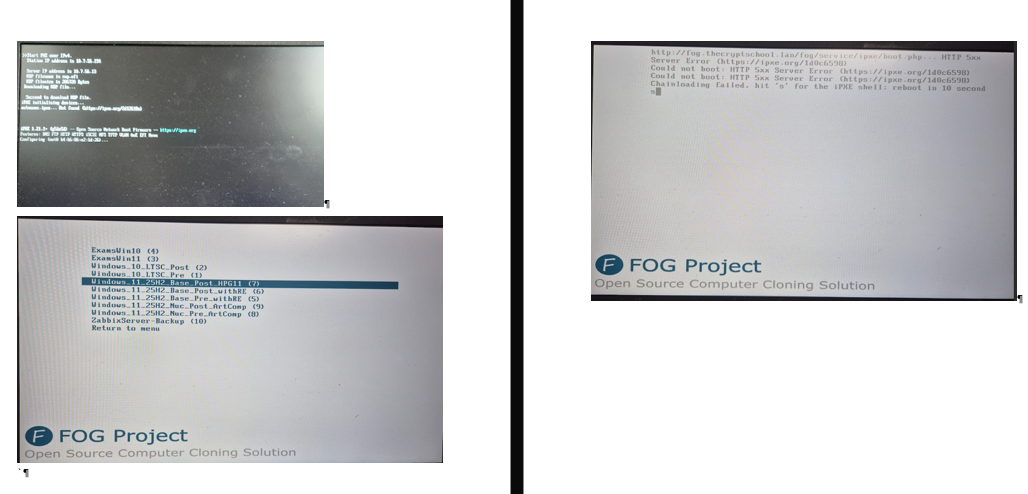
as explained in the title from the fog PXE boot menu on the client computer if you choose deploy image and pick the image it then displays this error message.
http://myfogserver/fog/service/ipxe/boot.php...  HTTP 5xx Server Error (https://ipxe.org/1d0c6598)
Could not boot: HTTP 5xx Server Error (https://ipxe.org/1d0c6598)
Could not boot: HTTP 5xx Server Error (https://ipxe.org/1d0c6598)
Chainloading failed, hit 's' for the iPXE shell; reboot in 10 seconds
if i go and find the host in the web console and choose deploy image it works fine and will deploy the image - so workaround fine… but i would like to fix it as we mostly reinstall from the client…
From the client PXE menu we are fine registering new hosts (including choosing to image them as part of that process)
-
@Gordon-Taylor Can you please install the dev-branch version?
The error (value min() issue you see) has been fixed in the latest dev-branch.
I hope this would fix the problem you’re seeing of course, but we won’t really know until that’s done.
1754 is the latest “stable” version, but dev-branch is a bit newer than the stable branch specifically in an attempt to fix other (and this) particular issue(s).
Please help us build the FOG community with everyone involved. It's not just about coding - way more we need people to test things, update documentation and most importantly work on uniting the community of people enjoying and working on FOG! Get in contact with me (chat bubble in the top right corner) if you want to join in.
Web GUI issue? Please check apache error (debian/ubuntu: /var/log/apache2/error.log, centos/fedora/rhel: /var/log/httpd/error_log) and php-fpm log (/var/log/php*-fpm.log)
Please support FOG if you like it: https://wiki.fogproject.org/wiki/index.php/Support_FOG
-
@Gordon-Taylor If you’re seeing an HTTP 5xx (doesn’t matter the exact number)
can you please provide your http error logs:
/var/log/php-fpm/www-error.log (on redhat based)
/var/log/apache2/error.log (on debian/ubuntu)Also, can you get your mysql history:
sudo mysql -u root fog
select * from history;
Thank you!
Please help us build the FOG community with everyone involved. It's not just about coding - way more we need people to test things, update documentation and most importantly work on uniting the community of people enjoying and working on FOG! Get in contact with me (chat bubble in the top right corner) if you want to join in.
Web GUI issue? Please check apache error (debian/ubuntu: /var/log/apache2/error.log, centos/fedora/rhel: /var/log/httpd/error_log) and php-fpm log (/var/log/php*-fpm.log)
Please support FOG if you like it: https://wiki.fogproject.org/wiki/index.php/Support_FOG
-
@Tom-Elliott Thanks for coming back to me
last two erros from apache2 - the last from 12:14 one is the only one at the timei last tried to pull image from the menu.
[Mon Jan 26 12:13:25.935606 2026] [proxy_fcgi:error] [pid 3067025] [client 192.168.4.119:56722] AH01071: Got error 'PHP message: PHP Fatal error:  Uncaught Error: Call to a member function isValid() on null in /var/www/html/fog/lib/fog/host.class.php:775\nStack trace:\n#0 /var/www/html/fog/lib/fog/host.class.php(789): Host->_setAlo()\n#1 /var/www/html/fog/lib/client/autologout.class.php(43): Host->getAlo()\n#2 /var/www/html/fog/lib/fog/fogpage.class.php(3290): Autologout->json()\n#3 /var/www/html/fog/lib/fog/fogpage.class.php(255): FOGPage->requestClientInfo()\n#4 /var/www/html/fog/lib/pages/dashboardpage.class.php(76): FOGPage->__construct()\n#5 /var/www/html/fog/lib/fog/loadglobals.class.php(65): DashboardPage->__construct()\n#6 /var/www/html/fog/lib/fog/loadglobals.class.php(79): LoadGlobals::_init()\n#7 /var/www/html/fog/commons/base.inc.php(38): LoadGlobals->__construct()\n#8 /var/www/html/fog/management/index.php(22): require('...')\n#9 {main}\n  thrown in /var/www/html/fog/lib/fog/host.class.php on line 775'
[Mon Jan 26 12:14:51.730575 2026] [proxy_fcgi:error] [pid 3066513] [client 10.7.56.194:46160] AH01071: Got error 'PHP message: PHP Fatal error:  Uncaught ValueError: min(): Argument #1 ($value) must contain at least one element in /var/www/html/fog/lib/fog/image.class.php:496\nStack trace:\n#0 /var/www/html/fog/lib/fog/image.class.php(496): min()\n#1 /var/www/html/fog/lib/fog/image.class.php(389): Image->getPrimaryGroup()\n#2 /var/www/html/fog/lib/fog/host.class.php(1133): Image->getStorageGroup()\n#3 /var/www/html/fog/lib/fog/host.class.php(1398): Host->_createTasking()\n#4 /var/www/html/fog/lib/fog/bootmenu.class.php(1390): Host->createImagePackage()\n#5 /var/www/html/fog/lib/fog/bootmenu.class.php(1332): BootMenu->setTasking()\n#6 /var/www/html/fog/lib/fog/bootmenu.class.php(493): BootMenu->verifyCreds()\n#7 /var/www/html/fog/service/ipxe/boot.php(52): BootMenu->__construct()\n#8 {main}\n  thrown in /var/www/html/fog/lib/fog/image.class.php on line 496'
This is the sql i couldn’t get the sudo commands to run but was able to execute the sql via webmin (everything at the end of the file from this year)
sudo errors (
gordon@fog:~$ sudo mysql -u root fog
[sudo] password for gordon:
ERROR 1045 (28000): Access denied for user ‘root’@‘localhost’ (using password: NO)
gordon@fog:~$ sudo -s
root@fog:/home/gordon# mysql -u root fog
ERROR 1045 (28000): Access denied for user ‘root’@‘localhost’ (using password: NO)
root@fog:/home/gordon# select * from history
)5964 [2026-01-06 15:47:57] Inventory ID: 598 has been successfully updated. jash-young 2026-01-06 15:47:57 192.168.12.26 5965 [2026-01-06 15:47:57] Host ID: 750 NAME: HP445RG6T05 has been successfully updated. jash-young 2026-01-06 15:47:57 192.168.12.26 5966 [2026-01-16 12:41:48] Image ID: 14 NAME: ZabbixServer-Backup has been successfully updated. gordon 2026-01-16 12:41:48 10.7.56.207 5967 [2026-01-16 12:46:40] Host ID: 1217 NAME: zabbixserver has been successfully updated. gordon 2026-01-16 12:46:40 10.7.56.207 5968 [2026-01-16 12:46:52] Task ID: 47506 NAME: Capture Task - zabbixserver has been successfully updated. gordon 2026-01-16 12:46:52 10.7.56.207 5969 [2026-01-16 13:33:12] Inventory ID: 502 has been successfully updated. jash-young 2026-01-16 13:33:12 192.168.12.19 5970 [2026-01-16 13:33:12] Host ID: 656 NAME: HP440G6T10 has been successfully updated. jash-young 2026-01-16 13:33:12 192.168.12.19 5971 [2026-01-16 13:34:42] Host ID: 661 NAME: HP440G6T15 has been successfully updated. jash-young 2026-01-16 13:34:42 192.168.12.19 5972 [2026-01-16 13:34:51] Inventory ID: 507 has been successfully updated. jash-young 2026-01-16 13:34:51 192.168.12.19 5973 [2026-01-16 13:34:51] Host ID: 661 NAME: HP440G6T15 has been successfully updated. jash-young 2026-01-16 13:34:51 192.168.12.19 5974 [2026-01-21 13:52:29] Inventory ID: 667 has been successfully updated. jash-young 2026-01-21 13:52:29 192.168.12.16 5975 [2026-01-21 13:52:29] Host ID: 819 NAME: HP440G8T11 has been successfully updated. jash-young 2026-01-21 13:52:29 192.168.12.16 5976 [2026-01-23 11:56:00] Host ID: 1218 NAME: HP4G1iT01 has been successfully updated. jash-young 2026-01-23 11:56:00 192.168.12.16 5977 [2026-01-23 12:18:38] Host ID: 1218 NAME: HP4G1iT01 has been successfully updated. jash-young 2026-01-23 12:18:38 192.168.12.16 5978 [2026-01-23 12:19:14] Host ID: 1218 NAME: HP4G1iT01 has been successfully updated. jash-young 2026-01-23 12:19:14 192.168.12.16 5979 [2026-01-23 14:48:37] Host ID: 1219 NAME: HP4G1iT02 has been successfully updated. gordon 2026-01-23 14:48:37 10.7.56.55 5980 [2026-01-23 14:48:44] Task ID: 47513 NAME: Capture Task - HP4G1iT02 has been successfully updated. gordon 2026-01-23 14:48:44 10.7.56.55 5981 [2026-01-26 10:37:59] Host ID: 560 NAME: HP430G5T08 has been successfully updated. gordon 2026-01-26 10:37:59 10.7.56.57 5982 [2026-01-26 10:38:06] Task ID: 47515 NAME: Deploy Task - HP430G5T08 has been successfully updated. gordon 2026-01-26 10:38:06 10.7.56.57 5983 [2026-01-26 10:38:06] SnapinJob ID: 3313 has been successfully updated. gordon 2026-01-26 10:38:06 10.7.56.57Screen shots of trying to deploy from menu
-
@Gordon-Taylor Can you please install the dev-branch version?
The error (value min() issue you see) has been fixed in the latest dev-branch.
I hope this would fix the problem you’re seeing of course, but we won’t really know until that’s done.
1754 is the latest “stable” version, but dev-branch is a bit newer than the stable branch specifically in an attempt to fix other (and this) particular issue(s).
Please help us build the FOG community with everyone involved. It's not just about coding - way more we need people to test things, update documentation and most importantly work on uniting the community of people enjoying and working on FOG! Get in contact with me (chat bubble in the top right corner) if you want to join in.
Web GUI issue? Please check apache error (debian/ubuntu: /var/log/apache2/error.log, centos/fedora/rhel: /var/log/httpd/error_log) and php-fpm log (/var/log/php*-fpm.log)
Please support FOG if you like it: https://wiki.fogproject.org/wiki/index.php/Support_FOG
-
@Tom-Elliott Thanks Tom, yes that looks to have sorted it out thankyou…
-
 T Tom Elliott has marked this topic as solved on