Issue when I tried to make Windows 11 gold image
-
Good evening everyone!
I’m a new FOG user and new to this forum.
I need to capture a master image in Windows 10 and another in Windows 11 so I can distribute them to multiple clients using PXE.
My server:
I installed my server (version 1.5.10.1660) on Linux Debian and was able to upload a “gold” image in Windows 10. I had some problems.
I could resolved the issue to make manually the partition and install Windows 10.
I use for this image LegacyMy problem:
My current problem is that I’m trying to do the same but using Windows 11 and UEFI. At the moment, it’s impossible.I’ve read on this forum, and in theory, the procedure is the same (and easy, but I can’t).
https://forums.fogproject.org/topic/16947/fog-windows-11
I tried:
I disabled Secure Boot.
I created different images to test the configuration. There were recommendations to use the config single disk resizable or multiple partitions option.I tried using Clonezilla (which uses PartClone) and I was able to create images on a USB drive. I took that image and uploaded it to my FOG server and (obviously XD) it didn’t work.
I tried rebuilding the machine’s BCD. It worked with Windows 10, but not with Windows 11 (it creates the partitions with the information, but it doesn’t boot).
The problem is that the image never finishes deploying. On the client, it reaches 100%, restarts, and starts again. On the server, I never see the completion message.
If I cancel the task or disconnect the network cable after restarting, the image won’t boot.
Can anyone guide me on how to solve this problem? Any links I can read?
Sorry for “my” english. Im using Google translate -
Hi,
I am not an expert on the technicalities, and someone with more experience may be able to explain it better. However, I can confirm that there is no issue capturing and deploying Windows 11 with FOG 1.15. I capture and deploy Windows 11 weekly without any problems. I mainly use the Single Disk (Everything) option, but I have also used multi-partition successfully.
Based on your description, it sounds like your configuration is not capturing the boot partition. As a result, when the image finishes deploying, the system cannot find a valid boot mechanism and falls back to network boot.
I am not aware of any completion message on the server. As far as I know, once the progress bar in the Task tab reaches 100%, the image has been fully cloned to the computer. Can you confirm if that is what you are seeing?
-
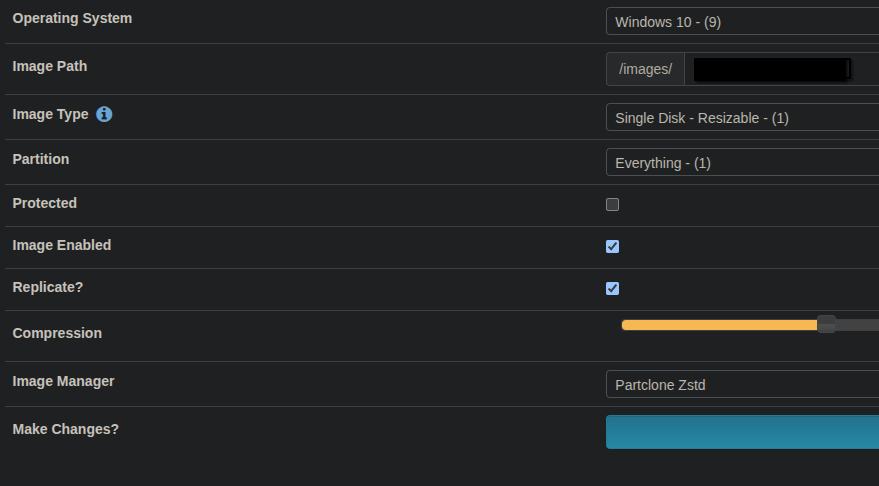
we use these image settings to capture and deploy windows 11 images to hundreds of UEFI computers in our corporate environment and generally have no issues.
I’d recommend you to create a new windows 11 installation for testing to see if everything works fine then.
Also, create the legacy windows 10 image on legacy (non-uefi) hardware and create the UEFI windows 11 image on uefi hardware to avoid compatibility issues.
Should work without issue. -
Hi everyone, and thanks for your answers.
Good news! If FOG works for you, it’ll work for me too (comming soon).
@mashina said in Issue when I tried to make Windows 11 gold image:
I am not aware of any completion message on the server. As far as I know, once the progress bar in the Task tab reaches 100%, the image has been fully cloned to the computer. Can you confirm if that is what you are seeing?
In the PC client, yes it’s exactly this message appears
@mashina said in Issue when I tried to make Windows 11 gold image:
Based on your description, it sounds like your configuration is not capturing the boot partition. As a result, when the image finishes deploying, the system cannot find a valid boot mechanism and falls back to network boot.
I’m looking at the clone I made on a test PC, and I can see using diskpart that the BCD was created correctly.
The files are there.
I tried rebuilding the BCD using the commands.
509 / 5000
Hi everyone, and thanks for your replies.Good news! If FOG works for you, it’ll work for me too (eventually).
I’m looking at the clone I made on a test PC, and I can see using diskpart that the BCD was created correctly.
The files are there.
I tried rebuilding the BCD using the commands. The output is correct, but Windows won’t boot.
boot C:\Windows /l es-es /s X: /f UEFI
@pilipp_edv said in Issue when I tried to make Windows 11 gold image:
d8eb6692-2fff-4250-9ce8-9bf34f1e1183-image.png
I have the same configuration in my server.
But i tested the others options (im not used DD)I don’t know what other options I have to check.
Do you know of any logs where I can find more information?Regards
-
Hi Again guys
I have some news about this problem.
I found a work around.I change the file d1.fixed_size_partitions deleting the recovery Windows partition. This change generated and error when I made the deploy image in Client PC.
But if I cancel the job in the CLI fog server and reset the client machine after fog show the error
It boot ok.I’ll continue reading …
Thanks