1.6.0.158 unable to approve agent
-
@chscduo The approval fails at the step where the server signs the agent’s certificate. In 1.6.0.158 the server hides OpenSSL’s reason, so you see only “signing failed”. The next dev-branch build shows the reason.
Please run these two commands as root on the FOG server and post both outputs:
openssl x509 -noout -pubkey -in /etc/fog/pki/agent/ca/.fogAgentCA.pem | sha256sum
openssl pkey -pubout -in /etc/fog/pki/agent/ca/.fogAgentCA.key | sha256sum
The two hashes must be the same. If they are different, the agent CA key does not match its certificate.
-
@Tom-Elliott thanks for your reply, results seem correct :
openssl x509 -noout -pubkey -in /etc/fog/pki/agent/ca/.fogAgentCA.pem | sha256sum
274bce381532f276b5eba9497c43ac132f49938cf07bd49c2615fd5097051cc7 -openssl pkey -pubout -in /etc/fog/pki/agent/ca/.fogAgentCA.key | sha256sum
274bce381532f276b5eba9497c43ac132f49938cf07bd49c2615fd5097051cc7 - -
@chscduo Thanks. The key matches the certificate, so that cause is ruled out.
The next check runs the same signing step as the server, with a test request. Please run this as root on the FOG server and post the whole output:
bash -c '. /opt/fog/.fog-pki; echo "cert=$PKI_AGENT_CA_CERT key=$PKI_AGENT_CA_KEY"; openssl req -new -newkey ec -pkeyopt ec_paramgen_curve:P-256 -nodes -keyout /dev/null -subj / -out /tmp/t.csr 2>/dev/null; openssl x509 -req -in /tmp/t.csr -CA "$PKI_AGENT_CA_CERT" -CAkey "$PKI_AGENT_CA_KEY" -CAcreateserial -sha256 -days 1 -out /dev/null; echo rc=$?; rm -f /tmp/t.csr'rc=0means the CA signs correctly. The problem is then the request the agent sent.- Any other result prints OpenSSL’s reason.
The first line also shows which CA files the server uses. They must be the two files you checked.
-
@Tom-Elliott here the output :
cert=/etc/fog/pki/agent/ca/.fogAgentCA.pem key=/etc/fog/pki/agent/ca/.fogAgentCA.key
Certificate request self-signature ok
subject=
rc=0 -
@chscduo Thanks. The CA signs correctly, so the problem is the request the agent sent. This check runs the same signing step on that stored request. Please run these lines as root on the FOG server and post the whole output:
mysql -N -B -r fog -e "SELECT aeCSR FROM agentEnrollment WHERE aeState='pending' ORDER BY aeID DESC LIMIT 1" > /tmp/r.csr
openssl req -in /tmp/r.csr -noout -verify -subject
openssl x509 -req -in /tmp/r.csr -CA /etc/fog/pki/agent/ca/.fogAgentCA.pem -CAkey /etc/fog/pki/agent/ca/.fogAgentCA.key -CAcreateserial -sha256 -days 1 -out /dev/null; echo rc=$?
rm -f /tmp/r.csr
If your database is not named
fog, ormysqlasks for a password, add-uand-pto the first line. -
@Tom-Elliott Thanks for your help.
This is the output :Certificate request self-signature verify OK
subject=
Certificate request self-signature ok
subject=
rc=0 -
@chscduo Thanks. Your CA and the stored request both sign correctly by hand, so the failure happens only in the way the server runs the signing helper. The helper in 1.6.0.158 hides OpenSSL’s reason. The current helper shows it, and it is the only change to that file since 1.6.0.158.
Please replace the helper as root on the FOG server:
curl -fsSL https://raw.githubusercontent.com/FOGProject/fogproject/dev-branch/packages/pki/fog-sign-node-cert -o /tmp/fsnc
sed -i 's|^CONF=.*|CONF="/opt/fog/.fog-pki"|' /tmp/fsnc
install -o root -g root -m 0755 /tmp/fsnc /opt/fog/bin/fog-sign-node-cert
rm -f /tmp/fsnc
Then approve the agent again and post the full error message. It now ends with OpenSSL’s reason.
-
@Tom-Elliott Very interesting !
Error is more readable :
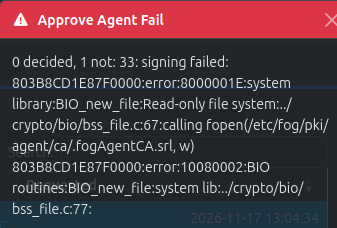
Here are permissions on .fogAgentCA.srl :

Why the write process failed ?
-
@chscduo That error is the answer. Your web server’s service runs with
/etcread-only, which is a systemd hardening setting. The signing helper runs throughsudofrom the web server, so it inherits that restriction. The old helper wrote a serial counter,.fogAgentCA.srl, next to the CA on every signing. That write failed. When you ran the same step by hand, you were outside that service, so it worked.The helper no longer writes there. It now gives each certificate a random serial number, which is how a CA normally assigns them. Please replace the helper again with the same commands:
curl -fsSL https://raw.githubusercontent.com/FOGProject/fogproject/dev-branch/packages/pki/fog-sign-node-cert -o /tmp/fsnc
sed -i 's|^CONF=.*|CONF="/opt/fog/.fog-pki"|' /tmp/fsnc
install -o root -g root -m 0755 /tmp/fsnc /opt/fog/bin/fog-sign-node-cert
rm -f /tmp/fsnc
Then approve the agent again. You can delete
/etc/fog/pki/agent/ca/.fogAgentCA.srl. Nothing reads it. -
@Tom-Elliott Wahou you solved it !
The agent is approved without any error.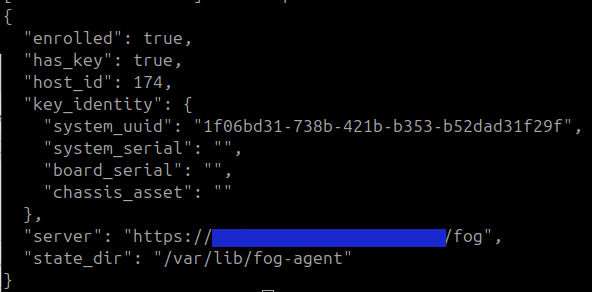
Thanks a lot for your time and step by step answers.
-
 T Tom Elliott has marked this topic as solved
-
@chscduo Glad it works, and thanks for running each check so quickly.
The fix is in
dev-branch, so the next FOG update includes it. The update replaces the helper you installed by hand with the same code, so you have nothing to undo.