Fog driver injection in 2026.
-
My org used FOG many years ago and is now tired of Microsoft Autopilot, so I am setting up a new FOG site for our org.
I have added the fog.drivers script from the tutorial site: https://forums.fogproject.org/topic/8889/fog-post-install-script-for-win-driver-injection
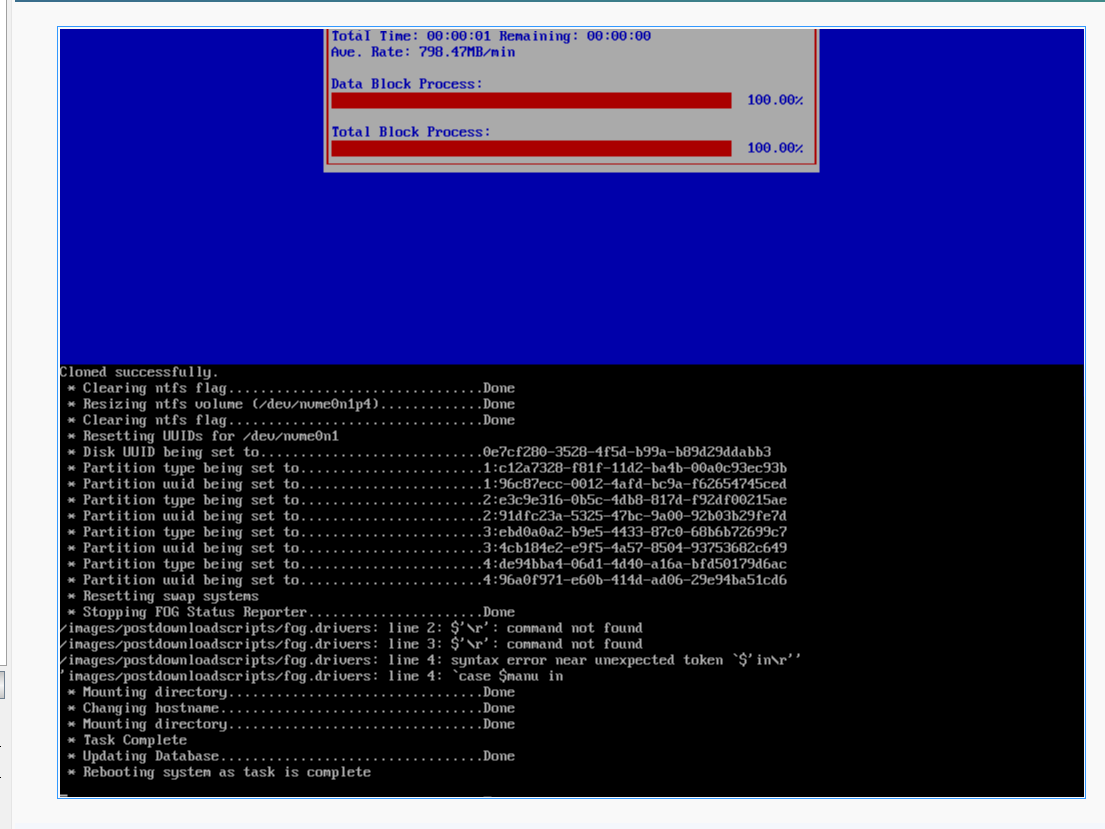
It looks like the script attempts to run, but indicates some errors preventing the script from running. (see screenshot). At first I was running a modified version of the script, attempting to simplify the machine identification, but I have since tried running the script as it came from the FOG tutorial and have the same result.
-
@Paul-Freeman
\ris usually an indicator.Like your script may have been opened/edited in Windows text editor/notepad, then saved and uploaded to
/images/postdownloadscripts/fog.driversWhy does this matter?
Windows likes to use “CRLF” line endings from the days of “Control Line Feeds” of automated typewriters.
\r\nis the typical sequence that Windows uses for a new line, which sends the line back to the beginning then moves to the next line.*nix uses
\nand tries to use\ras an actual key which is invalid in most scripts.I might recommend replacing all
\ritems within the script to\nor''(empty space)? -
@Tom-Elliott Well I feel silly. I am using a Windows workstation to set this all up. I corrected this and now the script appears to run.
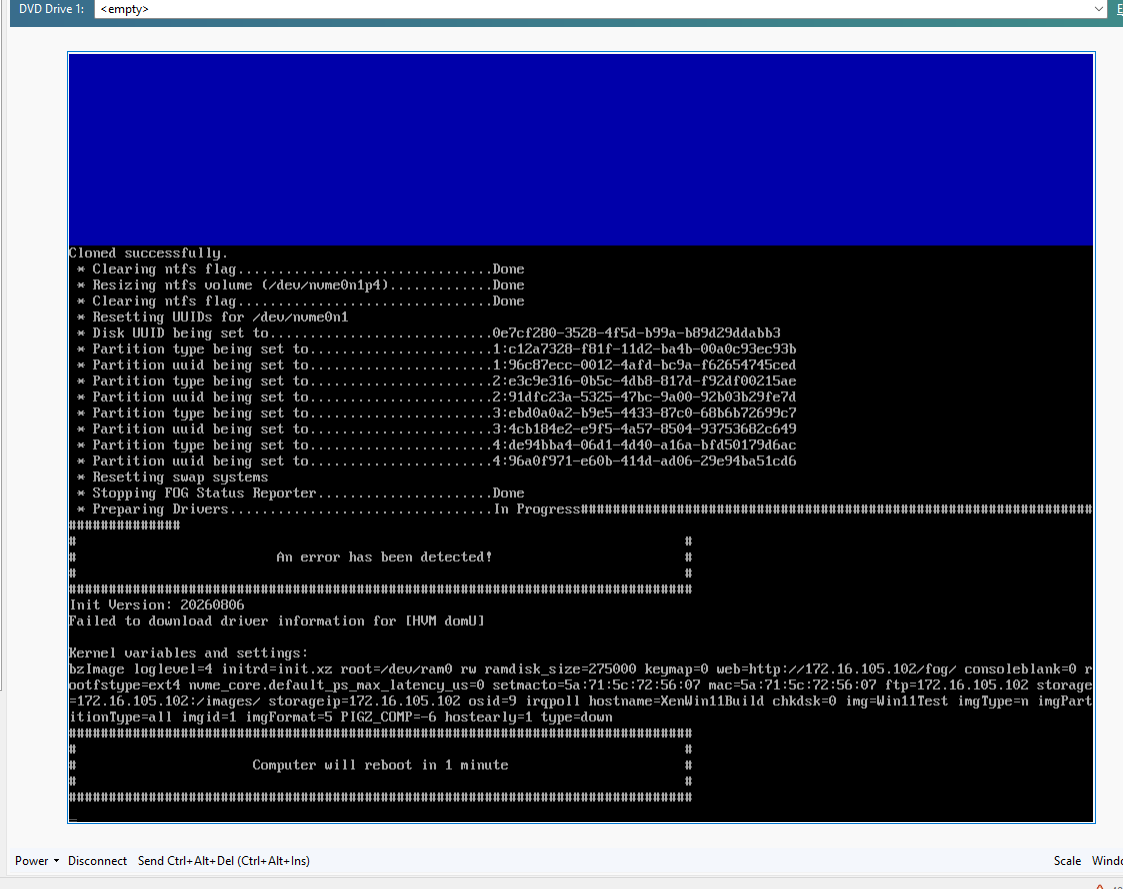
Now this errors out stating it did not find drivers, which in this case is true, I’m testing this on a VM. This also seems to fail the task and imaging restarts when the machine reboots. Is there any way to tell the task to “continue on error”?
I have a test laptop on the bench that I will play with next week. Thanks for your help.
-
@Paul-Freeman Do you mind posting yoru script?
I suspect your script is throwing a handleError (which will exit and restart the machine) and since postinit runs before the task gets to complete that explains what you’re seeing.
-
@Tom-Elliott Here is the script. I modified the original script to attempt to remove the detection for OS version and x86 or x64 version. I am only going to be deploying Windows 11 64 bit.
I tested this on my Lenovo ThinkPad and the system is detecting the Lenovo correctly, but the script still errors out with "Failed to download driver information for [ThinkPad P14s Gen 4]
Its possible I have not setup the target path correctly in the script, still playing with this part.
#!/bin/bash ceol=`tput el`; manu=`dmidecode -s system-manufacturer`; case $manu in [Ll][Ee][Nn][Oo][Vv][Oo]) machine=$(dmidecode -s system-version) ;; *[Dd][Ee][Ll][Ll]*) machine=$(dmidecode -s system-product-name) #pruduct is typo, just realized sorry :( ;; *) machine=$(dmidecode -s system-product-name) # Technically, we can remove the dell one as it's the "default" ;; esac [[ -z $machine ]] && return #assuming you want it to break if it is not lenovo or dell? machine="${machine%"${machine##*[![:space:]]}"}" #Removes Trailing Spaces ############################################# # Quick hack to find out if the installed OS image is a x86 or x64 #system64="/ntfs/Windows/SysWOW64/regedit.exe" # sloppy detect if 64bit or not #[[ ! -f $system64 ]] && arch="x86" || arch="x64" ############################################# #this section has been updated to bring the osn names in line # with how the Dell CABs are defined #case $osid in # 5) osn="win7" ;; # 6) osn="win8" ;; # 7) osn="win8.1" ;; # 9) osn="win10" ;; #esac ############################################# dots "Preparing Drivers" # below creates local folder on imaged pc # this can be anywhere you want just remember # to make sure it matches throughout! (case IS important here) clientdriverpath="/ntfs/Windows/DRV" remotedriverpath="/images/drivers/$machine" [[ ! -d $clientdriverpath ]] && mkdir -p "$clientdriverpath" >/dev/null 2>&1 echo -n "In Progress" #there's 3 ways you could handle this, #driver cab file, extracted driver files or both #so on the server put extracted driver files to match below folder tree #i.e. Model Latitude E5410, Windows 7 x86 image would be: #/fog/Drivers/Latitude E5410/win7/x86 rsync -aqz "$remotedriverpath" "$clientdriverpath" >/dev/null 2>&1 [[ ! $? -eq 0 ]] && handleError "Failed to download driver information for [$machine]" #this next bit adds driver location on pc to devicepath in registry (so sysprep uses it to reference) # remember to make devicepath= match the path you've used locally #also do not remove %SystemRoot%\inf #and to add more locations just use ; in between each location #regfile="/ntfs/Windows/System32/config/SOFTWARE" #key="\Microsoft\Windows\CurrentVersion\DevicePath" #devpath="%SystemRoot%\DRV;%SystemRoot%\inf;"; #reged -e "$regfile" &>/dev/null <<EOFREG #ed $key #$devpath #q #y #EOFREG echo -e "\b\b\b\b\b\b\b\b\b\b\b${ceol}Done"; # this just removes "In Progress and replaces it with done :-)" -
@Paul-Freeman Please try this for your script:
#!/bin/bash ## FOG post-download script -- copy model-matched drivers into the imaged OS. ## ## Sourced, not executed: funcs.sh completeTasking() does ## . ${postdownpath}fog.postdownload ## so use `return` here, never `exit` -- an exit aborts the whole imaging init ## and the task never completes. ## ## Install to /images/postdownloadscripts/drivers.sh, then add this line to ## /images/postdownloadscripts/fog.postdownload: ## . ${postdownpath}drivers.sh ## ## Server layout expected (extracted .inf trees, not CABs): ## /images/drivers/<model>/... e.g. /images/drivers/Latitude E5410/ ## Lands in the image as: ## C:\Windows\DRV\... driverbase="/images/drivers" clientdriverdir="Windows/DRV" # relative to the mounted Windows volume ############################################# # Work out the model name ############################################# # Lenovo is the only real special case: it puts the marketing model # ("ThinkPad T14 Gen 3") in system-version and a bare machine type ("21AH") in # system-product-name. Dell and everyone else use system-product-name, so Dell # needs no branch of its own -- it is the default. manufacturer=$(dmidecode -s system-manufacturer 2>/dev/null) case $manufacturer in [Ll][Ee][Nn][Oo][Vv][Oo]) machine=$(dmidecode -s system-version 2>/dev/null) ;; *) machine=$(dmidecode -s system-product-name 2>/dev/null) ;; esac # Strip leading and trailing whitespace. Dell in particular pads its DMI # strings, and " Latitude 5420 " will not match the folder on the server. machine="${machine#"${machine%%[![:space:]]*}"}" machine="${machine%"${machine##*[![:space:]]}"}" dots "Preparing drivers" # Placeholder junk dmidecode returns on whiteboxes, VMs and unflashed boards. # Treat these the same as "no model" rather than looking for a folder named # "To Be Filled By O.E.M.". case $machine in ""|[Tt]o[[:space:]][Bb]e[[:space:]][Ff]illed*|[Ss]ystem[[:space:]][Pp]roduct[[:space:]][Nn]ame*|[Dd]efault[[:space:]]string*) echo "Skipped (no usable model name)" debugPause return ;; esac ############################################# # Bail out before mounting anything if there are no drivers to copy ############################################# # -d, not -f: these are directories. The original used -f, which is false for a # directory, so the copy could never run. remotedriverpath="$driverbase/$machine" if [[ ! -d $remotedriverpath ]]; then echo "Skipped (no drivers for $machine)" debugPause return fi ############################################# # Find and mount the Windows volume ############################################# # /ntfs is NOT mounted when post-download scripts run -- every funcs.sh helper # that touches it mounts and unmounts for itself (see mountOSPartition and # clearMountedDevices). Without this, mkdir -p /ntfs/Windows/DRV just creates a # directory in the ramdisk that disappears at reboot, which is the usual reason # this script "succeeds" and no drivers appear. [[ -z $disks ]] && disks="$hd" [[ -d /ntfs ]] || mkdir -p /ntfs >/dev/null 2>&1 umount /ntfs >/dev/null 2>&1 winpart="" for disk in $disks; do getPartitions "$disk" for part in $parts; do fsTypeSetting "$part" [[ $fstype == ntfs ]] || continue ntfs-3g -o remove_hiberfile,rw "$part" /ntfs >/dev/null 2>&1 || continue # WinRE/recovery partitions are NTFS too. \Windows\System32 is what # distinguishes the actual OS volume from them. if [[ -d /ntfs/Windows/System32 ]]; then winpart="$part" break 2 fi umount /ntfs >/dev/null 2>&1 done done if [[ -z $winpart ]]; then echo "Skipped (no Windows partition found)" debugPause return fi ############################################# # Copy the drivers ############################################# # -rt, not -a: ntfs-3g mounted without a permissions map cannot honour chown or # chmod, so rsync -a fails on every file and returns 23 -- a spurious "Failed" # even though the data copied fine. -r -t gives recursion and mtimes, which is # all a driver tree needs. -z is dropped too: it is a local copy, so # compression costs CPU and buys nothing. # # Trailing slash on the source copies the CONTENTS of the model folder into # DRV. Without it you get C:\Windows\DRV\<model>\... and the DevicePath below # no longer points at the .inf files. mkdir -p "/ntfs/$clientdriverdir" >/dev/null 2>&1 rsync -rt "$remotedriverpath/" "/ntfs/$clientdriverdir/" >/dev/null 2>&1 errStat=$? ############################################# # Point sysprep at the drivers ############################################# # NOTE: this block is still commented out, as in the original. Without it the # files are copied but nothing ever reads them -- DevicePath is what makes # sysprep/PnP search C:\Windows\DRV. Uncomment to actually inject. It must stay # ABOVE the umount below, because it edits a file on the mounted volume. # Keep %SystemRoot%\inf in the list; separate extra locations with ; # #regfile="/ntfs/Windows/System32/config/SOFTWARE" #key="\Microsoft\Windows\CurrentVersion\DevicePath" #devpath="%SystemRoot%\DRV;%SystemRoot%\inf;"; #reged -e "$regfile" &>/dev/null <<EOFREG #ed $key #$devpath #q #y #EOFREG umount /ntfs >/dev/null 2>&1 ############################################# # Report ############################################# # A driver copy that fails must not fail the imaging task, so this never calls # handleError. handleWarning is used only for a genuine copy failure -- note it # sleeps 60 seconds, which is why the "no drivers for this model" cases above # just echo and return instead. if [[ $errStat -ne 0 ]]; then echo "Failed" debugPause handleWarning "Failed to copy drivers for [$machine] (rsync exit $errStat)" return fi echo "Done" debugPause -
@Tom-Elliott Hey that did the trick. Drivers copied as expected now. Thank you!
Is there a repository somewhere I can find updated post download scripts or did I just not find the correct forum post?
-
@Paul-Freeman There is no repository for post download scripts. At least not one that’s centrally managed that I’m aware of.
Post download scripts are intended to be custom to your environment, and as such it wouldn’t be something FOG would want to maintain.
The forums are the right spot really.
-
OK that makes sense. This got me going for driver deployment. Thank you for your help!
