• Recent
    • Unsolved
    • Tags
    • Popular
    • Users
    • Groups
    • Search
    • Register
    • Login

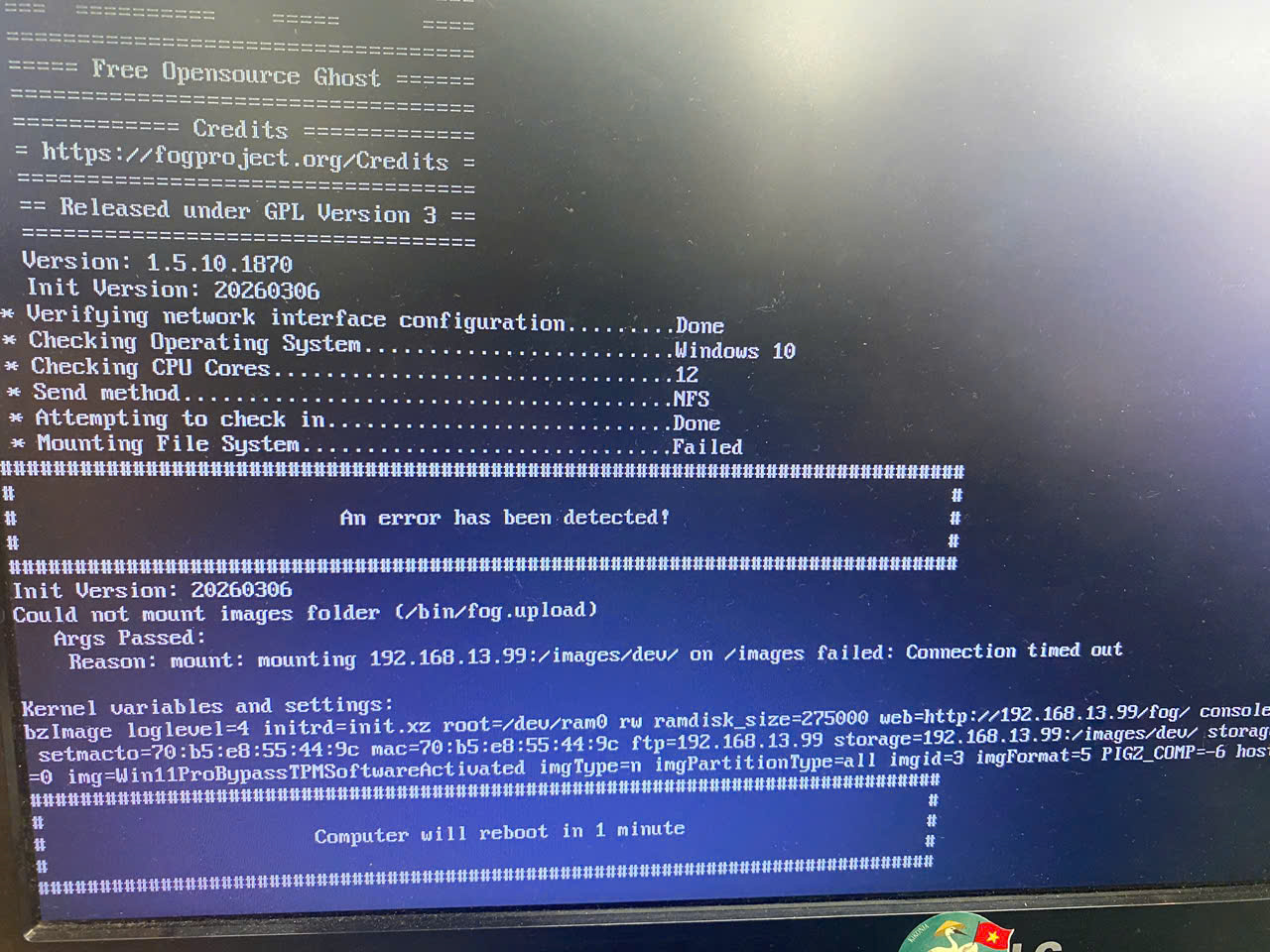
    Could not mount image folder (/bin/fog.upload). mounting IP:/images/dev on /images failed: connection time out

    Scheduled Pinned Locked Moved Unsolved FOG Problems
    4 Posts 2 Posters 88 Views
    Loading More Posts
    • Oldest to Newest
    • Newest to Oldest
    • Most Votes
    Reply
    • Reply as topic
    Log in to reply
    This topic has been deleted. Only users with topic management privileges can see it.
    • V
      vanlam
      last edited by

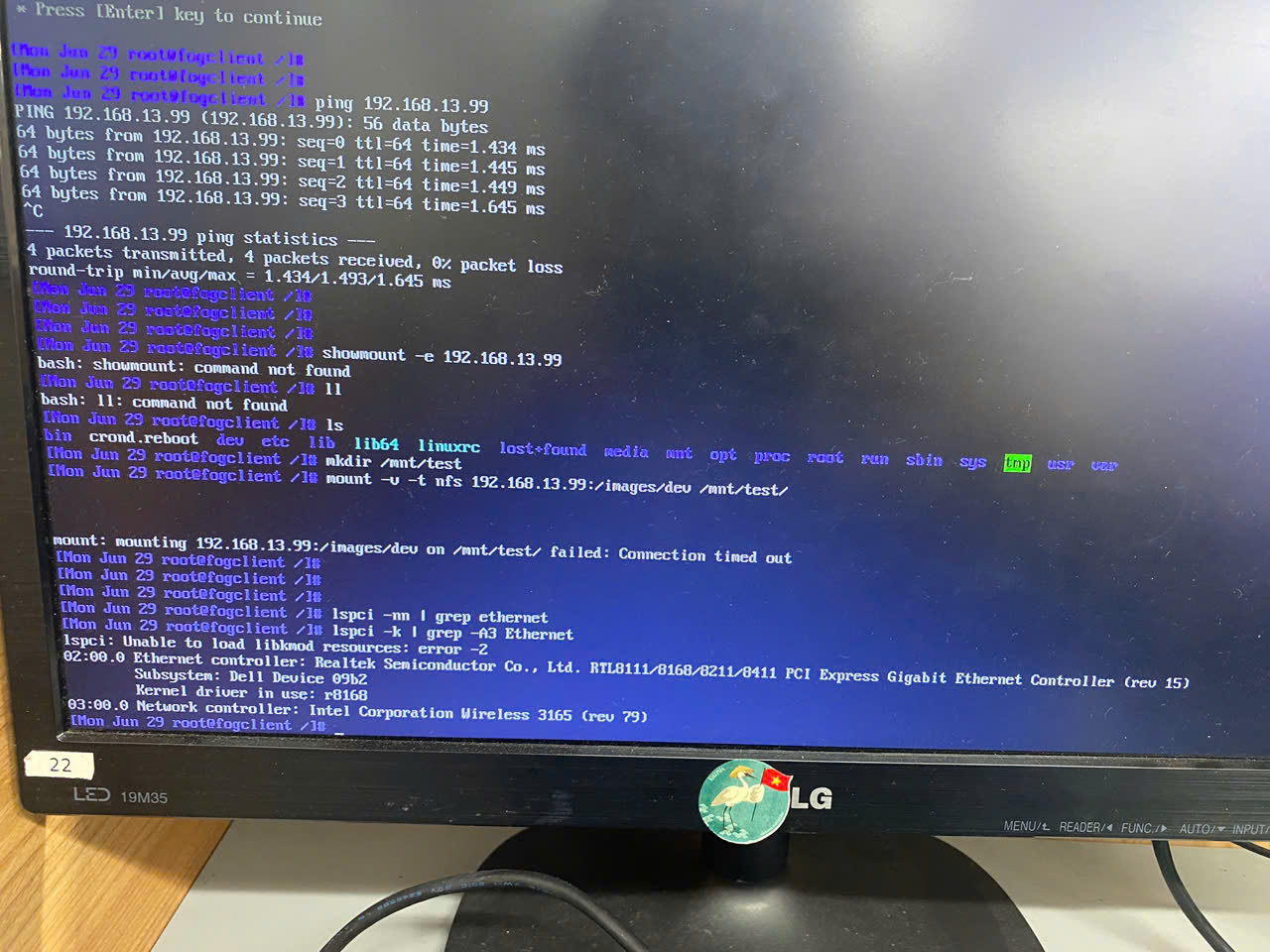
      I set up a FOG server on Ubuntu 24.04 (Proxmox 8.3), I have captured and deployed images on Proxmox, everything worked fine. But when I deploy the image on a physical PC, it doesn’t work. I tried capturing packets with “tcpdump -ni any port 2049 or port 111”, but no packets on port 2049 are reaching the server at all.aef05040-8396-46b8-9d24-30df2b4f92ae-image.png
      36ceab38-21e1-4e30-a599-842be1fb3287-image.png

      pls help me!

      Tom ElliottT V 2 Replies Last reply Reply Quote 0
      • Tom ElliottT
        Tom Elliott @vanlam
        last edited by

        @vanlam You may need to ensure the fog server at 192.168.13.99 is running NFS appropriately?

        Please help us build the FOG community with everyone involved. It's not just about coding - way more we need people to test things, update documentation and most importantly work on uniting the community of people enjoying and working on FOG! Get in contact with me (chat bubble in the top right corner) if you want to join in.

        Web GUI issue? Please check apache error (debian/ubuntu: /var/log/apache2/error.log, centos/fedora/rhel: /var/log/httpd/error_log) and php-fpm log (/var/log/php*-fpm.log)

        Please support FOG if you like it: https://wiki.fogproject.org/wiki/index.php/Support_FOG

        V 1 Reply Last reply Reply Quote 0
        • V
          vanlam @vanlam
          last edited by vanlam

          This post is deleted!
          1 Reply Last reply Reply Quote 0
          • V
            vanlam @Tom Elliott
            last edited by vanlam

            @Tom-Elliott yes, I checked the services, they all running.
            systemctl status nfs-server
            ● nfs-server.service - NFS server and services
            Loaded: loaded (/usr/lib/systemd/system/nfs-server.service; enabled; preset: enabled)
            Drop-In: /run/systemd/generator/nfs-server.service.d
            └─order-with-mounts.conf
            Active: active (exited) since Tue 2026-06-30 09:06:50 UTC; 17h ago
            Process: 4995 ExecStartPre=/usr/sbin/exportfs -r (code=exited, status=0/SUCCESS)
            Process: 4997 ExecStart=/usr/sbin/rpc.nfsd (code=exited, status=0/SUCCESS)
            Main PID: 4997 (code=exited, status=0/SUCCESS)
            CPU: 10ms

            Jun 30 09:06:49 fog-svr.local systemd[1]: Starting nfs-server.service - NFS server and services…
            Jun 30 09:06:50 fog-svr.local systemd[1]: Finished nfs-server.service - NFS server and services.

            rpcinfo -p 192.168.13.99
            192.168.13.99 mountd
            rpcinfo -t 192.168.13.99 nfs
            rpcin program vers proto port service
            100000 4 tcp 111 portmapper
            100000 3 tcp 111 portmapper
            100000 2 tcp 111 portmapper
            100000 4 udp 111 portmapper
            100000 3 udp 111 portmapper
            100000 2 udp 111 portmapper
            100024 1 udp 50174 status
            100024 1 tcp 34667 status
            100005 1 tcp 20048 mountd
            100005 2 tcp 20048 mountd
            100005 3 tcp 20048 mountd
            100003 3 tcp 2049 nfs
            100227 3 tcp 2049 nfs_acl
            100021 1 udp 38178 nlockmgr
            100021 3 udp 38178 nlockmgr
            100021 4 udp 38178 nlockmgr
            100021 1 tcp 37227 nlockmgr
            100021 3 tcp 37227 nlockmgr
            100021 4 tcp 37227 nlockmgr

            I deployed the image using a VM on Proxmox and it worked, but with a phisical PC it gives the error like above. All are on the same VLAN.

            1 Reply Last reply Reply Quote 0
            • 1 / 1
            • First post
              Last post

            87

            Online

            12.7k

            Users

            17.6k

            Topics

            156.7k

            Posts
            Copyright © 2012-2026 FOG Project