Schedule Multicast Tasks Issues
-
Hello,
I am currently using the FOG REST API to develop a multicast solution for end users. Immediate multicast tasks are working as expected.
However, I’m encountering an issue with scheduled tasks. When I create a scheduled multicast task, the task object is successfully registered. But once the scheduled time passes, the task does not execute and remains listed under Tasks → Scheduled Tasks.
To rule out API-related issues, I also attempted to schedule a multicast task directly through the FOG Web UI, but experienced the same behavior.
Additional details:
Version: v1.6.0-beta.2277
SCHEDULERGLOBALENABLED is enabled
FogScheduler service is activeCould you please advise what might be causing scheduled tasks not to execute, or suggest any additional checks or logs I should review?
Thank you in advance for your help.
-
Added some logs
Fog Database:
name@fog:/opt/fog/log$ sudo mariadb -e "
USE fog;
SELECT *
FROM scheduledTasks\G
"*************************** 1. row ***************************
stID: 27
stName: Multi-Cast Task
stDesc:
stType: S
stTaskTypeID: 8
stMinute:
stHour:
stDOM:
stMonth:
stDOW:
stIsGroup: 1
stGroupHostID: 41
stImageID: 0
stShutDown:
stOther1:
stOther2: -1
stOther3: xy.xy
stOther4: 1
stOther5:
stDateTime: 1773389439
stActive: 1Crontask:
*************************** 2. row ***************************
stID: 28
stName: Multi-Cast Task
stDesc:
stType: C
stTaskTypeID: 8
stMinute: 0
stHour: *
stDOM: *
stMonth: *
stDOW: *
stIsGroup: 1
stGroupHostID: 41
stImageID: 0
stShutDown:
stOther1:
stOther2: -1
stOther3: xy.xy
stOther4: 1
stOther5:
stDateTime: 0
stActive: 1Fog Settings
±-----------------------±-----------------+
| settingKey | settingValue |
±-----------------------±-----------------+
| SCHEDULERDEVICEOUTPUT | /dev/tty4 |
| SCHEDULERGLOBALENABLED | 1 |
| SCHEDULERLOGFILENAME | fogscheduler.log |
| SCHEDULERSLEEPTIME | 60 |
±-----------------------±-----------------+[03-06-26 12:26:18 pm] Interface Ready with IP Address: 127.0.0.1
[03-06-26 12:26:18 pm] Interface Ready with IP Address: 127.0.1.1
[03-06-26 12:26:18 pm] Interface Ready with IP Address: 172.28.1.80
[03-06-26 12:26:18 pm] Interface Ready with IP Address: domain.name.xxx
[03-06-26 12:26:18 pm] * Starting TaskScheduler Service
[03-06-26 12:26:18 pm] * Checking for new items every 60 seconds
[03-06-26 12:26:18 pm] * Starting service loop
[03-06-26 12:26:18 pm] * 3 tasks found.
[03-06-26 12:26:18 pm] * Checking for expired checked-in tasks…
[03-06-26 12:26:18 pm] * Scheduled Task run time: Fri, 01 Jan 2027 00:00:00 +0200
[03-06-26 12:26:18 pm] * This is a cron style task that should not run now.The time zone:
name@fog:/opt/fog/log$ date
Fri Mar 13 10:38:46 EET 2026
name@fog:/opt/fog/log$ sudo mariadb -e “SELECT NOW();”
±--------------------+
| NOW() |
±--------------------+
| 2026-03-13 10:39:22 |
±--------------------+ -
@devle So I’m unable to replicate this:
[03-26-26 11:46:47 am]  * 1 task found.
[03-26-26 11:46:47 am]  * Checking for expired checked-in tasks...
[03-26-26 11:46:47 am]  * Scheduled Task run time: Thu, 26 Mar 2026 12:00:00 +0000
[03-26-26 11:46:47 am]  * This is a cron style task that should not run now.
^C
telliott@7550precision:~/fogproject$ date -u
Thu Mar 26 11:46:57 AM UTC 2026
telliott@7550precision:~/fogproject$
The item I have:
MariaDB [fog]> select * from scheduledTasks\G *************************** 1. row *************************** stID: 2 stName: Multi-Cast Task stDesc: stType: C stTaskTypeID: 8 stMinute: 0 stHour: * stDOM: * stMonth: * stDOW: * stIsGroup: 1 stGroupHostID: 1 stImageID: 0 stShutDown: stOther1: stOther2: -1 stOther3: fog stOther4: 1 stOther5: stDateTime: 0 stActive: 1 1 row in set (0.000 sec) -
It does seem, maybe, your FOGScheduler service may need a good kick though?
-
@Tom-Elliott Hi Tom, thanks for your reply.
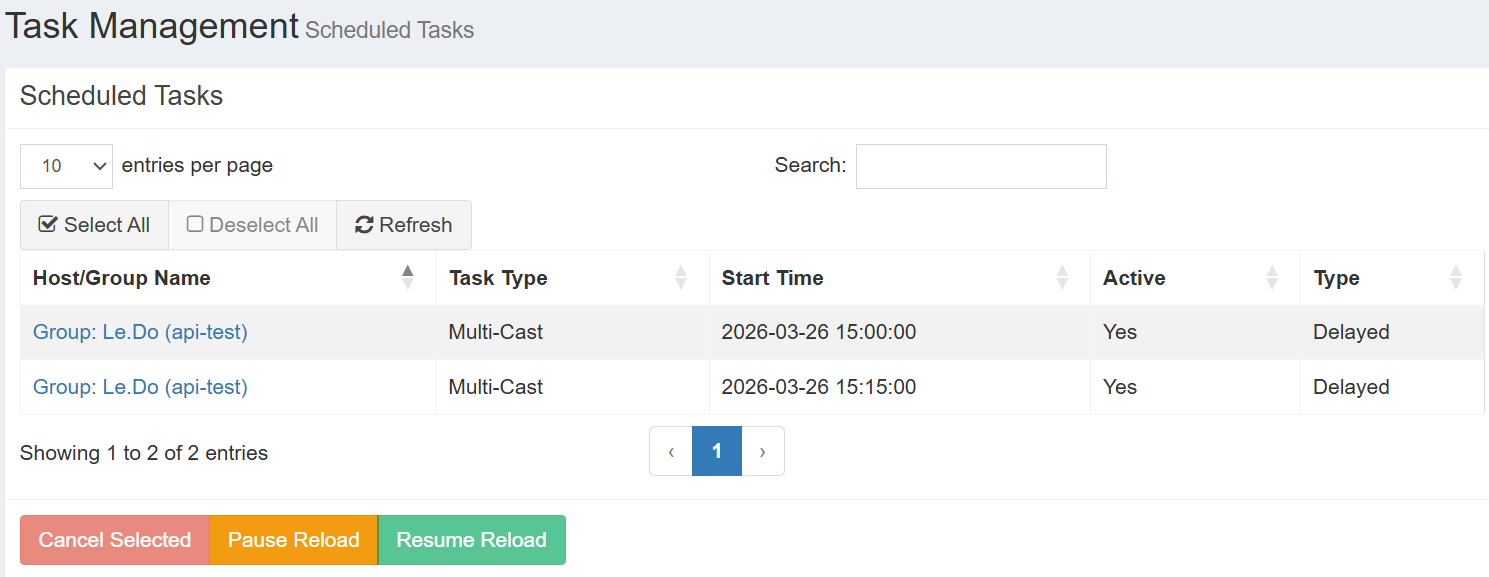
I restarted the FogScheduler. Half an hour has past since I created 1 tasks via API and 1 through Fog Web. They stayed in the Scheduled Tasks and did not get executed.
-
@devle The first one appears to be set to run at 15:00
I don’t know what timezone you’re in, but I suspect your server’s timezone is showing UTC.
It’s interesting but it shows you should be seeing them trigger at 2026-03-26 15:00 (~ 1.5 hrs from right now, and 1.75 hrs from right now)
So it does appear scheduled tasks are working appropriately since restarting the service at least?
Also, i might suggest updating the latest working-1.6 as that will kick the tires around other services as well.
You are able to set the UI datetime FOG Configuration -> FOG Settings -> look for TZ_INFO and update to your relevant Timezone.
-
@Tom-Elliott Hi Tom, I checked the server Time Zone. It matched with the FOG_TZ_INFO which is EET.
Server Time: Fri Mar 27 09:04:39 EET 2026
FOG_TZ_INFO: Europe/Helsinki [EET: +2:00]I was unable to schedule the task in the previous version, so I updated to v1.6-beta.2277 two weeks ago. Could you please let me know which version you were referring to in your comment as the working one?
I could not schedule task in previous version so I updated it to v1.6-beta.2277 2 weeks ago. Please let me know the working version that you suggested in your comment.
I noticed a difference between the C and S schedule task types. For C tasks, the parameters stMinute, stHour, stDOM, stMonth, and stDOW are populated, whereas for S tasks they are not. Is this expected behavior?
Delayed:
*************************** 1. row ***************************
stID: 27
stName: Multi-Cast Task
stDesc:
stType: S
stTaskTypeID: 8
stMinute:
stHour:
stDOM:
stMonth:
stDOW:
stIsGroup: 1
stGroupHostID: 41
stImageID: 0
stShutDown:
stOther1:
stOther2: -1
stOther3: xy.xy
stOther4: 1
stOther5:
stDateTime: 1773389439
stActive: 1Cron:
*************************** 2. row ***************************
stID: 28
stName: Multi-Cast Task
stDesc:
stType: C
stTaskTypeID: 8
stMinute: 0
stHour: *
stDOM: *
stMonth: *
stDOW: *
stIsGroup: 1
stGroupHostID: 41
stImageID: 0
stShutDown:
stOther1:
stOther2: -1
stOther3: xy.xy
stOther4: 1
stOther5:
stDateTime: 0
stActive: 1 -
@devle I’m the developer for FOG so I’m almost always at the “latest” because i’m the one making them.
The version I’m at currently is ending in 2283 (so about 6 commits ahead of you.)
Yes, cron tasks are expected to have stMinute, stHour, stDOM, stMonth, stDOW filled out and delayed tasks would not have this filled out (and the stDateTime would have the timestamp of when that task is expected to kick off.)
-
@Tom-Elliott Hi Tom, I updated to 1.6-beta-2297.
I still face the same issue of scheduled task did not work. FOGScheduler is active. I noticed there are warnings related to Undefined array key in fog/fogcron.class.php in the attached log.
sudo systemctl status FOGScheduler.service
● FOGScheduler.service - FOGScheduler
Loaded: loaded (/lib/systemd/system/FOGScheduler.service; enabled; vendor preset: enabled)
Active: active (running) since Tue 2026-03-31 10:13:34 EEST; 48min ago
Main PID: 952993 (php)
Tasks: 2 (limit: 28695)
Memory: 10.8M
CPU: 48min 47.812s
CGroup: /system.slice/FOGScheduler.service
├─952993 php /opt/fog/service/FOGTaskScheduler/FOGTaskScheduler
└─953049 php /opt/fog/service/FOGTaskScheduler/FOGTaskSchedulerMar 26 14:13:13 fog env[3374690]: PHP Warning: Undefined array key 2 in /var/www/html/fog/lib/fog/fogcron.class.php on line 68
Mar 26 14:13:13 fog env[3374690]: PHP Warning: Undefined array key 3 in /var/www/html/fog/lib/fog/fogcron.class.php on line 69
Mar 26 14:13:13 fog env[3374690]: PHP Warning: Undefined array key 4 in /var/www/html/fog/lib/fog/fogcron.class.php on line 70 -
@devle I’ve made a couple of edits, though I still cannot replicate the problem you’re seeing.
You shouldn’t see the errors any more (just saying), though I don’t know if these things will fix whatever problem you’re seeing.
