This can be disregarded – and marked as solved - the underlying VM infrastrcture was having an issue - we didn’t catch it as we of course thought it was due to the upgrade.
Z
Best posts made by zzeuss1969
-
RE: Kernel update to 18.04 -- image deployment now taking 4x the timeposted in FOG Problems
Latest posts made by zzeuss1969
-
Images completing and not copyingposted in FOG Problems
Referencing: https://forums.fogproject.org/topic/18067/unable-to-locate-image-store
So issue afoot on a fresh install of 24.04 LTS Ubuntu
Image process works successfully in tasks, but then the image is not copied to /images out of /dev/images and the tasks page has a persistent spinning wheel of death…
expected (image nicely tucked in under image name):
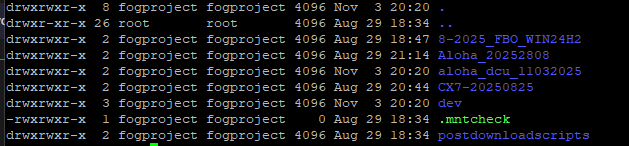
On new device (MAC only):


Running dev branch 1.5.10.1734 Ubuntu 24.04.3 LTS
Thank you in advance for guidance. Next up is a full reimage of the new device and start over.
-
RE: Unable to locate Image store.....posted in FOG Problems
@Tom-Elliott Yep, I caught that workaround in the earlier post. I moved the image folder from /images/dev to /images, but still resulted in the same error.
One thing I noticed this morning, is that the image capture process is hanging at 99% on the task page, as in for at least 45 minutes. Not sure if that is a symptom or the cause.
The previous post was suspect of a very recent init version – but i’m on the most recent dev-branch.
Thank you!
-
Unable to locate Image store.....posted in FOG Problems
SO, referencing:
Re: Unable to locate image store during image deployment
I’m having the same issue with OOB Fog on new hardware. dev branch 1.5.10.1734 Ubuntu 24.04.3 LTS
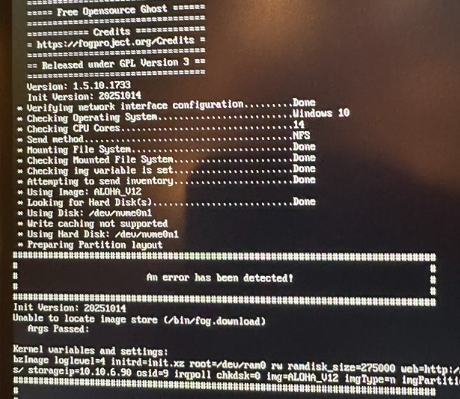
I attempted the workaround described by switching from resizable to non-resize and still getting the error.
Any thoughts?
-
RE: Failed Imaging post migration to 20.04posted in FOG Problems
@Sebastian-Roth Thank you – but I think we figured it out. A Junior Tech captured the original image in legacy BIOS, but we have moved on to UEFI. Once I recaptured in UEFI mode, everything is working and imaging is fine.
Thank you for your responses and guidance. It’s appreciated.
-
RE: Failed Imaging post migration to 20.04posted in FOG Problems
Correct, they’re the same make/model Dell laptop
-
RE: Failed Imaging post migration to 20.04posted in FOG Problems
Upgraded to 1.5.9.28 (dev-branch) a few weeks ago on the old, same version on the new as well. exported the DB, Imported on new box and then WinScP’d the images to the /images folder.
Both VM’s are on the same phyiscal host.
-
Failed Imaging post migration to 20.04posted in FOG Problems
Morning All,
Headscratcher - I just finished migrating to a new 20.04 (from 16.04) server and migrated ONE image from the old store over after bringing in the database for testing purposes.
During the image now, we get:
Current disk size doesn’t match that of the backup, Adjusting sizes to match but problems are possible
Secondary partition table overlaps the last partition by X blocks
“Partition 5 is too big for the disk”And it aborts…
Of course, I fire up the old server, everything works perfectly. The almighty google is failing me and my Linux skills are about a C+ — any thoughts or advise?
-
RE: Access denied on WinSCPposted in FOG Problems
Disregard - some how the SSH service was offline.
-
Access denied on WinSCPposted in FOG Problems
I ran the 1.5.9.28 update just now – no errors or anything, but now i’m unable to WinSCP via SSH(SFTP) with the access denied message. I cleared my cache’s in WinSCP just in case.
Did I miss something ?
Thank you,
-
RE: Kernel update to 18.04 -- image deployment now taking 4x the timeposted in FOG Problems
This can be disregarded – and marked as solved - the underlying VM infrastrcture was having an issue - we didn’t catch it as we of course thought it was due to the upgrade.