@deharter i could capture changing the image type , from “Single Disk - Resizeable” to “Multiple Partition Image - Single Disk (Not Resizeable)”
Latest posts made by boombasstic
-
RE: Unable to Capture an image: ERROR: Could not adjust the bad sector listposted in FOG Problems
-
Export image doesn't seem to work anymoreposted in FOG Problems
Hi, i recently upgraded my server from 1.5.9 to 1.5.10.1698
When i go to images , then click Export Images then Export , it asks for the credentials, but does nothing, it says Attempting to perform action but i can click on export and no file is downloaded.
It used to download a .csv but now it doesnt not anymore.
Any ideas how i could fix this?
Thanks.
-
RE: deploy issue after copying image to an other FOG serverposted in FOG Problems
I changed the d1.partitions and d1.minimum.partitions and it works.
-
RE: deploy issue after copying image to an other FOG serverposted in FOG Problems
@sebastian-roth
I am not sure to understand what you asked me to do.i tried changing the size of the data partition in the d1.minimum.partitions files, and set this partitions to fixed by adding its number in the d1.fixed_size_partitions
but it did not work.
-
RE: deploy issue after copying image to an other FOG serverposted in FOG Problems
Here are the content of the partition files.
d1.partitions
label: gpt label-id: 7D3BE2EA-722A-43A9-AEA0-1F36F17095D8 device: /dev/nvme0n1 unit: sectors first-lba: 34 last-lba: 500118158 /dev/nvme0n1p1 : start= 2048, size= 532480, type=C12A7328-F81F-11D2-BA4B-00A0C93EC93B, uuid=D1686215-19B9-4424-AE16-3405C9F3DEE1, name="EFI system partition", attrs="RequiredPartition GUID:63" /dev/nvme0n1p2 : start= 534528, size= 32768, type=E3C9E316-0B5C-4DB8-817D-F92DF00215AE, uuid=935DDB3D-1186-4C7F-A7D0-903A2F7831CE, name="Microsoft reserved partition", attrs="GUID:63" /dev/nvme0n1p3 : start= 567296, size= 496336896, type=EBD0A0A2-B9E5-4433-87C0-68B6B72699C7, uuid=A1E84F32-54EE-481A-A40E-C8A6AE68AD64, name="Basic data partition" /dev/nvme0n1p4 : start= 496904192, size= 1165312, type=DE94BBA4-06D1-4D40-A16A-BFD50179D6AC, uuid=5D48B483-9C7A-4094-BDA1-AD3DC4C1070A, name="attrs=\x22RequiredPartition GUID:63" /dev/nvme0n1p5 : start= 498069504, size= 2048000, type=DE94BBA4-06D1-4D40-A16A-BFD50179D6AC, uuid=02B11D85-B439-4E37-9004-691A53DCD24F, name="Basic data partition", attrs="RequiredPartition GUID:63"d1.minimum.partitions
label: gpt label-id: 7D3BE2EA-722A-43A9-AEA0-1F36F17095D8 device: /dev/nvme0n1 unit: sectors first-lba: 34 last-lba: 500118158 /dev/nvme0n1p1 : start= 2048, size= 532480, type=C12A7328-F81F-11D2-BA4B-00A0C93EC93B, uuid=D1686215-19B9-4424-AE16-3405C9F3DEE1, name="EFI system partition", attrs="RequiredPartition GUID:63" /dev/nvme0n1p2 : start= 534528, size= 32768, type=E3C9E316-0B5C-4DB8-817D-F92DF00215AE, uuid=935DDB3D-1186-4C7F-A7D0-903A2F7831CE, name="Microsoft reserved partition", attrs="GUID:63" /dev/nvme0n1p3 : start= 567296, size= 68387676, type=EBD0A0A2-B9E5-4433-87C0-68B6B72699C7, uuid=A1E84F32-54EE-481A-A40E-C8A6AE68AD64, name="Basic data partition" /dev/nvme0n1p4 : start= 496904192, size= 1031462, type=DE94BBA4-06D1-4D40-A16A-BFD50179D6AC, uuid=5D48B483-9C7A-4094-BDA1-AD3DC4C1070A, name="attrs=\x22RequiredPartition GUID:63" /dev/nvme0n1p5 : start= 498069504, size= 2048000, type=DE94BBA4-06D1-4D40-A16A-BFD50179D6AC, uuid=02B11D85-B439-4E37-9004-691A53DCD24F, name="Basic data partition", attrs="RequiredPartition GUID:63"d1.fixed_size_partitions
:1:2:5:1:2:5 -
RE: deploy issue after copying image to an other FOG serverposted in FOG Problems
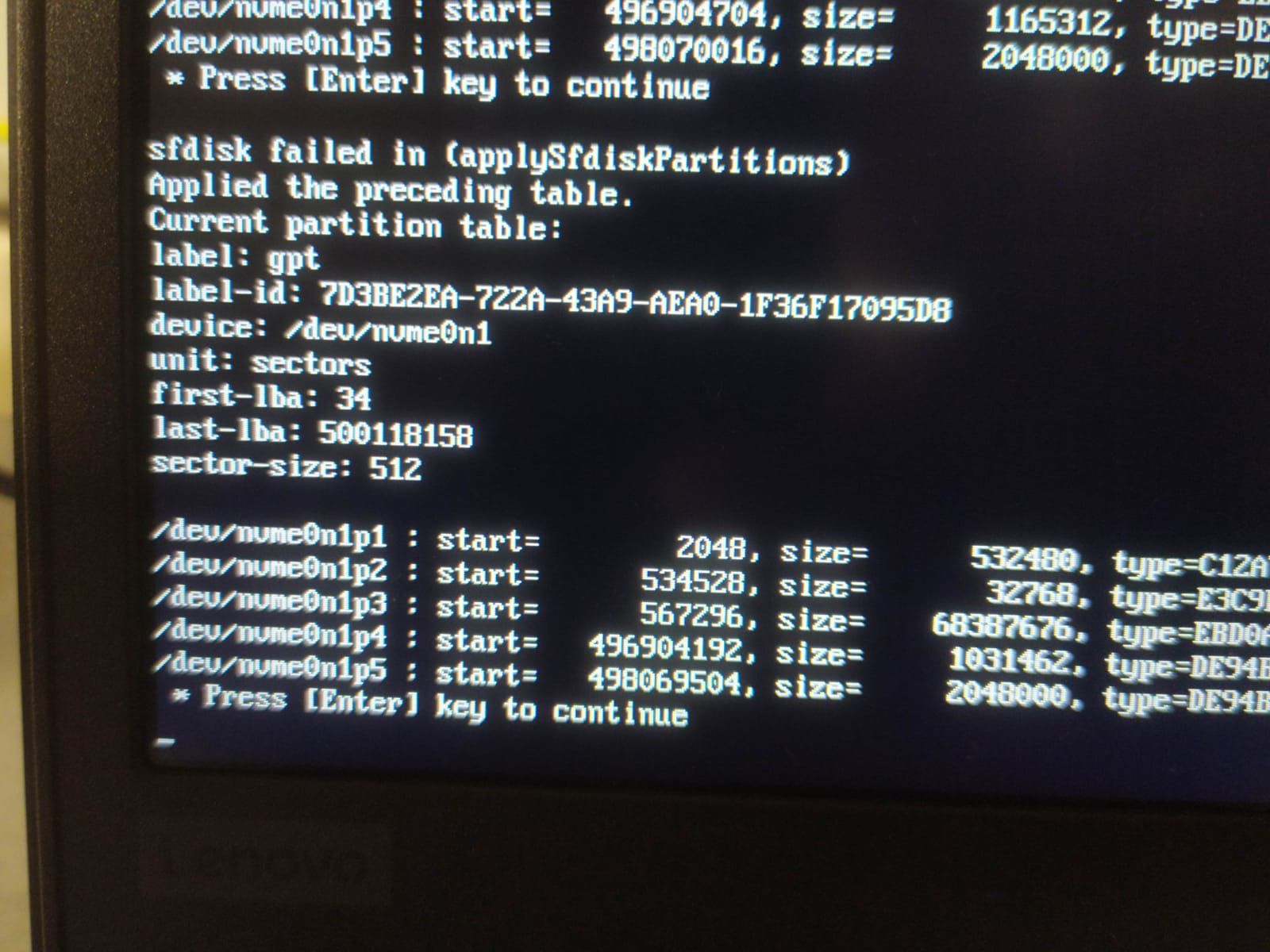
@sebastian-roth here are the picture of the debug deploy task with kernel arguments.
It shows an error message "sfdisk failed in (applySfdiskPartitions)

-
RE: deploy issue after copying image to an other FOG serverposted in FOG Problems
getting the inits with wget the SHA1 sum are correct. maybe it was an issue with cahced files.
The version now shows 20210307

it still does not work
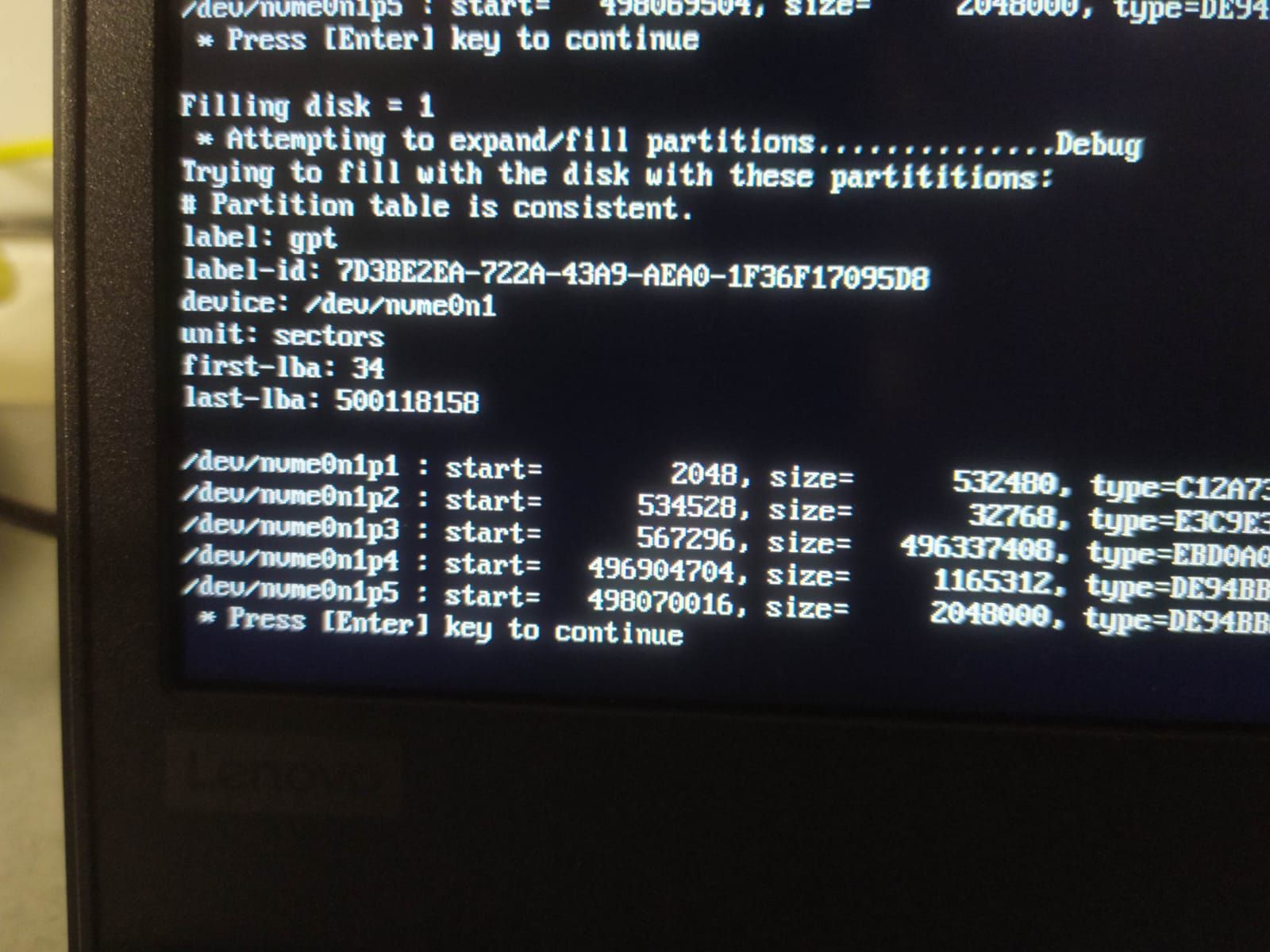
here is the filling disk step

the data partition after deploy still is
68387676 blocks while it should be 496336896 -
RE: deploy issue after copying image to an other FOG serverposted in FOG Problems
@sebastian-roth
there is no “filling disk” step in debug deploy task.
see picture below

i copied the latest inits once again and the Version show is still 20200906
here are the SHA1 sums
0d60fc165643a57c10120e0892f2a1e520b53809 /var/www/html/fog/service/ipxe/init_32.xz bea70a25cd1f0ddfd15bd1124acafaed79408d1e /var/www/html/fog/service/ipxe/init.xz 0d60fc165643a57c10120e0892f2a1e520b53809 /var/www/fog/service/ipxe/init_32.xz bea70a25cd1f0ddfd15bd1124acafaed79408d1e /var/www/fog/service/ipxe/init.xz -
RE: deploy issue after copying image to an other FOG serverposted in FOG Problems
So i ran some tests following my intuition that the “windows not loading” symptom came from a lack of disk space, and fog not resizing correctly the Data partition of Windows.
Among other things the result of the sfdisk -d /dev/nvme0n1 led me to think about this.
It show 68387676 blocks size for the C : system partition. which is the equivalent of the same partition size in the d1.minimum_partitions file.
its about 32GB which is the Used size on the partition.I booted with a Live Gparted, and expanded the partition, then the computer boots normally.
So i think the issue lies with the resizing, not with CRC check.
-
RE: deploy issue after copying image to an other FOG serverposted in FOG Problems
@sebastian-roth said in deploy issue after copying image to an other FOG server:
@boombasstic When updating the inits today I just noticed that I was on the wrong track. So far the inits on the webserver were still the ones not having the fix. I am sorry, didn’t remember I actually uploaded the fixed one separately: https://fogproject.org/inits/init-1.5.9-ignore_crc-fix.xz
As well you can re-download the current official inits that have the fix in them as well - as of now.
https://fogproject.org/inits/init.xz
https://fogproject.org/inits/init_32.xzWith the init-1.5.9-ignore_crc-fix.xz init Version was: 2020927
With the current official inits , the Version was : 20200906
Wit both of the the problem still occurs.