• Recent
    • Unsolved
    • Tags
    • Popular
    • Users
    • Groups
    • Search
    • Register
    • Login
    1. Home
    2. lan
    L
    • Profile
    • Following 1
    • Followers 0
    • Topics 1
    • Posts 5
    • Groups 0

    lan

    @lan

    0
    Reputation
    1
    Profile views
    5
    Posts
    0
    Followers
    1
    Following
    Joined
    Last Online

    lan Unfollow Follow

    Latest posts made by lan

    • RE: Raspberry Pi 4 unable to pxe boot

      Hi everyone, / @george1421

      I’ve been trying to capture the SD card of a Raspberry Pi 4 and I’ve hit a wall. I am booting via a USB stick using the EDK2 UEFI firmware, and I have explicitly set the System Table Selection to <Devicetree> in the UEFI settings.

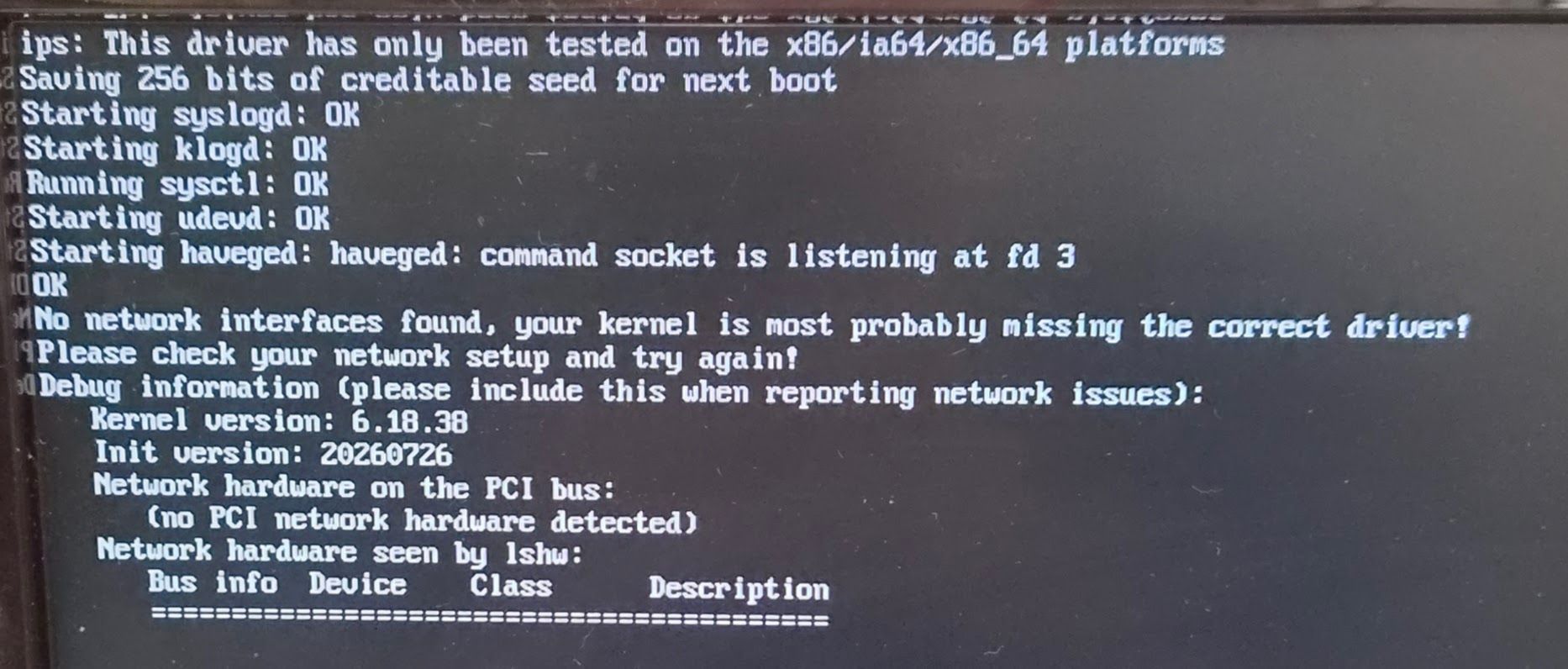
      I managed to get past the iPXE phase without issues, and the capture task successfully loads the FOS kernel and init. However, the boot process stops right after with the following error (see attached image):
      No network interfaces found, your kernel is most probably missing the correct driver!

      Current Setup & Debug info:

      FOG version: 1.5.10.2149

      Hardware: Raspberry Pi 4 (trying to capture the built-in SD card)

      Boot method: USB stick with UEFI firmware

      Kernel version: 6.18.38

      Init version: 20260726

      (No PCI network hardware detected - obviously, as it’s the SoC’s built-in NIC)

      I think it seems the current experimental ARM kernel is missing the built-in Pi 4 network driver (bcmgenet). Unfortunately, using an external USB-to-LAN adapter is not an option for me, as the UEFI firmware refuses to boot from it in my environment.

      My question is:
      Given that I am booting from a USB stick and making it exactly to this point in the capture task, is there any chance or workaround to successfully capture the Pi 4’s SD card? Is there a custom/specific kernel available that includes the built-in Pi network driver, or any other method I can use to bypass this missing driver issue?

      Any help or guidance would be greatly appreciated!
      20260803_152648.jpg
      posted in Bug Reports
      L
      lan
    • RE: The "auto deploy" function not working

      Thanks! 1.5.10. solved the problem!

      The strange thing was that on the opening page of FOG 1.5.9, “Latest Version:” was written as 1.5.9. (I can’t show it anymore because I’ve upgraded it to 1.5.10)

      posted in Hardware Compatibility
      L
      lan
    • RE: The "auto deploy" function not working

      @Sebastian-Roth My version is 1.5.9

      Could this be the problem? When will this fix (this version) be public?

      posted in Hardware Compatibility
      L
      lan
    • RE: The "auto deploy" function not working

      Maybe ipxe.efi is causing the error?

      >> Start PXE over IPv4
      Station IP address is 192.168.13.134
      Server IP address is 192.168.12.10
      NBP filename is ipxe.efi
      NBP filesize is 1085440 Bytes
      Downloading NBP file...
      
      NBP file downloaded successfully.
      iPXE initialising devices...WARNING: Using legacy NIC wrapper on 0c:0c:0c:0c:8c:0c
      ok
      
      iPXE 1.21.1+ (g11570) -- Open Source Network Boot Firmware -- https://ipxe.org
      Features: DNS FTP HTTP HTTPS iSCSI NFS TFTP VLAN SRP AoE EFI Menu
      Waiting for link-up on net1
      ..
      OK
      Configuring (net0 bc:0f:f3:85:d3:ab).....
      
      posted in Hardware Compatibility
      L
      lan
    • The "auto deploy" function not working

      The “auto deploy” function (it fills in the username and password for manual deployment, so I don’t have to always enter them manually) does not work for one type of laptop (HP 450 G10) - it works for about 10 other types of laptops.
      FOS is fresh.
      Thus, this type of laptop can now only be deployed via the web interface from a task.

      Thank you in advance for your help.

      https://www.youtube.com/watch?v=TpSKYgHpgKo

      posted in Hardware Compatibility
      L
      lan